Standing-desk label writers
If you draft and edit labels for extended periods while standing, the keyboard needs to fit the desk, screen and mouse arrangement. The Health and Safety Executive treats good posture as a whole-workstation consideration.


Choose a mechanical keyboard that fits your adjusted standing workstation and lets you enter the punctuation and shortcuts you use when drafting museum labels. A compact, lower-profile board can leave more desk space; a full-size UK-ISO board gives direct access to a number pad, while switch sound matters more when others work nearby. A keyboard alone cannot correct a poorly arranged workstation.
If you draft and edit labels for extended periods while standing, the keyboard needs to fit the desk, screen and mouse arrangement. The Health and Safety Executive treats good posture as a whole-workstation consideration.
If you write near colleagues, visitors or other quiet activities, consider the fitted switch and the board’s construction rather than assuming every mechanical keyboard sounds alike.
If familiar punctuation, ISO key positions, a number pad or remappable commands matter to your writing, check the exact keyboard variant before choosing a size or switch.
Consider it when: Usable desk width is limited and you want room to keep the mouse close. Logitech describes its MX Mechanical Mini as compact and offers a Tactile Quiet switch option.
Trade-off: The Mini lacks the integrated number pad of the full-size MX Mechanical. Confirm the physical layout of the exact variant if UK-ISO keys matter.
Consider it when: Familiar UK key positions, a number pad and remappable shortcuts take priority. Keychron identifies a full-size UK-ISO V6 Max configuration with QMK/VIA remapping.
Trade-off: A full-size board occupies more desk width; the chosen switch configuration still determines much of its typing feel and sound.
Consider it when: Typing near other people makes switch noise a deciding factor. Razer describes its Pro Type Ultra as having silent switches, damping foam and a cushioned wrist rest.
Trade-off: Check the physical layout of the exact Pro Type Ultra variant before relying on familiar UK symbol positions.
| Concern | What to check | Who this matters to |
|---|---|---|
| Standing-workstation fit | Check front height against your adjusted desk position and width against the space needed to keep the mouse close. | If I spend long stretches editing labels while standing, I need comfortable hand position and manageable reach before choosing a switch feel. Around 36% of consumers put workstation fit first. |
| Typing noise | Check the fitted switch variant and any stated sound-damping construction; a keyboard family can include switches with different sounds. | Writing near colleagues or visitors makes an intrusive click a concern even if I like its feel. Roughly 29% of consumers make quiet typing their primary need. |
| UK layout and writing keys | Confirm the exact physical UK-ISO layout and key legends, then decide whether you need a number pad or remappable shortcuts. | For frequent punctuation, dates and editing commands, I want keys where I expect them rather than a layout I must relearn. About 21% of consumers prioritise familiar layout and direct key access. |
| Connections and customisation | Check the selected board’s connection modes, device compatibility and, if you intend to change switches, its hot-swap configuration. | Moving between computers or tailoring key feel matters more to me than keeping a single fixed setup. Around 14% of consumers put connection and customisation flexibility first. |
ANSI and ISO layouts differ in key shapes and positions, which can interrupt familiar punctuation and symbol entry.
Look for UK-ISO in the exact variant’s layout specification and check its key legends; a UK-facing listing alone is not enough.
Switches and keyboard construction both affect typing sound. In Corsair’s manufacturer guidance, clicky switches are generally louder than linear options; this is not a measured comparison of every board.
Check the fitted switch, not just the model name, and consider stated damping features without treating them as a guarantee of room-level quietness.
Desk height, screen and mouse positions, and the way work is organised also affect workstation fit. Health and Safety Executive guidance considers posture in the context of the whole setup.
Adjust the workstation first, then check keyboard height, width and mouse reach in that arrangement.
A smaller board leaves more desk space but may remove the integrated number pad or dedicated keys used for dates, dimensions and editing.
List your frequently used keys and shortcuts. If key combinations would interrupt writing, consider a larger layout.
Its MX Mechanical range offers compact and full-size, low-profile routes for writing across devices.
Its V6 Max UK-ISO configuration is a full-size option for familiar key positions and configurable shortcuts.
Its Pro Type Ultra and BlackWidow V4 Low-Profile HyperSpeed offer different approaches to shared-space typing and a low front edge.
Corsair’s switch and construction guidance provides points to check when typing sound is a priority.
These mechanical keyboards cover compact and larger layouts for label writing at a standing desk. Compare the stated variant with your need for UK key positions, quieter typing and room for the mouse.
 No image available
Consider this wireless model when preserving space around the keyboard is important. If familiar UK punctuation is essential, confirm the exact physical layout and legends; also check its front height against your standing-desk setup.
 No image available
Consider this model if a more condensed layout appeals but key access remains important to your writing. The title states UK layout, not the exact physical UK-ISO configuration; check the legends, fitted switch and desk dimensions, particularly for shared-space use.
 No image available
The stated 80% format is worth considering when desk width is limited. This is a US QWERTY variant with gasket mounting and Latte Switch-Pink switches, so check whether its key positions suit your punctuation workflow and whether its dimensions fit the adjusted workstation.
 No image available
Consider this full-size, 108-key option if direct key access matters more than saving desk width. The title specifies hot-swappable construction, Silent Tactile Switches and a US layout; the switch wording is not a measured room-noise result, and the US key positions may not suit a UK punctuation workflow.
 No image available
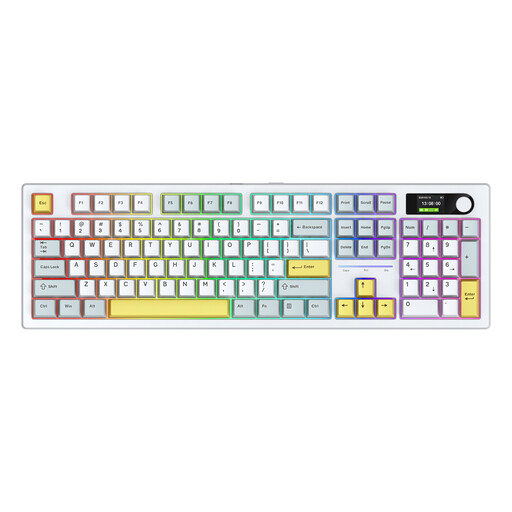
Consider this 104-key model if a larger key set suits your writing routine. Its title also identifies a colour display and detachable switches; confirm the physical layout, front height and desk fit before relying on it for familiar UK key positions.
Choose UK-ISO if familiar UK key positions and punctuation are important to your accuracy; it is not a requirement for every writer. ISO and ANSI differ physically, including the shape of Enter and the size of the left Shift key, so check the exact variant rather than relying on an English-language description.
A different keyboard can help only if it fits the workstation you use. The Health and Safety Executive considers posture in relation to the whole display-screen setup, so adjust desk and screen positions and check that the keyboard leaves the mouse within comfortable reach.
Start by avoiding a clicky variant if typing sound is a priority, then check the fitted switch and any damping features on the exact board. Corsair’s manufacturer guidance describes linear switches as generally quieter than tactile switches and clicky types as louder, but it does not establish the sound level of a particular keyboard in your room.
It directs attention to assessing the workstation, not to buying a particular keyboard model. In the UK, the Health and Safety Executive says employers must carry out a workstation assessment for workers who use display screen equipment daily as a normal part of their work continuously for an hour or more; choose a keyboard in the context of that setup and the work being done.