Joybuy keyboards for price-list work
These keyboards offer different layouts for price-list work, from compact 75% and 87-key designs to larger 99-key and 108-key options. Check the exact number-key arrangement and physical layout against your typing routine, particularly if UK key placement matters.
 No image available
AULA F99 Mechanical Keyboard, Light Blue, Reaper Switch
Consider this layout if you want number-entry space without choosing a conventional full-size board; confirm that its key arrangement suits your routine.
The named variant has a QWERTY US layout and wired, Bluetooth and 2.4G connection modes. Check whether its physical layout and key legends suit your UK typing needs.
View on Joybuy
 No image available
HyperX Alloy Rise 75 Wireless Keyboard UK
The 75% format is worth considering when you want more room beside the keyboard than a larger layout allows.
This is the UK-named wireless variant. If you enter numbers frequently, check its number-entry arrangement before deciding whether it suits your work.
View on Joybuy
 No image available
AULA F75 75% Wireless Mechanical Keyboard, QWERTY US
Consider the 75% layout if desk and mouse space take priority over a dedicated number-entry area.
The named variant lists wired, Bluetooth and 2.4G modes, PBT keycaps and RGB backlighting. Its QWERTY US layout needs checking against your UK key-placement preferences.
View on Joybuy
 No image available
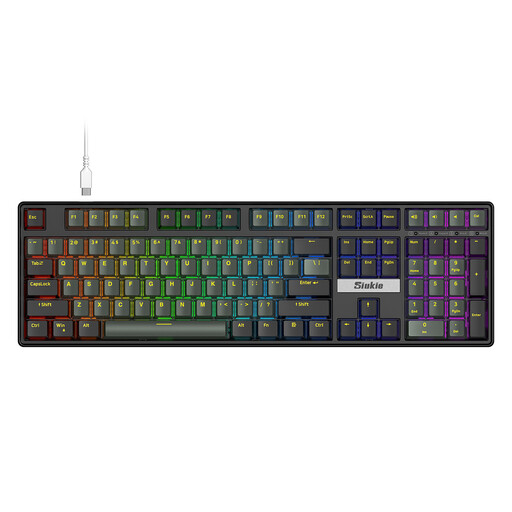
Siukie CR108 108-Key Wired Mechanical Keyboard
If regular number entry drives your choice, inspect this 108-key board’s exact key arrangement before relying on it for price lists.
The product name specifies a wired connection and detachable switches. Confirm its physical key layout if UK key placement matters to you.
View on Joybuy
 No image available
Siukie PL87W 87-Key Mechanical Keyboard
Assess this 87-key option if a smaller keyboard and mouse room matter more to you than a dedicated numpad.
The product name specifies detachable switches, 3MODE connectivity and RGB lighting. Confirm its physical layout and device-switching behaviour if either affects your setup.
View on Joybuy
Frequently asked questions
Do two monitors require a multi-device keyboard?
No, not if both monitors are connected to one computer: the keyboard connects to that computer. Look for device switching when you use separate hosts; Logitech says MX Mechanical Easy-Switch can connect to up to three devices.
Is full-size or tenkeyless better for checking price lists?
Choose full-size when repeated price, quantity or code entry makes a dedicated numpad important. Choose tenkeyless when mouse room and shortcuts matter more, provided you are comfortable entering numbers another way.
Will a mechanical keyboard alone resolve wrist or posture discomfort?
No. The Health and Safety Executive’s display-screen guidance treats the keyboard as part of the wider workstation and notes the value of space in front of it for resting hands and wrists. Consider mouse reach, chair and screen position, and your work routine as well.
How should I dispose of an old keyboard?
Check an electrical-recycling route rather than putting an old keyboard in ordinary household waste. Brighton & Hove City Council, for example, accepts small electrical items with a plug, battery or cable; check your own local authority’s arrangements or an applicable retailer take-back option.


