For puzzle-booklet work beside someone else, start with the fitted switch: choose an explicitly quiet or silent option, or check that a hot-swappable board accepts compatible silent switches. A compact layout leaves more room for pages and notes, but a full-size board keeps a number pad close at hand for frequent numerical entry. Check the exact physical layout and connection options before choosing a model; neither a mechanical label nor a compact size settles those questions.
Who this is for
Quiet shared-desk writers
If you draft clues, instructions and revisions beside another person, switch and keypress noise may be your first filter. Keychron and CHERRY describe silent-switch options for quieter typing, but check the switches fitted to the keyboard you select.
Number-and-layout-heavy puzzle makers
If you frequently enter page numbers, answer lengths, grid coordinates or spreadsheet data, decide whether the space saved by a compact board outweighs a dedicated number pad. Logitech offers compact and full-size MX Mechanical layouts, while Keychron lists a full-size V6 Max UK ISO option.
Multi-device booklet editors
If drafting and proofreading take place on different compatible devices, switching between them may matter more than extensive keyboard customisation. Logitech lists switching between up to three devices for its MX Mechanical range.
What matters when choosing
Check switch sound first when someone works beside you, then balance desk space against the keys you use repeatedly. Treat layout and connection as decisions about your own typing routine, not features every booklet maker needs.
| Concern |
What to check |
Who this matters to |
| Switch noise |
Check the fitted switch variant. Logitech distinguishes Tactile Quiet from Clicky; CHERRY describes damping in MX Silent Red. Do not treat case foam as a substitute for checking the switch. |
When someone is working next to me, I want to draft and revise without deliberately choosing an audible clicky switch. Around 33% of consumers put reducing disturbance first. |
| Desk space |
Compare the board’s footprint with the space needed for pages and notes, then check access to arrows and navigation keys on a compact layout. |
I need room for printed grids and reference material, but I still use navigation keys while editing. For around 27% of consumers, preserving working space is the primary need. |
| UK layout and numbers |
Confirm the selected variant’s physical UK ISO layout and legends if those are familiar to you; check for a dedicated number pad if numerical entry is frequent. |
If I regularly enter grid coordinates or page numbers, unfamiliar key positions or missing number keys can interrupt the work. Around 20% of consumers put layout and numerical entry first. |
| Devices and shortcuts |
Check connection modes, supported devices and whether remapping works with the software you use. |
I move between devices or use repeated layout commands, so switching or configurable shortcuts matter to me. For around 20% of consumers, that workflow is the main priority. |
Buying pitfalls
-
Assuming every mechanical switch sounds alike
Mechanical describes how the keys operate, not a single sound level. Logitech sells separate Tactile Quiet, Clicky and Linear variants; CHERRY describes damping in its MX Silent Red switch.
Read the switch name on the exact variant you are buying. For a shared desk, do not rely on a general mechanical or gasket-mounted label to establish how quiet it will be.
-
Overlooking a US physical layout
UK ISO and ANSI layouts differ in key shapes and positions, not just printed legends. Logitech’s layout guide identifies differences around Enter and left Shift, which can matter when typing familiar symbols and shortcuts.
If you normally use a UK keyboard, confirm the selected variant’s physical layout rather than relying on a product-family name.
-
Choosing compact before checking your working keys
A smaller board can leave more room for booklet pages, while moving frequently used keys to shortcuts or removing the dedicated number pad.
Think through a typical session of entering answer lengths, navigating a document and laying out grids. Choose the smaller format only if you can reach the keys you use often.
-
Assuming hot-swap means silent switches are fitted
Hot-swap support allows compatible switches to be changed; it does not identify the switches supplied with the board. Keychron lists silent switches separately from its hot-swappable keyboard options.
Check both the fitted switches and the board’s compatibility statement. If you do not want to change switches, look for a suitable factory-fitted variant.
Changing the fitted switches means obtaining a compatible set and spending time installing it.
Brands to consider
Logitech
The MX Mechanical range includes compact and full-size low-profile keyboards for productivity use.
- Logitech offers a space-saving MX Mechanical Mini and a full-size model with an integrated number pad, alongside switching between up to three compatible devices.
- Tactile Quiet, Clicky and Linear are distinct switch choices. Check the selected variant rather than assuming the whole range is quiet.
Keychron
Keychron offers customisable mechanical keyboards with UK ISO options, including a full-size V6 Max variant.
- Keychron describes the V6 Max UK ISO as full-size, with wired and wireless connection options, sound-absorbing foam and hot-swap support.
- Foam does not identify the fitted switch. Check the board variant and switch compatibility if you intend to use Keychron’s separately available silent switches.
CHERRY
CHERRY offers the wired KC 200 MX office keyboard and a separate MX Silent Red switch option.
- CHERRY describes damping in MX Silent Red for reduced operating noise; the KC 200 MX is positioned as a wired mechanical office keyboard.
- Do not assume a KC 200 MX variant comes fitted with MX Silent Red. A wired setup also will not suit someone who needs wireless device switching.
Joybuy keyboard choices
These mechanical keyboards offer different ways to balance shared-desk typing, working space and connections. Check the fitted switches and physical layout on the variant you choose, particularly if quiet typing or familiar UK key positions are essential.
 No image available
Ticktype DP104 108-key, Gecha Gray, Silent Tactile (US)
Consider this full-size option if you enter numbers frequently while working beside someone else. The listed variant has 108 keys, Silent Tactile switches, a hot-swappable design and tri-mode connectivity. Its physical layout is US, so check the key positions before buying; the switch name is not an independent sound measurement.
View on Joybuy
 No image available
MACHENIKE KG87 80%, Latte Switch-Pink (US)
Consider the 80% format if desk space matters more than having a full-size board. This tri-mode variant lists Latte switches, a gasket mount and a US QWERTY layout. Check whether its fitted switches meet your shared-desk noise needs and whether the US key positions suit your typing.
View on Joybuy
 No image available
HyperX Alloy Rise 75 Wireless Keyboard UK
Consider this wireless keyboard if you want a smaller-format option for a shared work surface. Before choosing it for work beside someone else, check the fitted switch noise and the exact physical key layout; the UK wording in the title alone does not establish a UK ISO configuration.
View on Joybuy
 No image available
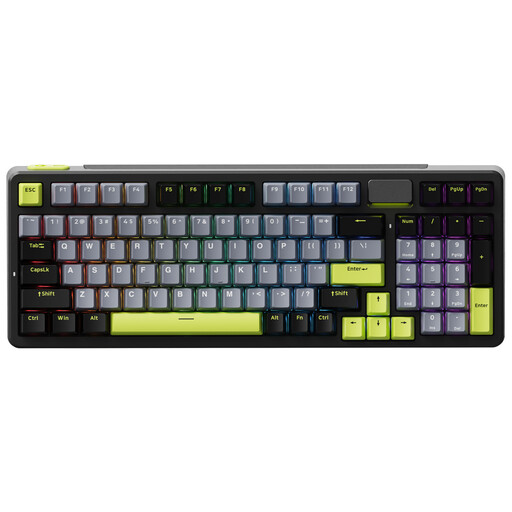
Rapoo V700DIY 96%, Gasket Mount-BG (US)
Consider the 96% layout if you want a compact-format alternative while making a booklet. This tri-mode keyboard is listed with a US QWERTY layout. Check the supplied switch type and its noise characteristics before treating it as suitable for quiet shared-desk typing.
View on Joybuy
Common questions
Should I choose clicky switches for a shared desk?
Choose an explicitly quiet or silent variant instead if reducing disturbance is central to your decision. Logitech distinguishes its Clicky and Tactile Quiet options, while CHERRY describes damping in MX Silent Red; check the switch fitted to the exact keyboard you buy.
Does a puzzle-booklet keyboard need to be UK ISO?
UK ISO is worth prioritising if you already use its key positions and symbols. Logitech’s layout guide explains that ISO and ANSI differ physically around Enter and left Shift, so changing the printed legends alone does not make the layouts equivalent.
What if an online keyboard feels wrong when it arrives?
For a UK distance purchase, GOV.UK explains that customers have a limited right to cancel even when an item is not faulty. Check the applicable cancellation period and return instructions promptly, and distinguish a change of mind from a keyboard that is faulty or misdescribed; a retailer’s voluntary policy is separate from statutory rights.
What should I do if a new keyboard is faulty?
Contact the seller and describe the fault rather than treating it as a change-of-mind return. GOV.UK distinguishes remedies for goods that are faulty or not as described from cancellation of an online order; check which remedy applies to the circumstances of your purchase.


