Frequent numeric stock-entry workers
If you repeatedly enter quantities or adjustments, a dedicated number pad may matter more than a small keyboard footprint. Logitech and Keychron list full-size models relevant to this choice.


If you enter stock quantities frequently, start with a mechanical keyboard that has a dedicated number pad, then choose its switches and connection to suit your workspace. Beside a bright window, treat keyboard illumination as a way to find keys in changing light, not a cure for glare: the Health and Safety Executive advises arranging the desk and screen to avoid bright reflections.
If you repeatedly enter quantities or adjustments, a dedicated number pad may matter more than a small keyboard footprint. Logitech and Keychron list full-size models relevant to this choice.
If daylight or reflections affect your desk, consider key visibility separately from screen glare. The Health and Safety Executive advises positioning the desk and screen to avoid bright reflections.
If colleagues sit nearby or you switch between work devices, weigh switch sound and feel against the connection you need. Logitech lists multi-device switching, while CORSAIR lists a wired option with sound-dampening layers.
For stock-count work, settle the number-pad and physical-layout questions before choosing lighting, switches or extra controls; a keyboard feature cannot replace changes needed to reduce screen glare.
| Concern | What to check | Who this matters to |
|---|---|---|
| Numeric entry | Confirm a dedicated number pad on the exact variant and check that its physical layout suits your usual key positions. | If I enter quantities repeatedly, I want number keys within easy reach rather than relying on a function layer; around 36% of consumers put dedicated numeric entry first. |
| Bright-window visibility | Check keycap contrast and adjustable illumination. Separately assess screen position and whether blinds or a desk move could reduce reflections. | Working beside a bright window, I need to see the keys without struggling with screen reflections; around 29% of consumers prioritise these visual conditions. |
| Switch sound and feel | Identify the exact switch and, where possible, listen to it; check for documented sound-dampening construction. | When colleagues work nearby, I want mechanical feedback without distracting them. Around 21% of consumers put shared-space noise first. |
| Connection and shortcuts | Confirm the connection modes and device compatibility; check whether remapping tools work with your stock system. | If I move between devices or repeat software shortcuts, I need a connection and controls that fit that workflow; around 14% of consumers make that flexibility their primary concern. |
Illuminated keys do not remove reflections from a screen. The Health and Safety Executive advises arranging the desk and screen to avoid glare or bright reflections, including light from windows.
Assess screen position and window treatment separately; choose keyboard lighting for finding keys as room light changes.
Physical key positions and symbols can differ between UK-ISO and US QWERTY boards. A Joybuy listing for a Siukie keyboard explicitly describes it as US QWERTY, while Keychron offers a UK-ISO K10 variant.
Check the selected variant’s layout description and images against the key positions and operating-system setting you use.
A compact footprint may save desk space but make repeated quantity entry less convenient if there is no dedicated numeric cluster.
If stock counts involve frequent numbers, confirm the actual number-pad arrangement rather than relying on a key count or the word mechanical.
Switch sound matters when other people share the workspace; a clicky switch may suit your typing preference without suiting the room.
Check the named switch, listen to a sound sample if available and consider any documented sound-dampening features.
The full-size MX Mechanical is a productivity-focused option for numeric entry and switching between work devices.
The K10 QMK ISO is relevant if UK-ISO key placement and configurable shortcuts matter to your stock-count workflow.
The wired K70 CORE RGB offers a full-size, UK-layout option for a fixed desk where added controls are useful.
The BlackWidow V4 X is worth considering when dedicated shortcuts are part of the stock-management task.
These mechanical keyboards offer different combinations of full-size or compact layouts, switches and connections for a stock-count desk. Check the exact number-pad arrangement before choosing one for frequent quantity entry, and address window glare at the workstation separately.
 No image available
Consider this variant if you want a full-size board and prefer Silent Tactile switches at a shared desk.
The product name specifies a US layout, RGB lighting, hot-swappable switches and an 8000mAh battery. Confirm the number-pad arrangement and whether the US key positions suit your work.
No image available
This variant is a full-size option if you prefer its specified linear switches; check their sound if others work nearby.
The product name specifies a US layout, RGB lighting, hot-swappable switches and an 8000mAh battery. Confirm the dedicated numeric-key arrangement before relying on it for repeated counts.
 No image available
A 75-series wireless board is worth considering if a smaller keyboard footprint matters more to you than an immediately identifiable number pad.
Confirm whether its key arrangement provides the numeric entry you need. The UK wording in the name does not, by itself, establish the physical key layout.
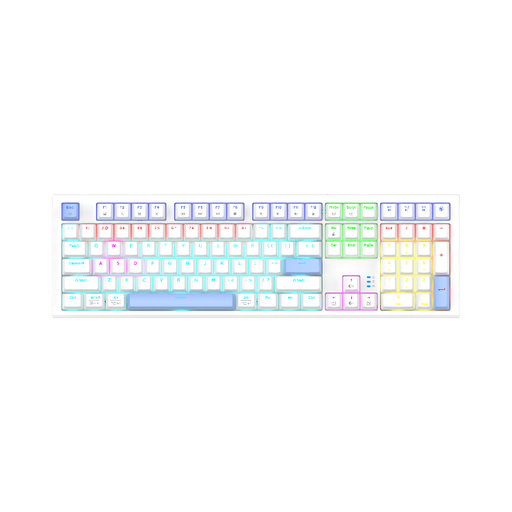 No image available
This is a fixed-desk option if a wired connection suits your stock-count station; consider the typing sound before using it near colleagues.
The product name specifies USB-A and a US QWERTY layout. Confirm the number-pad arrangement and that the physical key positions suit your work.
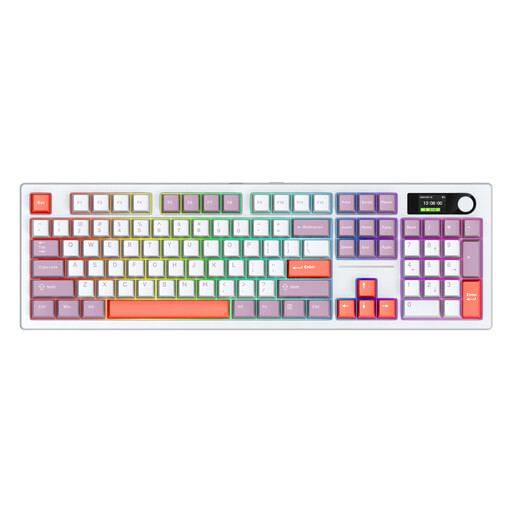 No image available
Consider this 104-key option if you want to compare a board with the connection flexibility indicated by its 3MODE product name.
The name also specifies RGB lighting and detachable switches. Check its physical layout, number-pad arrangement and switch sound against your stock-entry and shared-space needs.
No. Keyboard lighting may help you find keys when ambient light changes, but it does not remove screen reflections. The Health and Safety Executive advises arranging the desk and screen to avoid glare from windows or bright lights.
Choose the physical layout that matches the key positions and operating-system setting you use for stock work. Check the exact variant rather than the country of the shop: Keychron lists a UK-ISO K10 option, while a Joybuy Siukie listing explicitly describes a US QWERTY layout.
The Health and Safety Executive says employers must carry out a workstation assessment when workers use display screen equipment daily as part of normal work, continuously for an hour or more. The assessment considers the whole workstation, not just the keyboard.
Contact the trader about the fault rather than treating a change-of-mind returns policy as the only route. GOV.UK states that consumer law protects purchases of goods made remotely or in person; the remedy depends on the circumstances of the purchase and fault.