High-volume score-entry workers
If you repeatedly enter numeric ratings, codes or spreadsheet values, direct access to a number pad may matter more than saving desk width. Check that your chosen variant actually has one.


Choose a full-size keyboard with a dedicated number pad if repeated numeric entry is your main task and the desk has room for the mouse beside it. If keeping the mouse close matters more, consider a narrower TKL layout and accept using the number row or another pad for scores. Set the standing desk so the keyboard sits just below elbow height before deciding which width fits.
If you repeatedly enter numeric ratings, codes or spreadsheet values, direct access to a number pad may matter more than saving desk width. Check that your chosen variant actually has one.
If a wide keyboard pushes your mouse away, a narrower TKL layout may make it easier to keep both within reach. The Health and Safety Executive advises keeping the keyboard just below elbow height and the mouse in line with the elbow.
If you work near others or change devices, check the selected switch option, connection modes and key layout. Those details vary by model and variant.
Decide whether direct number-pad entry or a closer mouse position matters more, then check the switch, layout and connection options against the way you work.
| Concern | What to check | Who this matters to |
|---|---|---|
| Numeric score entry | Confirm a dedicated number pad on the exact variant and check that the keyboard can remain centred. | If I enter numerical ratings throughout the day, I want direct access to the number keys without moving the mouse out of reach. Roughly 40% of consumers would make numeric entry their primary concern. |
| Standing-desk fit | Set the desk height, then check keyboard width and whether the mouse can sit close by. | When desk space is tight, I would give up a number pad to avoid reaching farther for the mouse. Desk fit would come first for around 30% of consumers. |
| Shared-space and device fit | Check the selected switch, UK key layout and connection modes against your room and devices. | If I work beside other people or move between devices, I need a suitable switch and the right keys and connections. About 20% of consumers would prioritise those everyday fit checks. |
| Repeatable shortcuts | Identify the commands you would use, then check remapping compatibility and workplace rules. | I would want programmable controls only if approved shortcuts recur in my scoring workflow. Shortcut customisation would be the main concern for roughly 10% of consumers. |
A TKL layout saves width but removes the dedicated number pad, making sustained numeric entry less direct.
Think about how often you enter scores before choosing between a number pad and a narrower board.
If your numeric workload grows, you may need an external number pad.
A suitable layout cannot compensate for a standing height that leaves you shrugging your shoulders or reaching for the mouse.
Adjust the desk first. The Health and Safety Executive advises placing the keyboard just below elbow height and keeping the mouse in line with your elbow.
Key layout depends on the selected variant; some mechanical keyboards listed on Joybuy specify US QWERTY.
Check the variant title and key-layout specification for UK-ISO or UK layout if that is what you need, rather than relying on the product image.
Dedicated controls offer little practical value if your work consists mainly of entering scores manually.
List the shortcuts you would actually use and check whether your employer, client or survey platform permits them. Do not use macros to enter or submit responses where the rules prohibit it.
The MX Mechanical range offers a full-size option for work that calls for an integrated number pad.
The K8 Max UK-ISO range suits shoppers considering a narrower TKL layout and configurable keys.
The BlackWidow V4 is a full-size option to examine if permitted, repeatable shortcuts are central to your work.
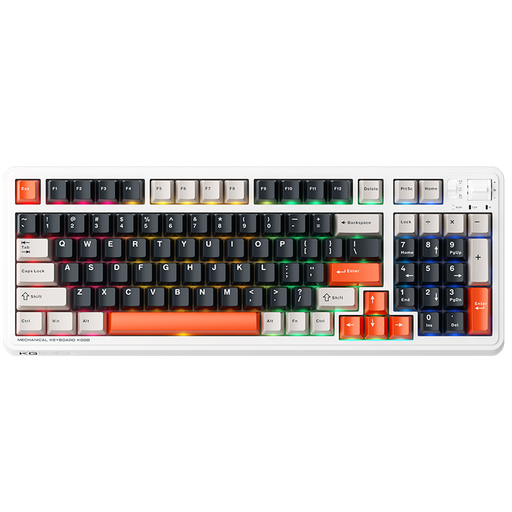
These keyboards offer different ways to balance score entry with space for the mouse, from a 96% layout and a full-size board to narrower options. Check the selected variant’s numeric keys and UK layout against your own workflow.
 No image available
Consider the 96% layout if you want to assess numeric access without moving to a conventional full-size board; check its key arrangement and dimensions against your desk.
The product title specifies a US QWERTY layout and hot-swappable design. Confirm the switch fitted to this variant if sound or feel matters.
 No image available
Consider this full-size model if you have room for a wider board and want the stated Silent Tactile switch variant. Confirm it has the number pad you need before relying on it for score entry.
The title specifies 108 keys, a US layout and tri-mode connectivity. Check its dimensions against the space available for your mouse.
 No image available
Consider this compact-layout option if keeping the mouse close matters more than immediate number-pad access. Check the selected key arrangement before buying it for frequent scores.
The title identifies a wireless UK version; confirm the exact key-layout variant if UK-ISO placement is important.
 No image available
Consider the 80% layout when space beside the keyboard is a priority. Check how you would enter frequent numerical scores and whether the board’s dimensions suit your desk.
The title specifies a US QWERTY layout and the Latte Switch-Pink variant; confirm that the keys and switch feel suit your work.
Choose full-size when frequent number-pad entry is your priority and you can keep the mouse close beside the keyboard. Choose TKL when desk width and mouse reach matter more, provided the number row or an external pad works for your scores.
Set the desk so you can keep your shoulders relaxed and the keyboard just below elbow height. The Health and Safety Executive also advises keeping the keyboard central and the mouse in line with your elbow; check that your chosen keyboard leaves room to do both.
Macros can serve approved, repeatable navigation or application shortcuts. Check your employer’s, client’s or survey platform’s rules before assigning actions that affect how responses are entered, validated or submitted.
No. Check the exact selected variant for UK-ISO keys if you need them: Joybuy also lists mechanical keyboards labelled US QWERTY, while Keychron identifies UK-ISO variants of its K8 Max.