Detail-heavy programme editors
If you regularly enter or check show times, dates, page numbers, cast lists and tabular details, access to a number pad may matter more than saving desk width.


Choose a keyboard with a dedicated number pad if entering performance times, page numbers and other programme figures is a regular part of the job; a compact layout makes more sense when desk and mouse space matter more. For shared workspaces, check the exact switch option rather than treating a quiet label as a measured noise comparison. If repeated formatting drives your choice, confirm remapping support, UK-ISO layout and compatibility with your editing setup before buying.
If you regularly enter or check show times, dates, page numbers, cast lists and tabular details, access to a number pad may matter more than saving desk width.
If you edit near rehearsals, meetings or other people, the switch option and the position of your keyboard deserve attention alongside its layout.
If you repeatedly format credits or move between editorial tools, remapping may be useful. Device switching becomes relevant when your work also moves between separate computers or devices.
For a two-screen programme-editing desk, start with the task that most shapes your keyboard choice: repeated formatting, shared-space typing, numerical work or switching between separate devices.
| Concern | What to check | Who this matters to |
|---|---|---|
| Repeated editing actions | Check remapping or macro support and the software needed to configure it. | If I keep applying styles to credits and cast lists, I want shortcuts that work in my editor. Around 31% of consumers would put repeat-action efficiency first. |
| Noise and desk setup | Check the exact switch option and whether the keyboard fits centrally at a comfortable height. | Working near rehearsals or colleagues, I need typing that does not disrupt the room while I work for long periods. Around 31% of consumers would prioritise shared-space noise and comfort. |
| Numbers and editing keys | Confirm the physical layout, number pad and navigation keys on the exact variant. | When I enter performance times and page references, I want direct access to numbers and navigation keys. Around 23% of consumers would make full-layout access their primary concern. |
| Device switching | Establish whether the screens use one computer or separate devices, then check the supported connections. | If my screens belong to different computers, I want to move between them with one keyboard. Around 15% of consumers would put device switching first. |
A keyboard sold on a UK site can have a different physical layout, affecting punctuation positions used in programme copy and shortcuts.
Check the exact variant and product photos; if you need UK-ISO, look for that layout explicitly in the listing.
A smaller layout frees desk space but may omit keys you rely on for schedules, page references or navigation.
Note which keys you use in a typical editing session, then compare them with the exact compact layout before giving up a dedicated number pad.
Logitech offers a Tactile Quiet option, while Razer describes silent switches and damping foam on the Pro Type Ultra. Those descriptions do not establish which keyboard will sound quieter in your room.
Check the switch variant and look for comparable sound tests if noise will determine your choice.
A new keyboard does not resolve a screen or mouse position that makes you twist towards your main editing document. The Health and Safety Executive advises placing the keyboard just below elbow height and keeping the screen and keyboard central.
Arrange the main screen, keyboard and mouse first, then choose a keyboard width that fits that position.
The K10 Max is a reference point if UK-ISO layout, a number pad and configurable shortcuts are central to your choice.
The MX Mechanical range offers a full-size number-pad option and a smaller Mini alternative for desks where width is limited.
The Pro Type Ultra is relevant if programmable controls and switching between separate devices matter to your editing setup.
These keyboards cover full-size and compact layouts that may suit different two-screen desks. Compare each exact variant with your need for UK punctuation positions, direct numeric entry, shared-space typing and editing shortcuts.
 No image available
Consider this full-size option if desk width is available and you prefer the listed Silent Tactile switch variant; that name is not a measured noise result.
The title specifies 108 keys, a US layout, hot-swappable switches and tri-mode connectivity. Check the exact key arrangement if you need a number pad or UK punctuation positions, and confirm remapping support if you use custom shortcuts.
 No image available
The 75% layout is an option when leaving room for a mouse matters more than having a full-width keyboard.
The title specifies wired, Bluetooth and 2.4 GHz modes, PBT keycaps and a US QWERTY layout. Check the keys available on this variant if you frequently enter programme figures, and confirm shortcut configuration support before relying on it.
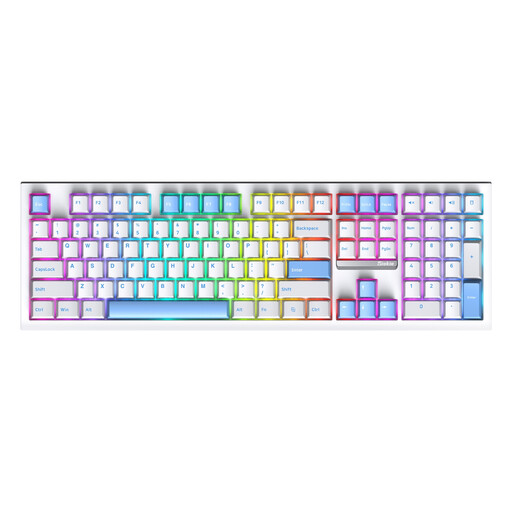 No image available
This 108-key option is worth comparing if you prefer a full-size layout for programme details and have room for it beside your mouse.
The title specifies detachable switches and three connection modes. Check the physical key layout and exact number-pad arrangement if either is essential to your work.
 No image available
Consider the 75% layout if a narrower keyboard would make your two-screen workstation easier to arrange.
The title specifies tri-mode connectivity and a US QWERTY layout. Check the exact keys present if numeric entry is frequent, and confirm any remapping support needed for your editing shortcuts.
 No image available
The 80% layout offers another compact choice when mouse space has priority over a full-width keyboard.
The title specifies tri-mode connectivity and a US QWERTY layout. Compare its exact key arrangement with your navigation and numeric-entry needs, and check shortcut support if you plan to remap keys.
No: if both screens run from one computer, choose a keyboard that works with that computer. Switching matters when you alternate between separate devices; Logitech lists up to three devices for MX Mechanical, Keychron lists three Bluetooth pairings for K10 Max, and Razer lists up to four devices for Pro Type Ultra.
Choose an explicitly labelled UK-ISO variant if you want that physical arrangement for punctuation and shortcuts in programme copy. Keychron identifies a UK-ISO K10 Max variant, but check the exact listing rather than assuming a model or seller offers the layout you need.
Keyboard type alone does not fix an awkward screen or mouse position. The Health and Safety Executive advises keeping the screen and keyboard central and placing the keyboard just below elbow height; check that your chosen keyboard fits that arrangement.
Ask the retailer how to use its electrical-waste take-back arrangement. GOV.UK says retailers must take back waste of the same type when a customer buys a new item; check the retailer’s process rather than assuming every store handles returns of old equipment in the same way.