Dual-screen long-form writers
You draft and revise a synopsis while keeping an outline or reference material visible on another screen. You need the keys you use regularly without crowding the space for your mouse and notes.


For a book synopsis on a two-screen desk, choose the keyboard layout around the keys you use and the space available. A TKL or 75% board can leave more room for a mouse and notes, while a full-size UK ISO board makes more sense if you regularly use a number pad and want familiar key positions. Check switch feel and connection options separately; changing keyboards does not replace a suitable workstation setup.
You draft and revise a synopsis while keeping an outline or reference material visible on another screen. You need the keys you use regularly without crowding the space for your mouse and notes.
You want familiar UK ISO key positions rather than adjusting to an ANSI layout. The physical arrangement matters when punctuation and keyboard shortcuts are part of your writing routine.
You want to assign controls for outlining or editing, or keep the option to change compatible switches later. Those features matter most if you expect to use them.
Start with desk space and the keys your synopsis workflow requires. Then check the physical layout, connection method and typing feel of the exact variant you intend to buy.
| Concern | What to check | Who this matters to |
|---|---|---|
| Desk space and keys | Measure the space available and check whether the layout retains the number pad, navigation keys, function row and arrows you use. | If my mouse and notes compete for room beside two screens, I want a smaller board without losing my usual editing keys; around 33% of consumers put that balance first. |
| UK ISO layout | Check the exact variant's physical layout, particularly Enter and left Shift, rather than relying on a UK-facing listing. | When I write and edit frequently, I want punctuation and shortcut keys where I expect them; roughly 27% of consumers prioritise familiar UK ISO positions. |
| Connections and shortcuts | Decide whether you need to connect to separate computers, and check how any key remapping works. | If I move between computers or repeatedly use the same editing commands, flexible connections or programmable keys matter to me; around 20% of consumers make this their main concern. |
| Typing feel and setup | Consider switch feel and sound, then leave room for your hands and check your typing position. | For a long drafting session, I care about how the keys feel and whether my desk arrangement lets me type comfortably; roughly 20% of consumers put these considerations first. |
The physical Enter and left Shift arrangements differ, which can disrupt familiar punctuation and shortcut habits during text-heavy work.
Inspect the key layout of the exact variant before ordering. A UK-facing product page alone does not establish that its keyboard is UK ISO.
A compact keyboard makes a different trade-off depending on its layout: a TKL board omits the number pad, while a 75% arrangement can compress the navigation area further.
List the number pad, function, arrow and navigation keys you actually use for your synopsis, then compare that list with the model's key map.
Keyboard height or switch type alone cannot establish whether a two-screen writing setup is comfortable. The Health and Safety Executive's display-screen guidance addresses the workstation as a whole.
Leave space for your hands when you are not typing, and keep your wrists straight and your touch light, as NHS desk-typing guidance advises.
A reference point if you want to compare full-size UK ISO options with programmable keys and changeable switches.
A reference point for compact TKL mechanical keyboards with wireless connection options.
A reference point if a 75% arrangement with a function row, arrow keys and switch-changing options appeals to you.
A reference point for writers specifically considering a slim, wired TKL board.
These choices include compact 75% keyboards for a desk where space matters and a larger wired keyboard for writers who want a number pad. Check each model's physical key layout against your UK-layout preference before choosing.
 No image available
Consider this wireless 75% model if desk space is tight but you want to check whether its key arrangement will suit your editing routine. Confirm the physical layout before buying; the UK wording in the name does not, by itself, establish UK ISO key positions. Switch feel is also worth checking against your preference.
 No image available
The 75% format is worth considering when you want a smaller board for your synopsis desk. The product name specifies hot-swappable Star Vektor switches, tri-mode connectivity, a TFT display and a control knob. Check the physical layout and the positions of the navigation keys you rely on before choosing it.
 No image available
This compact model is an option only if you are comfortable with its explicitly stated US QWERTY layout; it is not a UK ISO choice. Its name lists wired, Bluetooth and 2.4G connection modes and PBT keycaps. Compare its physical key positions with your writing shortcuts before ordering.
 No image available
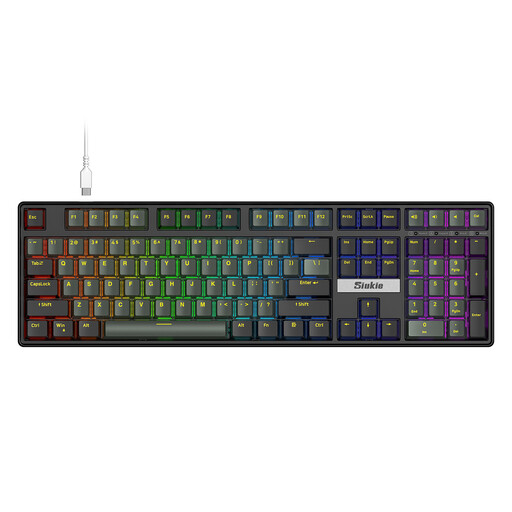
Consider this larger wired keyboard if a number pad is part of your writing or note-taking routine. Measure the available desk width, and confirm both the physical key layout and the switch option supplied with the exact variant before buying.
No. Both screens may be connected to one computer, in which case a multi-device keyboard is not needed for the displays. Consider switching between host devices only if you also use separate computers.
Choose UK ISO if familiar UK physical key positions matter to you. Logitech identifies differences around the Enter and left Shift keys, so inspect the exact variant rather than assuming every keyboard offered on a UK-facing page has that layout.
It is useful if you expect to experiment with compatible switch types; it is optional if you already like the supplied feel and do not plan to change it. Keychron states that the V6 Max supports MX mechanical switch hot-swapping, while Razer specifies 3- or 5-pin switch support for the BlackWidow V4 75%.
No keyboard type guarantees that outcome. The Health and Safety Executive's workstation guidance addresses more than the keyboard, and NHS desk-typing guidance advises straight wrists and a light touch. If symptoms persist or worsen, seek medical advice rather than relying on another hardware change.