What to check before buying
For interview-profile drafting with few sockets, settle the connection and charging arrangement first. Then check the editing keys, switch sound and physical layout against the space where you write.
| Concern | What to check | Who this matters to |
|---|
| Cables and charging |
Check Bluetooth or 2.4 GHz support, how the selected model charges and whether wired use is possible. |
I want to clear a permanent keyboard cable without making charging awkward at a desk with few sockets; around 29% of consumers put cable and power management first. |
| Switch sound |
Check the selected switch variant and its stated sound characteristics, not just the keyboard family. |
When I draft beside other people, I do not want each keystroke to interrupt them; around 23% of consumers make switch sound their primary concern. |
| Editing keys |
Compare direct access to arrow, navigation and function keys; decide whether you regularly need a numpad. |
Frequent revisions make me want the keys I use for moving through and editing text close at hand; around 18% of consumers prioritise that access. |
| Desk fit |
Measure the usable space and compare the keyboard’s footprint with the keys a smaller layout omits. |
My laptop and writing materials already occupy the desk, so keyboard size drives my choice; around 18% of consumers put desk fit first. |
| Device and UK layout |
Confirm the exact key arrangement, operating-system compatibility and connection requirements for each device. |
If I move a draft between devices, familiar key placement and reliable compatibility matter most; around 12% of consumers prioritise those needs. |
Joybuy keyboards for this setup
These wireless mechanical keyboards offer different layout choices for interview-profile drafting. Compare the exact switch, key arrangement and charging requirements before deciding which fits your desk.
 No image available
ASUS ROG Strix Scope II 96 Wireless, black, UK layout
Consider this if you want wireless use without choosing a particularly small editing layout.
The title identifies a 96% keyboard with a UK layout. Check the selected switch variant for shared-space writing and confirm the charging arrangement.
View on Joybuy
 No image available
HyperX Alloy Rise 75 Wireless, UK variant
Its 75% layout is a choice to examine if desk space matters but you still need to check access to your usual editing keys.
The title identifies a wireless UK variant. Confirm the exact key arrangement, switch sound, charging method and whether wired operation is available.
View on Joybuy
 No image available
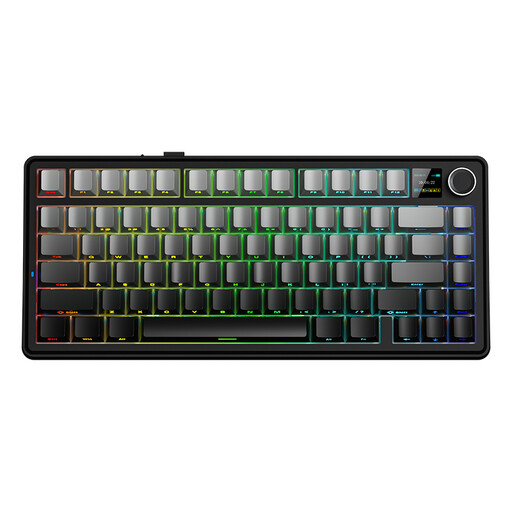
AULA F75 MAX 75%, US layout, Reaper switches, gradient grey
This compact option calls for particular care if familiar UK punctuation placement matters to your drafting.
The named variant has a US QWERTY layout, side-engraved keycaps and wired, Bluetooth and 2.4 GHz modes. Check its switch sound and charging requirements for your workspace.
View on Joybuy
 No image available
Ticktype DP104, Gecha Gray, US layout, Silent Tactile switches
Consider the larger key set if you regularly need direct access to more keys, provided a full-size board fits your desk.
This 108-key variant is described as hot-swappable, with an 8000mAh battery and US layout. Silent Tactile is the switch designation, not an independent noise measurement; check its sound before using it in a shared space.
View on Joybuy
 No image available
MACHENIKE KT84-B84W 75%, black, US layout, Gateron White switches
Its compact layout may suit a crowded writing desk if the US key arrangement works for you.
The title identifies a 75% tri-mode keyboard with Gateron White switches. Check switch sound, charging needs and device-switching behaviour before relying on it for shared-space or multi-device work.
View on Joybuy
Questions about choosing and using a keyboard
Will a wireless keyboard help when plug sockets are limited?
It can remove the need for a permanently connected keyboard cable, but it will still need power. Choose a wireless mode your computer can use, then check how the exact model charges and whether it offers a wired fallback.
Which switches should I consider when writing near other people?
Start with variants explicitly described as quiet or silent rather than assuming all mechanical switches sound alike. Logitech distinguishes its Tactile Quiet, Clicky and Linear options, while Razer identifies quiet or silent options on particular models; check the selected variant’s sound and feel.
Should I choose a 75%, TKL or full-size layout for editing?
Choose by the keys you use during revisions, not size alone. A smaller board can leave more desk room, but check whether its navigation and function keys are directly accessible; a full-size layout is worth considering if you regularly use a numpad.
What should I check before ordering a UK-layout keyboard?
Check the selected variant’s key arrangement rather than relying on the keyboard family name or a UK listing. Confirm device compatibility, included receiver or cable, and the seller’s return and warranty terms before ordering.
What should I do with an unwanted keyboard?
Check your local electrical-equipment recycling arrangements rather than putting it in general household waste. Oxfordshire County Council classifies items with electrical or electronic parts, a plug or a battery as waste electrical and electronic equipment; collection arrangements vary by area.


