What to check when buying
For a two-screen recipe-layout desk, decide how often you need a numpad before trading keyboard width for space; then consider noise and comfort where you actually work.
| Concern |
What to check |
Who this matters to |
| Numeric entry and editing keys |
Check for a dedicated numpad and the UK-ISO layout if those keys are part of your routine. |
If I repeatedly enter quantities and page dimensions, I want the number keys where I expect them during layout work. Around 37% of consumers would make dedicated numeric entry their primary concern. |
| Desk space |
Compare full-size and compact footprints, including the space you need for your mouse and reference materials. |
With a second display and recipe notes on the desk, I would rather give up a dedicated numpad than crowd my working area. Roughly 27% of consumers would put desk space first. |
| Switch noise |
Check the exact switch variant and, where possible, hear it before deciding; a quiet product description is not a comparable noise measurement. |
When I edit near other people, the sound of repeated typing affects where I can work. About 18% of consumers would prioritise lower-distraction typing. |
| Long-session comfort |
Consider key height and reach at your desk, as well as your wrist and forearm position. |
During a long editing session, I need a keyboard arrangement I can use comfortably alongside good desk habits. Around 18% of consumers would put long-session comfort first. |
Joybuy keyboards for this workflow
These models offer different full-size and compact starting points for a two-screen recipe-layout desk. Every listed variant specifies a US layout, so compare its keys with the UK punctuation and number-entry arrangement you need.
 No image available
AULA F99, US QWERTY, Light Blue, Reaper Switch
Consider this model if a compact keyboard appeals but you still need to assess its number-key arrangement for recipe quantities. The listed variant has US QWERTY keys and wired, Bluetooth and 2.4G connection modes; check that its punctuation and switch sound suit your workspace.
View on Joybuy
 No image available
Ticktype DP104, 108-key US layout, Gecha Gray, Silent Tactile switches
Its stated full-size 108-key layout is worth considering if numeric work is frequent and you have room for a larger board. This Gecha Gray variant lists Silent Tactile switches and hot-swap support, but the switch name does not guarantee a particular noise level; its key layout is US rather than UK-ISO.
View on Joybuy
 No image available
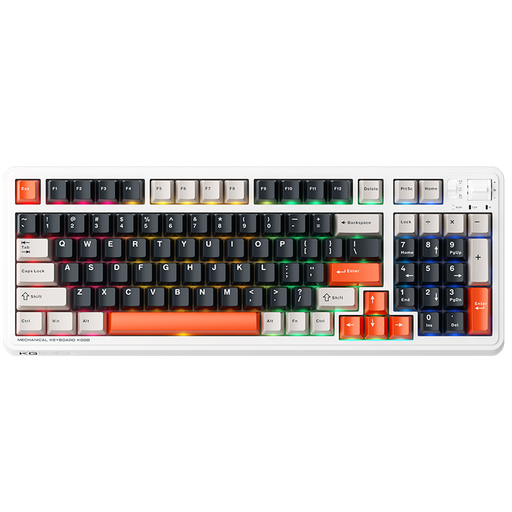
MACHENIKE KG98 96%, US QWERTY, Black White Orange
Consider its 96% format if you want to examine a compact arrangement without giving up on numeric-entry needs. The title lists a US QWERTY layout, tri-mode connection and hot-swap support; inspect the exact key arrangement and installed switches before deciding.
View on Joybuy
 No image available
AULA F75 75%, US QWERTY, PBT keycaps
The 75% format is a choice to examine when space beside a second display matters more than a large keyboard. This variant lists wired, Bluetooth and 2.4G modes and US QWERTY keys; confirm the exact key arrangement if a dedicated numpad or particular editing keys are essential.
View on Joybuy
 No image available
MACHENIKE KG87 80%, US QWERTY, Pink, Latte Switch
Its 80% layout is relevant if keyboard footprint is your main constraint at the recipe-layout desk. The listed variant has US QWERTY keys, tri-mode connection and a Latte Switch; confirm its key arrangement if you rely on a numpad, and assess switch sound separately.
View on Joybuy
Common questions
Do two screens mean I need a multi-device keyboard?
No, not if both screens connect to one computer: the keyboard still works with that single host. Device switching becomes useful when you alternate between separate computers or tablets; Logitech says its MX Mechanical can connect to up to three devices.
Is full-size or compact better for laying out recipes?
Choose full-size if you regularly use a dedicated numpad for quantities, costs or page measurements. A tenkeyless layout saves desk space by removing that pad, so it is a more fitting trade-off when mouse and reference space take priority.
Can I change mechanical switches later?
You can plan on changing switches without soldering only if the exact keyboard variant is described as hot-swappable. Keychron describes a hot-swappable K10 version and hot-swap capability for the K10 Max; do not extend those descriptions to every version or model.
Will an ergonomic keyboard prevent wrist or hand problems?
A keyboard alone cannot promise that outcome. NHS guidance identifies repetitive typing and posture as relevant considerations; keep your desk arrangement and breaks in mind, and seek medical advice if symptoms persist or worsen.
Which product marking should I check when buying in the UK?
For products placed on the market in Great Britain, GOV.UK says CE marking continues to be recognised alongside or in place of UKCA marking where applicable. Its guidance notes different processes for Northern Ireland, so do not assume the same marking rules apply there; check the documentation for the particular product.


