Choose mesh Wi-Fi if audiobook downloads repeatedly stall in a room with weak signal, especially when you need coverage across several rooms or floors. If the problem is new or occurs even near the router, check placement, competing activity and the broadband connection first. For a persistent dead zone, node placement matters more than a newer Wi-Fi generation alone; a busy household may also have reason to consider backhaul and capacity.
Who might need mesh Wi-Fi?
Listeners with a weak-signal room
If audiobook downloads repeatedly struggle in a bedroom, loft or garden office but work nearer the router, coverage is worth investigating. Ofcom explains that distance and building materials can weaken Wi-Fi; a mesh system is relevant if placement changes do not resolve the gap.
Listeners in busy homes
If other household members stream video or download large files while you download audiobooks, check both Wi-Fi coverage and demand on the broadband connection. Ofcom identifies those activities as potential contributors to connection problems.
Listeners who should troubleshoot first
If you download on one phone or tablet and have not identified a recurring dead zone, check router placement, interference and broadband service before choosing mesh hardware. A new Wi-Fi system will not fix a provider outage.
What matters when choosing mesh?
For audiobook downloads at home, establish whether the main problem is a persistent weak-signal room, competing household activity or a connection that first needs troubleshooting.
Check the existing connection
Choose when: Downloads normally work near the router, or the problem started recently.
Trade-off: Placement and broadband checks will not remove a persistent coverage barrier between rooms.
Coverage-focused mesh
Choose when: The audiobook device repeatedly loses signal in a particular room or across floors.
Trade-off: Each additional node needs power and a usable connection to the rest of the mesh.
Higher-capacity mesh
Choose when: Several people use data-heavy services at once, or an Ethernet connection to a satellite is practical.
Trade-off: Headline Wi-Fi capability may exceed what one audiobook download needs and cannot increase the speed of the broadband service.
| Concern |
What to check |
Who this matters to |
| Signal in the download room |
Identify where the signal weakens; consider walls, floors and a powered position for each node that can still connect to the mesh. |
If downloads repeatedly stall in a distant room but work near the router, I want a dependable connection in that room. Around 42% of consumers put dead-zone coverage first. |
| Busy-household capacity |
Check which data-heavy activities run at the same time and whether the exact system supports the backhaul arrangement you can use. |
When others stream video or download large files, I want to know whether shared activity is disrupting my audiobook download. Roughly 33% of consumers prioritise household capacity. |
| Cause of the problem |
Compare the connection near the router and in the problem room; check placement, competing use and provider service status. |
If the issue appeared recently on one device, I want to identify its cause before changing equipment. About 25% of consumers put diagnosis first. |
Buying mistakes to avoid
-
Choosing a newer Wi-Fi generation before checking the fault
According to Ofcom, Wi-Fi cannot outperform the broadband service. An outage, interference or competing heavy use can affect downloads even if you change the mesh system.
Try the audiobook download near the router and in the problem room, then check router placement and provider service status before selecting a system.
-
Treating advertised coverage as a guarantee
Walls, floors and other obstacles affect signal reach. Ofcom notes that larger homes may need more mesh units, so a coverage figure cannot settle whether a particular room will be served.
Map the rooms that matter and plan positions where nodes can reach both the main unit and the problem areas.
If the initial pack cannot bridge the layout, another satellite may need its own suitable powered position.
-
Assuming mesh will connect to any broadband setup without configuration
Ofcom notes that third-party routers can be harder to set up and that a broadband provider may not support troubleshooting them.
Identify your current router, modem or optical network terminal, then check the exact mesh model’s supported setup mode before changing equipment.
Changing router or gateway settings can add setup time.
-
Confusing optional features with the coverage hardware
The cited eero 6 listing separates its digital-security subscription from the mesh hardware. Those features are not the same as the connection needed to download an audiobook.
Decide which management or security features you intend to use, then check what the exact bundle includes.
Mesh brands to consider
TP-Link Deco
A mesh range with different Wi-Fi generations and pack sizes for households comparing coverage arrangements.
- TP-Link describes Deco as a network of nodes using one network name, with roaming and routing features on supported systems.
- Features vary by model; check the exact node count, ports, backhaul options and setup requirements for your broadband equipment.
Amazon eero
An app-led mesh family to consider if expanding an existing eero network matters to you.
- The cited eero 6 listing describes expansion using cross-compatible eero hardware.
- Check the exact bundle and whether any management features you want require a separate subscription.
NETGEAR Orbi
A mesh family worth examining when satellite connections and Ethernet options matter alongside coverage.
- NETGEAR specifies wired satellite backhaul and 2.5 Gig Ethernet ports for its Orbi 370 series.
- Check whether those connections suit your home’s wiring and broadband setup; an audiobook download alone does not require every higher-capacity feature.
Joybuy mesh Wi-Fi options
These three-unit mesh systems are relevant if audiobook downloads are affected by weak Wi-Fi across rooms. Compare their stated configurations against your home layout and broadband equipment; a newer Wi-Fi generation alone does not establish that it will solve the problem.
 No image available
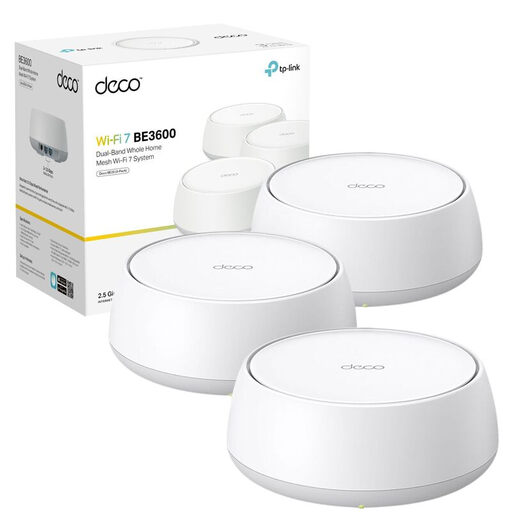
TP-Link Deco BE22 BE3600 Wi-Fi 7 (3-pack)
Consider this three-unit mesh pack if audiobook downloads are affected by weak signal in several rooms.
The title identifies the BE22 model, BE3600 designation and Wi-Fi 7. Check where the units can be placed and whether the setup suits your broadband equipment.
Joybuy
 No image available
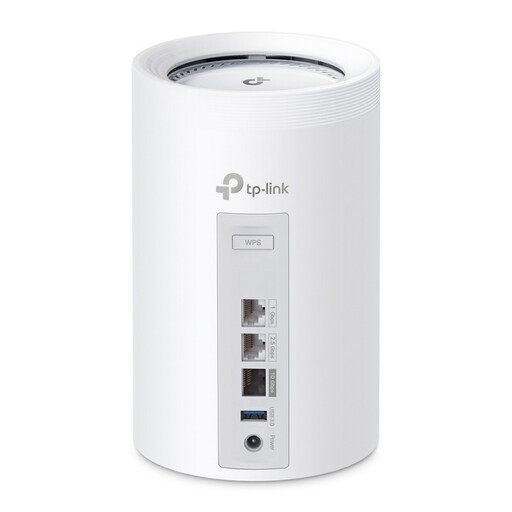
TP-Link Deco BE65 BE9300 Tri-Band Wi-Fi 7 (3-pack)
Consider this three-unit system if you need mesh coverage and are comparing higher-capacity configurations for a busy home.
The title specifies the BE65 model, BE9300 designation and tri-band Wi-Fi 7. Confirm the backhaul arrangement you need and how the system connects to your broadband equipment.
Joybuy
 No image available
TP-Link Deco BE25 Wi-Fi 7 (3-pack)
Consider this three-unit mesh system when the main goal is reaching rooms where audiobook downloads repeatedly struggle.
The title identifies the BE25 model and Wi-Fi 7. Plan node positions around the rooms that matter, and check the exact setup and backhaul options if they affect your installation.
Joybuy
 No image available
NETGEAR Orbi 370 RBE373 Dual-Band BE3600 Wi-Fi 7 (3-pack, white)
Consider this Orbi 370 system if multi-room coverage matters and you can make use of its satellite connection options.
The title specifies dual-band Wi-Fi 7 and 2.5 Gbps Ethernet. NETGEAR says Orbi 370 satellites support wired backhaul; using it requires a practical Ethernet connection between suitable locations. Check compatibility with your existing broadband setup.
Joybuy
Frequently asked questions
Do I need mesh Wi-Fi just to download an audiobook?
Usually not if your phone or tablet has a stable connection where you download. Consider mesh when downloads repeatedly struggle in a weak-signal room after placement and interference checks. Audible’s Wi-Fi-only download setting controls which connection the app uses; it does not improve weak home Wi-Fi coverage.
Where should I put the router and mesh nodes?
Place the main router centrally and away from objects that obstruct or interfere with its signal, then position each additional node where it can maintain a useful connection while extending coverage towards the problem room. Ofcom identifies placement and interference as factors in Wi-Fi performance; test the positions in your own home rather than relying on a coverage figure alone.
Can mesh fix a slow broadband line or provider outage?
No. Mesh can address in-home Wi-Fi coverage, but it cannot increase the speed supplied by the broadband connection or resolve an outage. Ofcom advises checking provider service, competing heavy use and Wi-Fi conditions when diagnosing a slow or unreliable connection.


