Laptop-first solo demo makers
If you want to record guitar or vocals into a computer with few separate components, look at the microphone's computer connection and whether you can monitor what it captures.


Choose a USB condenser if you want a direct connection to your computer, an XLR condenser if you have a suitable interface and want that recording setup, or a dynamic instrument microphone if room noise makes close placement a priority. Before buying for guitar and vocals, check the connection and power requirements, included accessories and how much control you have over sound in the room.
If you want to record guitar or vocals into a computer with few separate components, look at the microphone's computer connection and whether you can monitor what it captures.
If you already use an XLR audio interface, or plan to build a recording setup around one, check the microphone's input, power and accessory requirements alongside its intended use.
If background sound is difficult to control, consider how closely you can position the microphone to the instrument and where unwanted sound will reach it from.
Start with the connection you can use, then decide how room sound and the complete recording setup affect your choice.
Choose it when: You want to connect one microphone directly to a computer; Audio-Technica specifies USB-C operation and headphone monitoring for the AT2020USB-X.
Bear in mind: A condenser still needs thoughtful placement when the recording room is not quiet.
Choose it when: You have, or intend to use, a compatible audio interface for guitar and vocal recording.
Bear in mind: Check the whole signal chain: Audio-Technica specifies full 48 V DC phantom power for the XLR AT2020.
Choose it when: Close placement on an acoustic instrument and managing background pickup take priority; Shure describes the SM57 for this use.
Bear in mind: The SM57 still needs an XLR recording path and is a different capture choice from a condenser in a quieter room.
| Concern | What to check | Who it matters to |
|---|---|---|
| Computer connection | Check for USB, XLR or both; for XLR, confirm the interface input and required power. | I want to start a demo on my laptop without assembling an XLR setup; around 31% of consumers put a straightforward computer connection first. |
| Guitar and vocal detail | Check the microphone's intended sources and pickup pattern, then consider whether you can record in a reasonably quiet room. | In a quieter home setup, I want to concentrate on capturing guitar and vocal detail; for around 31% of consumers, that is the primary need. |
| Background sound | Check the pickup pattern and whether close placement lets you keep unwanted sound away from the front of the microphone. | When other sounds enter my room, I need a practical way to focus on the instrument; around 23% of consumers place room-noise handling first. |
| Complete XLR setup | Check cable and mounting accessories, interface compatibility and, where required, full 48 V phantom power. | I do not want to choose an XLR microphone and then discover that I cannot connect it; completing the recording setup comes first for around 15% of consumers. |
The XLR Audio-Technica AT2020 requires a suitable connection and full 48 V DC phantom power, according to Audio-Technica.
Trace the path from microphone to computer before ordering, including the balanced XLR cable, interface input and phantom-power specification.
RØDE lists a shock mount, pop filter and XLR cable with the NT1 Signature Series, while Audio-Technica says the AT2020's XLR cable is sold separately.
Check the contents of the exact model and bundle, including what you will use to mount and connect it.
Shure describes the SM57's cardioid pattern as reducing background pickup around the main sound source. That does not remove the need to position a microphone for the guitar and the room.
If the space is noisy, consider a practical close-miking position or reduce the unwanted sound, then make a short test recording before settling on placement.
Its NT1 models offer two distinct condenser setups for guitar and vocals: the NT1 Signature Series uses XLR, while the NT1 5th Generation offers USB and XLR.
The XLR AT2020 and USB AT2020USB-X suit different computer-recording setups; their connections should not be treated as interchangeable.
The SM57 offers a dynamic XLR instrument-microphone route for buyers considering close placement in a less quiet room.
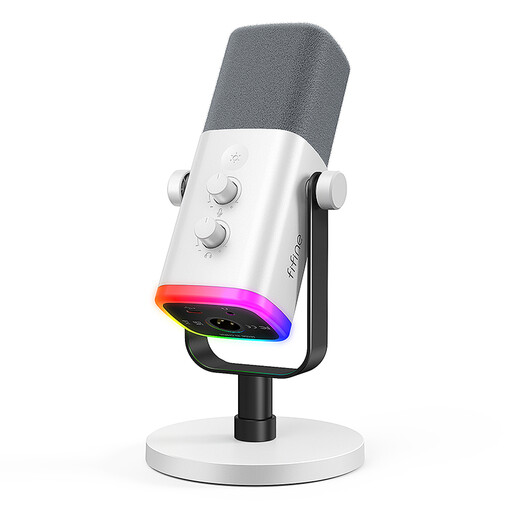
The FIFINE microphone below offers a USB or XLR route for computer-led recording. Its listed uses focus on voice, gaming and streaming, so check its suitability for acoustic guitar before choosing it for a guitar-and-vocal demo.
 No image available
The USB connection may suit a computer-led voice demo; if your acoustic demo includes guitar, check whether this model suits the way you intend to record it.
The product name specifies a monitoring jack, gain knob and mute button. For XLR use, allow for a cable: the product information says an XLR cable is not included.
Not if you choose a microphone with a suitable USB connection to your computer, such as the RØDE NT1 5th Generation or Audio-Technica AT2020USB-X. For the XLR AT2020, Audio-Technica specifies an interface that supplies full 48 V DC phantom power through a balanced XLR cable.
Start with a position aimed at the guitar and make a short test recording, then adjust it for the balance you want. Room sound and the position of any vocal performer also matter, so do not assume one placement will suit every demo.
Check the interface, XLR cable and mounting accessories for the exact microphone package. Audio-Technica says the XLR AT2020 needs full 48 V DC phantom power and that its cable is sold separately; RØDE lists a shock mount, pop filter and XLR cable with the NT1 Signature Series.
Check the performer's permission before recording or sharing their performance. The UK Intellectual Property Office explains that performers' rights can restrict both making a recording of a live performance and uploading that recording for public viewing; permission to use any music you do not own is a separate question.