What matters when choosing?
Choose a microphone position that keeps the narrator close to it, then match the connection and monitoring setup to whether the narrator stays put or moves around the classroom.
Stand-mounted cardioid dynamic microphone
Choose when: The narrator can remain close to a stand-mounted microphone in a room with distracting sound.
Allow for: A compatible microphone input and cable; directional pickup cannot compensate for placing the microphone far away.
USB cardioid desk microphone
Choose when: The narrator stays at a desk or lectern and records directly to a compatible computer.
Allow for: A fixed microphone position, which is less suitable if the narrator walks around the room.
Wireless microphone system
Choose when: Movement is necessary and the microphone can be secured close to the speaker.
Allow for: Charging, connection checks and a test of the complete recording path in the classroom.
| Concern |
What to check |
Who this matters to |
| Clear speech in a noisy or echoey room |
Check how you will keep the microphone close to the narrator, and whether directional pickup suits that position. |
If the room adds echoes or incidental noise, I need the guidance to remain intelligible. Around 33% of consumers would make speech clarity their primary concern. |
| Direct laptop recording |
Confirm the computer connection, cable reach and a way to listen on headphones. |
When I narrate from one desk, I want to record and check the sound without arranging a separate microphone interface. Around 27% of consumers would put a simple fixed-position setup first. |
| Freedom to move |
Check how the microphone attaches near the speaker and whether the receiver works with the recording device. |
If I walk between positions while speaking, I cannot keep returning to a desk microphone. Around 20% of consumers would prioritise movement. |
| Monitoring and recording resilience |
Check for headphone monitoring; for wireless, consider whether on-board recording or a safety channel is available. |
When a session would be difficult to repeat, I want to hear problems early and check any backup settings before starting. Around 20% of consumers would make recording resilience their main concern. |
Joybuy products for this scenario
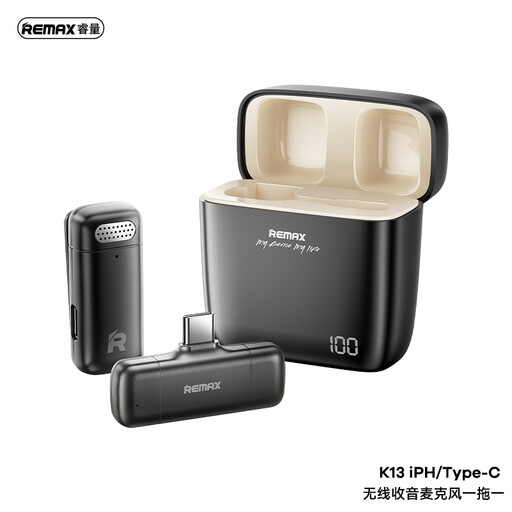
This wireless microphone option is relevant if the meditation leader needs to move while narrating. Check its attachment and recording-device connection before choosing it for a classroom session.
 No image available
REMAX K13 1-to-1 USB-C Wireless Microphone, Black
Consider this wireless transmitter-and-receiver model if the narrator needs to move while speaking. Check that its USB-C receiver works with your recording device and that the transmitter can be secured close to the speaker. Its listed omnidirectional pickup makes a classroom test especially important if background sound or reflections are a concern.
View on Joybuy
Frequently asked questions
Should I put the microphone across the classroom to capture the whole meditation?
Not if the aim is clear narration from one speaker. Shure’s placement guidance explains that a microphone cannot effectively separate direct speech from room reflections, so keep it near the narrator and test the result in the classroom.
Will a cardioid microphone fix an echoey classroom?
No: cardioid pickup does not undo the effect of positioning a microphone too far from the speaker. Keep it close to the meditation leader, reduce avoidable noise and listen to a test recording.
What should I test before the class starts?
Record a short passage in the actual classroom and listen on headphones for room sound, incidental noise and distorted speech. With wireless equipment, also check charging, microphone attachment, the receiver connection and any backup-recording settings you intend to use.
Can I record pupils or staff during a classroom meditation?
Check the school’s approved process before making or sharing audio that could identify them. The Information Commissioner’s Office highlights child-specific considerations when organisations handle children’s personal information; ask the school’s data-protection lead about the recording’s purpose, handling and retention rather than assuming the same permission rule applies to every session.
What might I need besides the microphone?
Plan for a position that keeps the microphone close, a compatible connection to the recording device and headphones for a test. Package contents vary: Audio-Technica lists a desk stand for the AT2020USB-X, while a wireless setup also needs its transmitter and receiver prepared for use.


