First-time family archivists
If you record one person at a time, a direct USB connection and headphone monitoring can keep the setup manageable without an audio interface. Check compatibility with the computer or tablet you intend to use.


For one storyteller recording directly to a compatible computer or tablet, start with a USB microphone and a way to monitor the recording through headphones. A quiet, controlled booth can suit a cardioid USB condenser; if ventilation or reflections are noticeable, consider a dynamic microphone used close to the speaker. Choose USB/XLR connectivity if you may later use an audio interface, but recording two voices on separate tracks also requires separate microphones and suitable inputs.
If you record one person at a time, a direct USB connection and headphone monitoring can keep the setup manageable without an audio interface. Check compatibility with the computer or tablet you intend to use.
Ventilation, computer noise or hard surfaces make microphone position especially important. A directional microphone used close to the storyteller is worth considering, provided they can maintain a consistent speaking position.
You might begin with one narrator and later use separate microphones for interviews. USB/XLR connectivity leaves an XLR connection route open, though separate tracks also require suitable additional equipment.
Decide how many people will speak, then listen to the booth itself. For a quiet, one-person setup, direct USB recording may be enough; audible booth noise makes close placement more important, while separate interview tracks call for a different recording setup.
| Concern | What to check | Who this matters to |
|---|---|---|
| Booth noise and reflections | Check the pickup pattern and whether the storyteller can face the microphone and speak close to it. | If ventilation or reflected sound is audible, I want my relative’s voice to remain the focus without asking them to speak from across the booth. Roughly 36% of consumers put noise and reflection control first. |
| Simple recording and monitoring | Confirm device and port compatibility, plus a headphone output that lets you check the captured sound. | When a family story cannot easily be repeated, I want to hear a problem before the conversation ends. Around 29% of consumers prioritise straightforward recording and live monitoring. |
| Two-person conversations | Decide whether one shared recording is acceptable; separate voice tracks need dedicated microphones and enough interface inputs. | If both interviewer and storyteller will speak, I need to decide whether I must adjust their voices separately afterwards. Roughly 21% of consumers place that conversation workflow first. |
| Future expansion | Look at USB/XLR connections and the mounting and cables needed for a later setup. | I may start with occasional solo recordings but later connect microphones through an interface. Around 14% of consumers give that expansion route priority over their immediate setup. |
Hard surfaces and equipment can still be audible in a recording. Shure’s recording guidance identifies room acoustics and microphone placement as factors in capturing a voice clearly.
Make a short recording in the booth and listen for reflections and background noise. If they are noticeable, consider a directional dynamic microphone that the storyteller can use close up; a cardioid USB condenser remains an option in a quiet, controlled booth.
A USB connection is useful only if it works with the intended computer or tablet, and a headphone socket is useful only if it supports the monitoring workflow you need.
Check the device’s ports, the microphone’s compatibility and cable requirements, and how you will listen during recording.
A shared microphone does not provide an independently recorded track for each speaker. Shure’s home-recording guidance describes a two-input interface as a way to record two tracks at once.
For interviewer-and-narrator sessions, decide whether a shared recording will do. If separate tracks matter, plan for a microphone for each person and an interface with enough inputs.
Shure describes processing features on the MV7+, but its recording guidance also stresses room acoustics and placement. Processing should not be treated as a guarantee against booth noise.
Reduce avoidable noise, keep the narrator’s position consistent and monitor a short test before the full conversation.
The NT-USB Mini is a compact USB condenser option to consider for one storyteller in a quiet booth.
Its microphone range includes the ATR2100x-USB dynamic USB/XLR model and the AT2040USB dynamic USB model.
The MV7+ is a dynamic USB-C/XLR option for buyers considering built-in voice-processing controls.
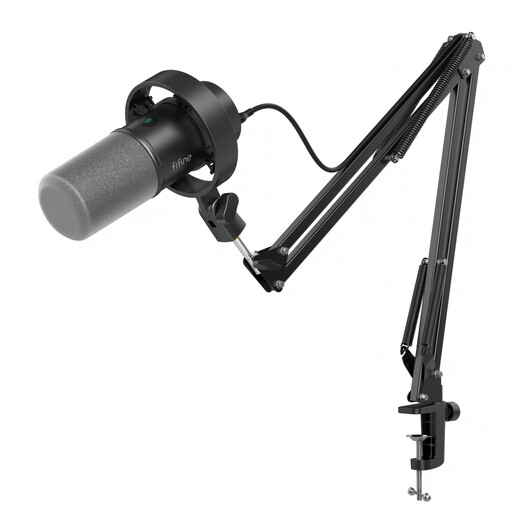
These two FIFINE dynamic USB/XLR microphones are choices for a storyteller who can speak close to the microphone and may want an XLR connection later. For either model, check compatibility with your recording device and whether its included support suits your booth.
 No image available
Consider this kit if you want to position one storyteller’s microphone on a boom arm and keep an XLR connection option for later. Its listed features include a mute button, headphone jack and gain knob. Check that the arm clamp fits your desk, that your recording device is compatible and whether you need a separate XLR cable.
 No image available
Consider this model if a desktop stand suits a one-person booth setup and you want the option of connecting by USB or XLR. The listing name also specifies a mute button and headphone jack. Check device compatibility and whether your planned position calls for a boom arm or an XLR cable.
Consider a close-used dynamic microphone if background noise is audible; a cardioid USB condenser can suit a quiet, controlled booth. Shure’s home-recording guidance notes that dynamic microphones tend to pick up less background noise, but placement and room acoustics still affect either choice.
Not for one compatible USB microphone recording directly to a computer or tablet. An interface becomes relevant if you plan to use XLR connections or record separate microphones on separate tracks; check that it has enough inputs for the speakers.
Make a short test recording and listen through headphones before the full interview. Check for fan noise, hum, plosives and a voice that sounds too distant; RØDE specifies zero-latency headphone monitoring for the NT-USB Mini.
One shared microphone does not give each speaker a separate microphone track. If you need to adjust the interviewer’s and storyteller’s voices independently, plan for separate microphones connected to suitable recording inputs.
The Information Commissioner’s Office says UK GDPR does not apply to processing by individuals purely for personal or household activities. If an organisation records or uses the stories, or the activity is no longer purely personal or household, assess the applicable data-protection obligations rather than relying on that position.