Start with a USB microphone if you want to record spoken flashcards directly to a compatible computer without a separate audio interface. At a shared desk, consider a dynamic USB microphone if nearby noise is your main concern and you can speak close to it; a compact cardioid USB condenser is another option when easy placement matters more. Neither choice makes nearby speech disappear, so check your recording position, device connection and monitoring controls before buying.
Who is this for?
Recorders sharing a noisy desk
If another person is talking or typing nearby, you need to keep your voice close to the microphone and pay attention to which direction it faces. Audio-Technica’s microphone guidance makes close, front-facing placement particularly important for a dynamic model.
Flashcard makers recording short takes
If you record one prompt after another, a direct USB connection and headphone monitoring can make it easier to check a clip before saving it. Confirm that both work with the device you use.
People short of desk space
If the desk has to be cleared between tasks, look at the microphone’s stand and how easily it can be moved. A control on the microphone may also help when you need to pause for a conversation.
What matters when choosing?
Choose a recording position you can maintain for each flashcard, then check how the microphone connects to your device and fits the shared desk.
Dynamic USB microphone
Consider it when: Nearby noise or room reflections are the main problem and you can speak directly into the microphone at close range. Audio-Technica’s guidance favours this arrangement for noisy or reflective spaces.
Trade-off: You must maintain that close position; a USB/XLR model’s XLR connection adds little to a straightforward computer-recording setup unless you plan to use other recording equipment.
Cardioid USB condenser
Consider it when: You want direct USB recording and a microphone that can be positioned conveniently in a reasonably controlled shared space. A compact model such as the RØDE NT-USB Mini provides one example of this setup.
Trade-off: Forward-facing pickup helps prioritise your voice, but nearby speech can still reach the recording. Placement remains important.
| Concern | What to check | Who this matters to |
|---|
| Nearby sound |
Check the microphone type and pickup pattern, then whether you can maintain its recommended speaking distance. Audio-Technica advises speaking directly into a dynamic microphone within 200 mm. |
If another person talks or types beside me, I want my close voice to take priority without assuming their sounds will vanish. Around 42% of consumers put nearby sound first. |
| Recording workflow |
Match the supplied cable to your device’s ports; check for a headphone output and direct monitoring if you want to listen while recording. |
When I make many short clips, I want to start recording and check each take without setting up separate equipment. For around 33% of consumers, that straightforward workflow is the primary need. |
| Shared-desk fit |
Check the stand’s footprint and whether the microphone has a local mute control. If desk knocks are frequent, consider its mounting options. |
I need to move the microphone out of the way and pause recording when someone needs the desk. That flexibility comes first for around 25% of consumers. |
What should you avoid?
-
Expecting a pickup pattern to silence the desk
A cardioid pattern prioritises sound in front of the microphone; it does not eliminate nearby conversation. Audio-Technica also advises close, direct placement when using a dynamic microphone in a noisy or reflective room.
Decide whether you can speak close to the microphone for every take. If not, make a short test recording with the microphone positioned as you would use it during normal desk activity.
-
Assuming every USB setup fits your device
The microphone’s connector and the cable in the box may not match your recording device. RØDE, for example, specifies a USB-C-to-USB-A cable for the NT-USB Mini and an adapter for Lightning-port iOS devices.
Compare the supplied cable with your exact device port, and check for a headphone connection if you want to monitor clips privately.
A different cable or device-specific adapter may be needed for your setup.
-
Overlooking desk knocks and interruptions
Contact with a shared desk can put unwanted knocks into a recording. A stand, pop filter or microphone-side mute control may also affect how easily you can handle short takes and pauses.
Check the exact box contents and stand compatibility, then test your usual desk position before recording a large set of flashcards.
If the supplied setup does not suit your desk, a separate stand, shock mount or pop filter may be useful.
Brands to consider
RØDE
The NT-USB Mini is a compact USB desk-microphone example for recording to a compatible computer or tablet.
- RØDE lists a cardioid pattern, built-in pop filter, detachable desk stand and headphone monitoring for the NT-USB Mini.
- Its directional pickup still calls for careful positioning around nearby speakers.
Shure
The MV7+ is a dynamic USB-C/XLR spoken-word option for people considering more than a simple USB workflow.
- Shure describes voice-isolation and digital noise-processing features, alongside headphone monitoring and a touch mute panel.
- Check whether you would use its XLR connection and processing controls; neither replaces suitable microphone placement.
Audio-Technica
Its AT2020USB-X and AT2020USB-XP are cardioid USB condenser options with different onboard controls.
- Audio-Technica lists direct monitoring and touch mute for both models; the AT2020USB-XP also has selectable noise reduction and automatic gain control.
- Test processing settings with your normal voice and desk noise rather than assuming they will remove nearby speech.
Logitech G
The Yeti Orb is a compact USB cardioid condenser option with optional software controls.
- Logitech G lists a cardioid capsule and optional G HUB and Blue VO!CE controls.
- Logitech G says the capsule is designed to reduce sounds such as keypresses; check how it handles your own desk setup rather than relying on that claim alone.
Joybuy products for audio flashcards
These products offer different ways to record spoken flashcards: two dynamic USB/XLR desk setups and a compact DJI microphone kit. For the desk setups, check whether close placement suits your space; for the DJI kit, confirm its connection to your recording device before choosing it.
 No image available
FIFINE AM8 USB/XLR Dynamic Microphone
Consider this desktop model if you can keep a microphone close and facing you for short spoken recordings.
The product name specifies a mute button, headphone jack and desktop stand. Check that its suggested 2–6 inch speaking distance works at your desk; the listed function keys apply in USB mode, and an XLR cable and boom arm are not included.
View on Joybuy
 No image available
FIFINE K688CT USB/XLR Dynamic Microphone Kit with Boom Arm
Consider the arm-mounted kit if you can accommodate a close-speaking position without keeping the microphone on a desktop stand.
The product name specifies a mute button, headphone jack and gain knob. Check the clamp against your desk: the listed fit is for desks under 2 inches thick. The suggested speaking distance is 2–6 inches; an XLR cable is not included, and the listed microphone controls are unavailable in XLR mode.
View on Joybuy
 No image available
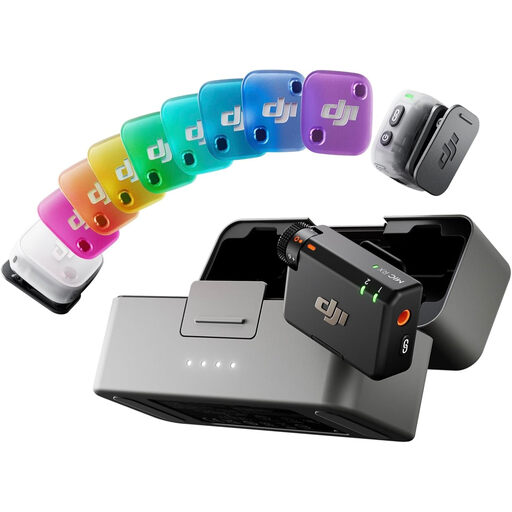
DJI Mic Mini 2 (2 TX + 1 RX + Charging Case)
Consider this compact recording kit if a wearable setup suits your flashcard routine.
Before buying, confirm exactly how the receiver connects to your computer or tablet and whether the kit offers the headphone monitoring and local mute control you need.
View on Joybuy
Common questions
Do I need an audio interface to record flashcards on a computer?
Not if you choose a USB microphone that works with your computer. Audio-Technica explains that a USB microphone can provide the digital connection without a dedicated audio interface; check your device’s port and the cable or adapter required by the exact model.
Will a cardioid microphone keep my desk mate out of the recording?
No: a cardioid pattern prioritises sound in front of the microphone but cannot guarantee that nearby speech disappears. If constant noise or reflections are your main difficulty, Audio-Technica advises speaking directly into a dynamic microphone at close range, specifying within 200 mm for optimal use.
Can two people share one microphone for flashcards?
They can in some recording arrangements, but microphone position matters. Audio-Technica notes that a condenser can be placed farther from its sound source for two-person recording; it may also pick up whichever voices are within range when both people are working at the desk.
What should I do with an old microphone when replacing it in the UK?
Ask the retailer how its like-for-like electrical-equipment take-back works for your purchase. GOV.UK says retailers supplying new electrical equipment must offer take-back of waste of the same type under the applicable rules; check the retailer’s arrangements rather than assuming a particular collection method.


