What matters when choosing?
Start with the connection your computer can use, then decide whether clear outgoing speech, sustained comfort or freedom from charging is your main concern.
| Concern |
What to check |
Who this matters to |
| Clear outgoing speech |
Look for a positionable boom microphone and documented microphone noise handling. Make a recording with realistic nearby noise. |
If other people are talking nearby, I need fellow participants to understand my contributions without repeated interruptions. Around 33% of consumers put clear outgoing speech first. |
| Connection and meeting app |
Match the headset connection and exact variant to your computer and meeting app; select and test both audio devices. |
I need to join on time and know the workshop is using my headset rather than the laptop microphone. Connection certainty comes first for around 27% of consumers. |
| Comfort and listening focus |
Compare wearing style, cushions and weight. Check whether the exact variant has ANC if listening distraction is a concern. |
During a longer discussion, I need a fit I can tolerate and enough focus to follow other speakers. Around 20% of consumers make comfort and listening focus their main concern. |
| Low-maintenance use |
Decide whether you need wired audio or a documented way to use a wireless model by cable. Confirm that any cable carries audio, not just power. |
For an occasional scheduled workshop, I would rather not manage charging or Bluetooth pairing just before joining. Low-maintenance use is the priority for around 20% of consumers. |
ANC and microphone noise handling solve different problems: the former concerns sound reaching your ears, while the latter concerns sound sent to other participants. Poly and EPOS describe these as separate features in their work-headset specifications; neither feature alone establishes how a particular headset will sound in your room.
Relevant brands to consider
These product lines illustrate different features to check; the exact model and variant determine which features and connections you get.
Jabra
The Evolve2 65 is a wireless, on-ear work headset offered in UC- and Microsoft Teams-focused variants.
- Jabra specifies three microphones for the Evolve2 65 and says its Teams-certified version is optimised for Teams.
- Jabra’s microphone comparison demonstration took place in its own audio lab; it does not establish the result for your room or independently compare every competing headset.
Logitech
The work-focused Zone range includes connection variants worth checking against a particular meeting app.
- Logitech lists dual microphones with beamforming and digital signal processing for Zone Vibe Wireless, alongside named meeting-platform certifications.
- Platform conditions depend on the connection variant; specified native-Bluetooth Teams certification conditions include Windows 11 and the new Teams app.
Poly
Voyager Focus 2 is a wireless, call-oriented headset with separately described microphone noise handling and listening-side ANC.
- HP/Poly describes Acoustic Fence microphone noise cancellation, adjustable hybrid ANC and an option for USB-corded use.
- HP’s talk-time specifications vary with settings including ANC and the online indicator; check the mode you expect to use rather than relying on one headline figure.
EPOS
The IMPACT 1000 line offers detailed microphone, connection and wearing-style specifications for comparison.
- EPOS lists adaptive beamforming, hybrid adaptive ANC and a USB-C cable connection in its IMPACT 1000 technical sheet.
- Microphone counts and other features vary by mono, stereo and ANC configuration; check the specification for the exact variant.
Wired headsets for workshop use
These wired Joybuy headsets offer microphone options for a desk-based writing workshop. Before choosing one, check how its audio plugs connect to your computer and test the microphone in the meeting app; a product name alone cannot establish call clarity.
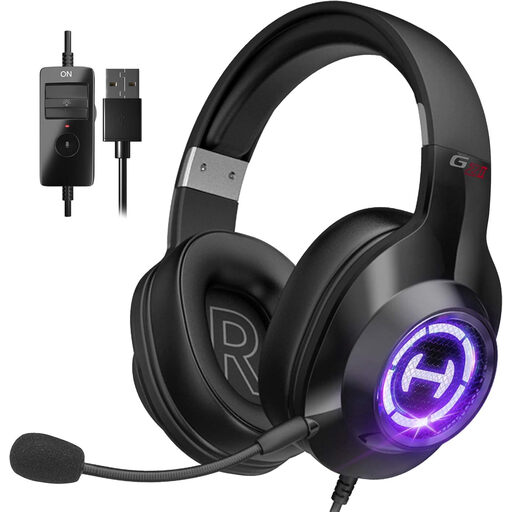 Image unavailable
Edifier G2II wired USB gaming headset, black
Consider this model if you want a wired USB headset for a desk-based workshop and can test its microphone before the session.
- The product name specifies a microphone, 50 mm drivers and PC and Mac compatibility.
- Check that your computer and meeting app recognise it as both the microphone and speaker; test a recording with nearby noise.
View on Joybuy
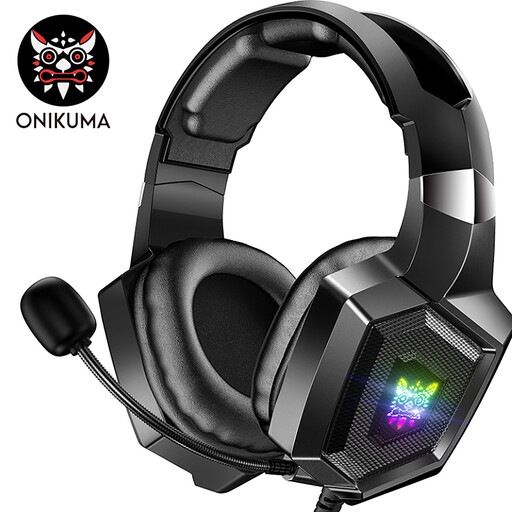 Image unavailable
ONIKUMA K8 wired over-ear gaming headset
The flexible microphone may suit you if you want to adjust its position while speaking during the workshop.
- The listing describes separate 3.5 mm audio and microphone connections; check whether your computer accepts them or needs an adapter.
- Test a recording rather than treating a microphone noise-cancellation claim as a result you will necessarily hear.
View on Joybuy
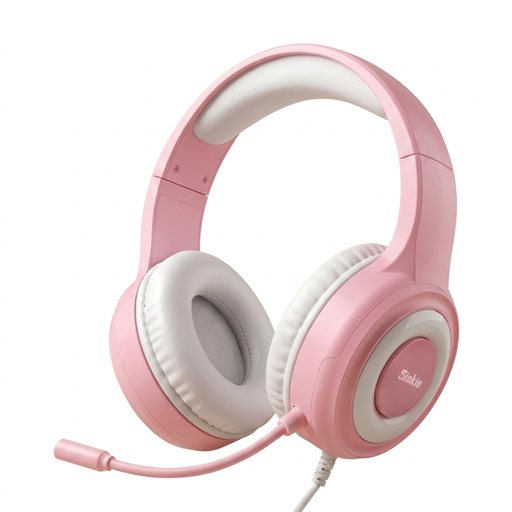 Image unavailable
Siukie CH25 wired gaming headset, blue LED
Its adjustable microphone boom is relevant if you want to position the microphone before speaking in a group discussion.
- The product name specifies an over-ear design and 50 mm drivers.
- The listing describes separate 3.5 mm audio and microphone connections, with USB used for lighting. Check the audio connections your computer requires; do not assume the USB plug carries sound.
View on Joybuy
Frequently asked questions
Do I need a headset certified for Zoom or Microsoft Teams?
Choose a documented compatible or certified variant if its platform-specific features matter to you, and check the exact connection and operating-system conditions. Logitech, for example, specifies Windows 11 and the new Teams app for particular native-Bluetooth Teams certification conditions; Microsoft Teams also lets you select devices and make a test call.
Will ANC stop others hearing noise in my home?
No: listening-side ANC alone does not establish what your microphone sends to other participants. Poly and EPOS describe microphone noise handling separately from ANC, so check the microphone features and make a recording where you expect to join the workshop.
How can I check my headset before the workshop?
Select the headset for both microphone and speaker, then listen to a test recording and check speaker playback. Zoom provides speaker and microphone tests, Microsoft Teams offers device selection and a test call, and Windows lets you record and play back a microphone sample.
How should I dispose of an old wireless headset in the UK?
Take unwanted electrical equipment to an appropriate collection or recycling route rather than household rubbish. GOV.UK advises keeping electrical waste and batteries out of household rubbish; follow the headset’s instructions if its battery can be removed.


