For remote conversation lessons where the teacher is the main person speaking, choose a headset with a suitably positioned microphone, a connection that works with your teaching computer and accessible mute controls. A wired connection avoids charging and pairing; wireless allows more movement but adds battery and compatibility checks. If several learners are together in one room and must also be heard remotely, a teacher’s headset alone is not the room-audio solution.
Who needs which setup?
Remote tutors working around background noise
When learners need to hear prompts and corrections, pay attention to the microphone that carries your voice, not just the headphones you listen through. Logitech, HP and Jabra describe microphone-noise-reduction features on particular headset models; check the feature on the exact model you are considering.
Teachers at a regular desk
A wired headset can avoid charging and pairing between repeated computer-based lessons. If you need to mute quickly during interruptions, look for an accessible control; Logitech documents inline mute and volume controls on its H390.
Tutors moving between rooms or devices
Wireless headsets may suit teaching away from a fixed desk or switching between a computer and phone. Check the exact connection method, charging routine and audio settings in your teaching app before relying on one for a lesson.
What matters when choosing?
Decide who needs to be heard first. A headset addresses the teacher’s audio; when learners in the same room must speak to remote participants, plan how their voices will be captured too.
Wired headset
Choose when: You teach at a fixed computer and would rather use a cable than manage pairing or charge.
Trade-off: The cable limits movement; confirm that the connector fits your computer or an available adapter.
Wireless headset
Choose when: Moving during lessons or switching devices matters more than a cable-free charging routine.
Trade-off: Connection methods and battery arrangements differ by variant, so check the exact version before depending on it for class.
| Concern |
What to check |
Who this matters to |
| Teacher’s speech |
Check microphone position and microphone-noise-reduction features separately from listening-side active noise cancellation (ANC). |
If nearby noise competes with my prompts and corrections, I want learners to hear my voice clearly. Around 31% of consumers put teacher speech clarity first. |
| Connection and mute |
Match the connector to the computer and locate the mute control; select the intended input in the teaching app. |
When lessons follow one another at my desk, I need to connect and mute without disrupting the group. For around 31% of consumers, dependable setup is the primary concern. |
| Movement and devices |
For the exact wireless variant, check its connection method and stated talk time, plus whether corded audio use is available. |
I may move away from the desk or switch between a computer and phone, so a cable can get in the way. Around 23% of consumers prioritise that flexibility. |
| Long-session fit |
Consider mono or stereo wear, headband adjustment and whether you can assess fit over a normal lesson. |
If I teach for extended periods, pressure or heat could distract me even when the microphone suits the task. Comfort comes first for around 15% of consumers. |
Common setup mistakes
-
Assuming ANC improves what learners hear
ANC concerns the teacher’s listening experience; it does not, by itself, establish how well the outgoing microphone handles surrounding noise.
Check the microphone features separately and try a call under your usual teaching conditions.
-
Expecting one headset to capture a whole room
A microphone positioned for the teacher is not a substitute for a plan to capture learners seated elsewhere. Zoom also identifies multiple devices with active audio in one room as a possible cause of echo.
Identify everyone remote listeners need to hear, then test a suitable room microphone or individual-microphone arrangement with only the intended audio devices active.
A room setup may require separate audio equipment as well as the teacher’s headset.
-
Choosing wireless before checking the exact variant
A headset’s stated talk time or connection options do not establish which adapter is supplied with every variant or how it will connect to your teaching computer.
Confirm the full model name, supplied connection method, charging arrangements and audio-device settings in the app you use.
Brands to consider
These brands illustrate different headset routes; the features below belong to the named product lines, not every headset carrying the brand.
Logitech
Its H390 provides a wired-desk example, while Zone Wireless 2 illustrates a wireless business-headset route.
- Logitech lists a USB connection, noise-cancelling microphone and inline controls for H390.
- Zone Wireless 2 microphone and platform features are model-specific; check the connector and exact variant rather than applying them to the whole range.
Jabra
The wired Evolve2 50 line is relevant to computer-based lessons where call features matter.
- Jabra describes a two-microphone, noise-reducing speech system for Evolve2 50.
- Check the connection and mono or stereo variant; a teacher-worn microphone does not establish how well distant learners in the room will be heard.
Poly
Voyager Focus 2 is a wireless business-headset line to consider when movement is important.
- HP states up to 25 hours of talk time and describes corded use for Voyager Focus 2.
- Confirm the precise model version, supplied connection equipment and battery expectations for your teaching routine.
EPOS
Its IMPACT 1000 line offers another wireless route for teachers who manage more than one device.
- EPOS states that the cited IMPACT 1000 series can connect with up to three devices at once.
- Check the particular variant and connection requirements; the brand’s voice-processing claims are not a measure of results in your classroom.
Joybuy headset choices
These choices cover wired and wireless headsets for the teacher’s own voice. If remote participants also need to hear several learners together in one room, plan that room’s audio separately.
 No image available
Poly Blackwire 3220 Stereo USB-C Headset with USB-C/A Adapter
Consider this wired option for lessons at a computer when you prefer not to manage headset charging.
- The product name identifies a stereo USB-C headset and USB-C/A adapter.
- Confirm the connection and controls work with your teaching device and app.
View on Joybuy
 No image available
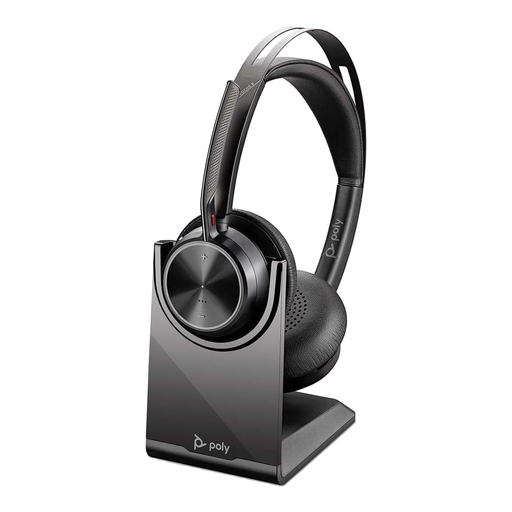
Poly Voyager Focus 2-M USB-C-C Headset with USB-C/A Adapter and Charging Stand
Consider this option if moving during a lesson matters and you can accommodate a charging routine.
- The named bundle includes a USB-C/A adapter and charging stand.
- Confirm how this exact variant connects to your computer and teaching app before relying on it for class.
View on Joybuy
 No image available
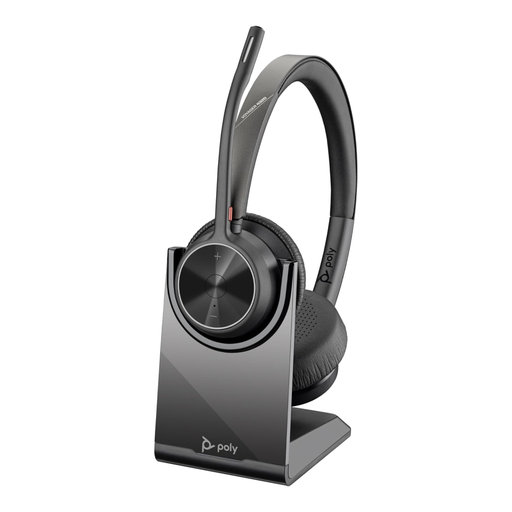
Poly Voyager 4320-M Wireless Headset, Black, with Charging Stand
This is another wireless choice for a teacher who needs freedom to move rather than a fixed cable.
- The product name identifies Bluetooth, USB Type-A and a charging stand.
- USB connection details vary within the listing; confirm what is included and how this variant connects to your teaching device.
View on Joybuy
 No image available
ONIKUMA K8 Wired Gaming Headset with Flexible Mic for PC and Xbox
Although presented as a gaming headset, this wired model may be worth considering if its microphone arrangement and connections suit your teaching computer.
- The product name identifies a flexible microphone and wired design.
- Check the computer’s audio and microphone ports, and whether an adapter is needed.
View on Joybuy
 No image available
Edifier G2II USB Wired Gaming Headset, Black, for PC and PS4
Consider this wired USB option only after checking that the teaching computer recognises its microphone.
- The product name specifies USB connectivity and a noise-cancelling microphone; that wording does not establish performance in a lesson.
- Confirm compatibility with your device and teaching app; the listed description excludes Xbox use.
View on Joybuy
Questions about teaching audio
Will the teacher’s headset pick up everyone in the room?
Do not rely on it as the sole microphone if remote listeners must hear learners seated around the room. Plan a room microphone or individual microphones and test the arrangement; Zoom warns that multiple devices with active audio in one room can cause echo.
Is ANC the feature to prioritise for conversation teaching?
Prioritise the outgoing microphone when your main concern is whether learners hear your speech. ANC affects what you hear and does not, on its own, establish how clearly the headset transmits your voice; check microphone features separately.
What should I check before the first online lesson?
Select the intended headset microphone and speaker in your teaching app, check microphone permissions where needed, and try the mute control on a test call. Google Meet advises users to select the correct audio devices and allow the required microphone access.


