For one seated participant, start with a microphone positioned close to their voice: a cardioid dynamic model is a practical choice if you have an XLR-capable recorder or interface, while a USB/XLR model also allows direct laptop recording. If both people need to move or speak from separate positions, consider a microphone for each voice or a dual wireless system. Whichever route you choose, test it in the room: microphone choice cannot fully compensate for noise or echo.
Who is recording?
One seated interviewee in an active room
If the participant stays near a stand, concentrate on getting their speech clearly above nearby activity and room reflections. The Oral History Society and the University of Leicester both emphasise placing the microphone close to the interviewee.
Two speakers or a moving interview
When questions and answers both need to remain clear, or the speakers cannot stay near one stand, plan close capture for each voice. The University of Leicester advises considering two microphones when the interviewer is too quiet.
A laptop-first recording team
A direct computer connection can simplify a fixed setup, but the team still needs to monitor the recording and manage its files. The Oral History Society recommends transferring and backing up recordings after the interview.
What matters when choosing?
Decide whether one or both voices need their own close microphone before choosing the connection and recording workflow.
XLR dynamic microphone
Choose when: One main speaker can sit close to a stand-mounted microphone connected to an XLR-capable recorder or interface.
Allow for: A stand and cable, plus another way to capture the interviewer if their questions must be clear.
USB/XLR dynamic microphone
Choose when: You want direct laptop recording now and an XLR connection for another setup.
Allow for: Checking which monitoring and controls work with your chosen connection; close placement still matters.
Dual wireless microphones
Choose when: The interviewer and participant need separate close microphones while sitting apart or moving.
Allow for: Charging, pairing and a test for clothing noise before the interview.
USB condenser microphone
Choose when: A fixed laptop-based interview lets you place the microphone close to the speaker.
Allow for: More room sound if the microphone has to sit at a distance in a reverberant space.
| Concern |
What to check |
Who this matters to |
| Clear speech amid room noise |
Can the microphone sit close to the speaker, away from the busiest part of the room? For a stand microphone, check its pickup pattern and connection. |
If the room is lively or echoey, I need speech to remain clear without placing the microphone across the room; around 33% of consumers would put room-noise control first. |
| Both voices on the recording |
Check whether your recorder has enough inputs for two microphones, or whether a wireless kit has two wearable transmitters. |
When questions matter as much as answers, I do not want the interviewer to disappear from the recording; roughly 20% of consumers would prioritise two-voice coverage. |
| Direct laptop recording |
Check the computer connection, live headphone monitoring and whether the recording software can save WAV files. |
If volunteers will record straight to a laptop, I need a setup they can connect and monitor consistently; about 20% of consumers would make computer simplicity their primary concern. |
| Preserving the interview |
Check the WAV recording path, available storage and power, then plan a monitored test and a separate backup after transfer. |
For an interview that would be difficult to repeat, I need to know the file has been captured and copied safely; around 27% of consumers would put recording preservation first. |
Recording pitfalls to avoid
-
Putting a microphone far away to keep it out of sight
A distant microphone captures more room sound relative to speech. Hard surfaces and nearby activity can then become more noticeable in the recording.
Work out how close a microphone can sit to each speaker before choosing a model. Test the quieter part of the room and use soft furnishings where practical, as the Oral History Society and University of Leicester advise.
-
Capturing the participant but losing the questions
A microphone close to only one person may leave prompts and follow-up questions too quiet to provide context later.
Test both planned speaking positions. If the interviewer is too quiet, consider a second microphone or a dual-channel setup, as University of Leicester guidance suggests.
Otherwise, transcription may take longer and the context of an answer may be harder to recover.
-
Finishing the session without securing the file
A recording left on one card or drive depends on that single copy. The Oral History Society recommends transferring, naming and backing up interview files.
Plan for WAV recording where possible, check the transferred file and make a separate backup before clearing the recording media.
Allow time and storage for file transfer, naming and backup copies.
-
Leaving future access to personal stories unclear
An interview may contain personal information, while archiving or publication can involve uses beyond the recording session.
Agree the interview’s purpose and intended access before recording. For an organisation handling personal information, the Information Commissioner's Office says a valid lawful basis must be identified; seek project-specific guidance if recordings will be shared or published.
Relevant brands for reference
Shure
Its SM58 is a close-use XLR dynamic microphone; its MV7+ offers both USB-C and XLR connections.
- Shure specifies a cardioid pickup pattern, shock mount and built-in pop filter for the SM58, and a headphone output for monitoring on the MV7+.
- The connection and monitoring workflow differs between these models. MV7+ USB and app features do not remove the need for close placement or room-noise control.
RØDE
Its Wireless PRO is a two-transmitter option for separate, wearable microphones.
- RØDE specifies two transmitters and 32-bit-float onboard recording for the Wireless PRO, allowing recordings to be made on the transmitters.
- A wireless interview still calls for charging, pairing and careful placement to avoid clothing rustle.
Audio-Technica
Its AT2020USB-X is a fixed-position USB condenser option for computer recording.
- Audio-Technica specifies USB-C connection, direct headphone monitoring and a supplied desk stand for the AT2020USB-X.
- In a reflective rehearsal room, the microphone still needs to sit near the speaker rather than at the far end of a table.
Joybuy products for these setups
These options cover close-positioned USB/XLR dynamic microphones for a fixed speaker and a two-transmitter wireless kit for separate speakers. Check the complete recording path, including your device connection and file workflow, before deciding.
 No image available
FIFINE K688CT USB/XLR Dynamic Microphone Kit with Boom Arm
Consider this kit when one seated speaker can use a boom arm to keep the microphone close. The product name specifies USB/XLR connections, a mute button, headphone jack and gain knob. Check how those controls work with your chosen connection, and confirm that your recorder or software can save and back up the interview in WAV format.
View on Joybuy
 No image available
FIFINE AM8 USB/XLR Dynamic Microphone with Desktop Stand
Consider this model for a fixed interview position if the desktop stand can place it near the speaker. Its product name specifies USB/XLR connections, a mute button and headphone jack. Check the included accessories for your planned XLR setup, and confirm that your recording software or recorder supports the WAV and backup workflow you need.
View on Joybuy
 No image available
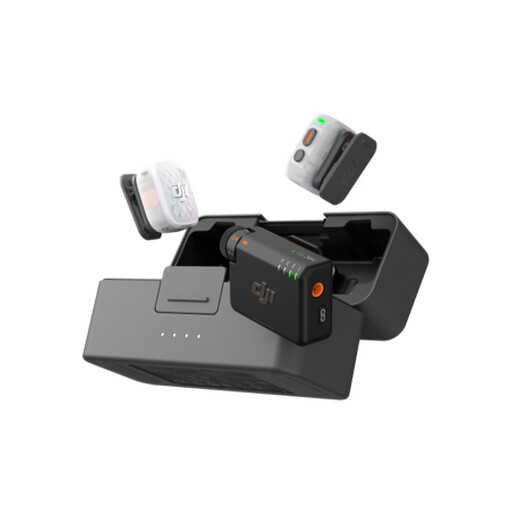
DJI Mic Mini 2S (2 TX + 1 RX + Charging Case)
Consider a two-transmitter kit when the interviewer and participant need separate microphones while sitting apart or moving. Confirm the exact receiver supplied and its compatibility with your recording device before purchase. Test placement for clothing noise, and check how recordings will be saved, transferred and backed up.
View on Joybuy
Common questions
How close should the microphone be to the interviewee?
Place it close enough for clear speech without distortion. For audio-only interviews, the Oral History Society gives around 15 cm from the interviewee’s mouth as a guide; make a short test recording and adjust the position so the person can speak naturally.
Will one microphone in the middle of the table capture both voices?
It may capture both, but a distant table position can also pick up more room echo and leave a speaker too quiet. The University of Leicester advises placing table microphones near the interviewee and considering two microphones when the interviewer’s voice is too faint. Test both seats before the interview.
Can I record an oral-history interview with a USB microphone?
Yes, if it can be placed close to the speaker and your computer setup lets you monitor the interview and save a suitable WAV file. Plan storage and a separate backup as well: the microphone alone does not preserve the recording after the session.
Is consent the only lawful basis for recording an oral-history interview?
Do not assume consent is the only possible lawful basis for an organisation handling personal information. The Information Commissioner's Office says a valid lawful basis must be identified before that information is handled. Agree the interview’s purpose and intended access clearly, and obtain guidance appropriate to the project if the recording may be archived, shared or published.


