What matters when choosing?
In an untreated room, decide how close you can perform and what equipment you can connect before choosing features for vocal detail or convenience.
Dynamic XLR
Choose when: You can perform close to the mic and already have an audio interface or mixer.
Allow for: An XLR cable and interface are needed for computer recording; close placement does not eliminate room noise.
Dynamic USB or dual USB/XLR
Choose when: You want to record directly to a computer, with dual-output models also offering an XLR connection for another setup.
Allow for: Convenient connectivity cannot replace a quiet room or suitable microphone placement.
Condenser
Consider when: You can control the room and want to capture a detailed performance from further away.
Allow for: Greater sensitivity can capture more of the untreated room; an XLR condenser needs 48 V phantom power, as LEWITT explains.
| Concern |
What to check |
Who this matters to |
| Room and background sound |
Check the pickup pattern and whether you can position the mic close to your mouth, away from avoidable noise. |
If reflections or background sounds compete with the words, I want my voice to remain the focus. Around 40% of consumers would make room and background sound their primary concern. |
| Recording connection |
Choose between direct USB recording and XLR through a compatible interface; check computer and software requirements. |
When I record to a laptop, I need a connection that works with the equipment I have. For around 30% of consumers, connection simplicity would come first. |
| Plosives and placement |
Check pop filtering, stand stability and any shock isolation needed for your performance position. |
With emphatic lines and movement, I need the microphone to stay put without distracting bursts or bumps. Around 20% of consumers would prioritise physical recording control. |
| Vocal detail |
Consider a condenser only alongside your ability to reduce room noise and reflections; check phantom power for an XLR model. |
If a more distant delivery is central to the performance, I may accept more room pickup to capture finer detail. Vocal detail would be the primary concern for around 10% of consumers. |
Joybuy microphone options
These dual USB/XLR dynamic microphones suit a close spoken-word setup when you want the option of connecting directly to a computer or using an XLR recording chain.
 No image available
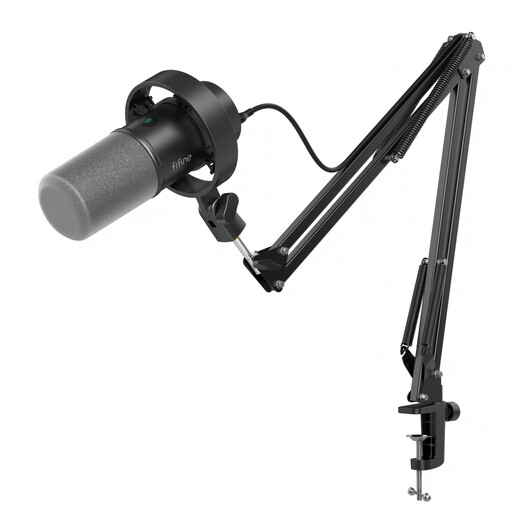
FIFINE K688CT USB/XLR Dynamic Microphone Kit with Boom Arm
Consider this kit if a boom arm would help you keep a consistent position during a close poetry performance.
The product name lists USB and XLR connections, a headphone jack, mute button and gain knob. For XLR recording, check that you have a compatible interface and cable; confirm that the boom mount fits your setup.
Joybuy
 No image available
FIFINE AM8 USB/XLR Dynamic Microphone with Desktop Stand
Consider this model if you can record close to a microphone on a desktop stand.
The product name lists USB and XLR connections, a headphone jack, mute button and RGB light. Check whether the desktop stand reaches a comfortable performance position; an XLR setup also needs a compatible interface and cable.
Joybuy
Common questions
Is a dynamic or condenser mic more suitable for an untreated room?
Start with a directional dynamic microphone if you need to record poetry close to the mic in the untreated room. RØDE, Shure and Audio-Technica describe spoken-word dynamic models designed to focus on the voice; LEWITT notes that a condenser's higher sensitivity can also capture more of the room, so consider one when you can control the space and want a more distant delivery.
How close should I stand to the microphone?
Begin close enough for the voice to remain prominent, then adjust your position using a short test recording. As a model-specific reference, Shure's SM7B guidance gives a close-speaking range of 2.54–15 cm to reduce off-axis noise; do not assume that range is a fixed setting for every microphone or delivery style.
Can an XLR-only microphone plug straight into a laptop?
An XLR-only microphone normally needs an XLR cable and a compatible audio interface for computer recording. RØDE specifies that setup for its XLR PodMic; if you want to avoid an interface, consider a microphone with USB output.
What should I check when buying a powered microphone or interface?
Check the seller and the documentation supplied for the particular model and intended destination. GOV.UK's electrical-equipment guidance addresses Great Britain and distinguishes it from Northern Ireland; do not assume that a marking or document appropriate to one destination settles the requirements for the other.


