What matters when choosing?
Decide how you will capture each voice before choosing a connection type. Then check whether the microphone can be positioned and monitored conveniently in your recording setup.
| Concern |
What to check |
Who this matters to |
| Speech amid room noise |
Check that the speaker can stay close to the front of the microphone and that its pickup pattern suits the planned orientation. Cardioid pickup reduces sound from the sides and rear, not from every direction. |
When other sounds and reflections compete with a learner’s voice, intelligible individual speech comes first; around 33% of consumers put room-noise control first. |
| Computer recording and monitoring |
Check for a USB connection and, if you want to hear the captured signal while speaking, a suitable headphone-monitoring facility on the exact model. |
If I practise alone at a laptop, I want to record and listen back without setting up an interface; around 27% of consumers prioritise that simple workflow. |
| Room to expand the setup |
Check that the same model has both USB and XLR connections, and that an intended XLR setup has a compatible interface or mixer. |
A direct computer connection works for now, but future sessions may use other recording equipment; for around 20% of consumers, that flexibility is the primary need. |
| Several learners |
Decide whether speakers can take turns close to one microphone or need separate microphones and recording channels at the same time. |
When individual responses must remain distinguishable, I need a workable plan for each active speaker; around 20% of consumers put multi-learner capture first. |
Relevant brands for reference
These model-specific examples show connection and placement options; the brand name alone does not determine how a microphone will behave in your room.
Audio-Technica
Its ATR2100x-USB and AT2020USB-X illustrate two computer-recording options for a single close speaker.
- According to Audio-Technica’s specifications, the dynamic ATR2100x-USB has USB and XLR outputs and a headphone jack for direct monitoring.
- The cardioid condenser AT2020USB-X also offers USB recording, but its directional pickup does not replace careful speaker and room placement.
RØDE
The PodMic USB and NT1 5th Generation offer different microphone formats with both direct computer and XLR connection routes.
- RØDE specifies USB and XLR connections for the dynamic PodMic USB and the cardioid condenser NT1 5th Generation.
- Neither model’s connection options remove the need to keep speech close and manage unwanted room sound.
Shure
The SM58 is a dynamic cardioid vocal microphone relevant to close speech capture.
- Shure specifies an integrated pop filter and shock mount for the SM58.
- The SM58 is an XLR-oriented model, so direct computer recording calls for compatible analogue equipment rather than a USB cable alone.
Joybuy microphones for this setup
These FIFINE USB/XLR dynamic microphones suit a close-positioned speech setup that starts at a computer and may later use an interface or mixer. Choose between the boom-arm kit and desktop-stand arrangement according to where each learner can speak.
 No image available
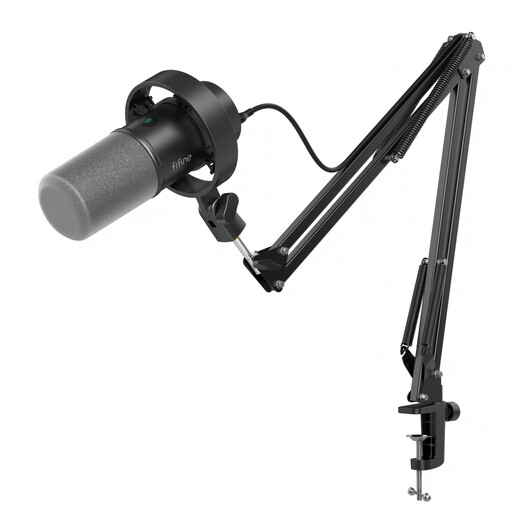
FIFINE K688CT USB/XLR Dynamic Microphone Kit with Boom Arm
Consider the boom-arm kit if a learner needs an adjustable position for close speech at a desk.
- Dynamic microphone with USB/XLR connections, a mute button, headphone jack and gain knob.
- Check that the boom arm’s desk clamp fits your surface. An XLR cable and compatible interface or mixer are needed for the XLR route.
View on Joybuy
 No image available
FIFINE AM8 USB/XLR Dynamic Microphone with Desktop Stand
Consider the desktop-stand arrangement if the speaker can work close to a microphone placed on the desk.
- Dynamic microphone with USB/XLR connections, a mute button and headphone jack.
- The desktop stand is included; check whether your speaking position instead calls for a boom arm. An XLR cable is not included.
View on Joybuy
Common questions
Will a microphone record exercises clearly from across the room?
Do not choose one on the assumption that it has a fixed useful reach. Shure explains that background noise strongly affects recording at a distance; placing the microphone close to each speaker is the more useful starting point.
Does a cardioid microphone remove rehearsal-room noise?
No. Cardioid pickup reduces sound arriving from the sides and rear, but other sound can still reach the microphone. Keep speech close, orient the microphone thoughtfully and make a test recording in the actual room.
Should I choose USB or XLR for language exercises?
USB is the more direct connection for one learner recording to a computer. Choose an XLR route if you plan to use a compatible interface or mixer; a USB/XLR microphone provides both connection options, though you still need the equipment for the XLR setup.
Can one microphone capture several learners individually?
One microphone can serve learners who take turns speaking close to it, but it is not a dependable plan for separate, simultaneous responses. If those responses matter, plan suitable microphones and recording channels for the active speakers.
What if an organiser saves learners’ voice recordings?
Recordings linked to identifiable learners can involve personal data under UK data-protection rules. The Information Commissioner’s Office says personal data relates to an identified or identifiable person; organisers should establish the appropriate arrangements for their own recording purpose, including how learners are informed and how recordings are kept. Do not assume consent is automatically the appropriate basis; if consent is used, the ICO says it must be specific and informed.


