A USB microphone with controllable placement and headphone monitoring is a sensible choice if you will record your telephone greeting on a compatible computer or tablet. At a shared desk, choose between a close-positioned microphone with the controls you need and a compact setup you can use during a quieter interval. Before buying, confirm how your telephone system accepts the finished audio file: a USB connection does not make a microphone a direct input for every desk telephone or PBX.
Who this is for
The recording device, available desk space and amount of background activity change which microphone features are useful for a short greeting.
Shared-desk voice recorder
You need an understandable greeting even when colleagues or room activity cannot be completely avoided. Close, repeatable positioning and a chance to listen to the take matter more than assuming a pickup pattern will remove every background sound.
Quick computer-recording user
You plan to create and export the greeting on a compatible computer or tablet and want a USB connection rather than an XLR-only recording setup. The telephone system still needs to accept the file you produce.
Minimal-desk setup buyer
You need to position the microphone around a shared workstation and put it away afterwards. Check how its stand or mount fits your desk, and listen for knocks and plosives before using the finished recording.
What matters when choosing
Confirm the telephone system’s recording and upload method before choosing a connection; then consider placement and monitoring for the desk where you will record.
| Concern |
What to check |
Who this matters to |
| Shared-desk noise |
Check the intended speaking position and pickup pattern, and whether you can record during a quieter interval. Treat noise-processing descriptions as manufacturer claims, not a promise to remove nearby voices. |
I may have to record near colleagues, so I need a speaking position I can repeat without relying on software to erase every interruption. Roughly 42% of consumers put control of shared-desk distraction first. |
| Recording workflow |
Confirm the approved recording device, required audio-file format and upload method with the telephone-system administrator or provider. Check the microphone’s connection and any software requirements against that device. |
If the greeting must be uploaded through a particular system, I need to know that my recording setup can produce an accepted file. For around 33% of consumers, workflow compatibility is the primary concern. |
| Desk setup and listening |
Check the space needed for the stand or mount and whether you can listen to a take before uploading it. A headphone output and an accessible mute control may help during recording. |
At a workstation others also use, I want a setup I can position and clear away, with a way to catch unwanted sound in the take. About 25% of consumers prioritise a manageable setup and the chance to check the recording. |
Mistakes to avoid
-
Assuming USB means direct telephone compatibility
A USB microphone can record through a compatible host without necessarily connecting to a desk telephone or PBX. Buying one before establishing the upload route risks leaving you with an unsuitable recording workflow.
Ask the system administrator which device should make the recording and what kind of file the greeting uploader accepts before choosing the microphone.
-
Expecting directional pickup to silence the office
A cardioid pattern and manufacturer-described noise processing do not establish that nearby conversation, typing or room activity will disappear from a shared-desk recording.
Position the microphone on its intended speaking side, keep a consistent distance and make a test take during a quieter interval where possible.
-
Uploading without listening to the exported file
Plosives, desk knocks, echo or the wrong selected input may be easier to spot when you listen than when you watch recording levels.
Monitor while recording if your setup allows it, then play back the exported file you intend to upload.
-
Turning up headphones for repeated takes
Shure warns in its MV7+ user guide that listening at excessive volume can cause permanent hearing damage.
Keep monitoring volume only as high as needed to assess the greeting, particularly if you will listen through several takes.
Relevant brands for reference
These examples illustrate different computer-recording setups; their features do not establish compatibility with your telephone system.
Shure
The MV7+ represents a close-talk USB/XLR option for a desk where monitoring, quick mute and positioning are priorities.
- Shure lists USB-C and XLR outputs, touch mute, a 3.5 mm headphone connection and Auto Level Mode for the MV7+.
- Shure’s voice-isolation and denoising descriptions are manufacturer claims, not a guarantee for a particular shared office. Check the stated Windows 10 or later and macOS 12 or later requirements if you intend to use MOTIV Mix desktop-app features.
RØDE
The NT-USB Mini represents a compact USB option for recording on a compatible computer or tablet when a removable desk stand is useful.
- RØDE lists cardioid pickup, class-compliant USB, a built-in pop filter, a detachable magnetic desk stand and zero-latency headphone monitoring.
- Its directional pickup does not make a noisy desk silent. If you want processing offered through RØDE Connect, check how that software fits your recording workflow.
Elgato
The Wave:3 MK.2 represents a USB cardioid option for someone who wants recording controls on the microphone.
- Elgato lists Auto Gain, tap-to-mute, a headphone jack, a multifunction dial and onboard digital signal processing for this model.
- Those processing and software features may be unnecessary for a one-off greeting. Check the recording computer and the telephone system’s accepted file workflow separately.
Joybuy products for computer recording
These USB microphone and headset options are relevant if you will record the greeting on a compatible computer. Choose a mount, desk stand or headset according to how you can position yourself at the shared desk, and confirm the telephone system’s file requirements separately.
 No image available
FIFINE K688CT USB/XLR microphone kit with boom arm
Consider this kit if you want to position a microphone on an arm while recording at a shared desk.
The product name specifies a dynamic microphone, USB/XLR connections, a mute button, headphone jack and gain knob. Check that the arm’s clamp fits the workstation before choosing this placement option; if using XLR, check what connecting equipment you need.
Joybuy
 No image available
FIFINE AM8 USB/XLR dynamic microphone with desktop stand
Consider the desktop-stand arrangement if you have room to place the microphone close to your speaking position and want to move it away after recording.
The product name specifies USB/XLR connections, a mute button and headphone jack. Check that the stand gives you a suitable position at your desk; if you plan to use an arm or XLR connection instead, check the accessories required.
Joybuy
 No image available
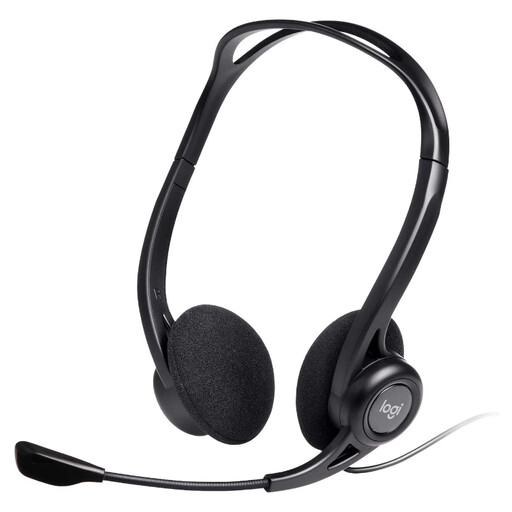
Logitech 960 wired USB headset with inline controls
A headset is worth considering if wearing a microphone suits your short recording session better than finding space for a desktop stand.
The product name identifies a wired USB headset with an inline remote and a noise-cancelling microphone; that description does not mean all nearby office sound will be removed. Check that your recording application can use the headset as its input, and listen to a test file before uploading it.
Joybuy
Common questions
Can I plug a USB microphone straight into a desk telephone?
Do not assume that a USB recording microphone will work as a direct desk-telephone input. Check the telephone system’s approved recording device and upload method; you may need to record the greeting on a compatible computer and submit an audio file instead.
What should I check before recording the final greeting?
Confirm the telephone system’s accepted audio-file format, any specified sample rate or bit depth, file-size limit and upload instructions. Make a short test take, export it using those requirements and listen to the exported file before submitting the greeting.
Will a pop filter or cardioid microphone solve shared-desk noise?
Neither feature replaces careful placement and a quieter recording moment. RØDE lists an integrated pop filter and cardioid pickup for the NT-USB Mini, while Shure describes pop-reduction processing for the MV7+; make a test take at your intended speaking position to judge what the finished file captures.


