Moving video diarists
If you narrate while walking or filming yourself, keeping the microphone on the speaker matters more than keeping it on the camera.


Choose a microphone according to what needs to stay prominent in the recording. A wearable wireless system keeps the microphone with a moving narrator; a close-positioned USB/XLR microphone suits seated narration, while a standalone recorder suits rehearsal sound and room ambience. A directional camera microphone is another option when the camera stays aimed at a nearby speaker, but none of these formats removes the need to check placement, connections and a short test recording.
If you narrate while walking or filming yourself, keeping the microphone on the speaker matters more than keeping it on the camera.
If you record spoken diary segments at a desk or in a rehearsal-room corner, you can position a voice microphone close to you and check how much room sound enters the take.
If performers, group sound or the atmosphere of the room belong in the diary, a recording focused only on the presenter may leave out what you want to document.
For a travel diary made in a rehearsal room, decide whether the recording should follow a moving voice, favour a seated narrator or capture the rehearsal itself. If you prefer a microphone mounted on the camera, consider how consistently it will point towards the speaker.
Choose it when: The narrator walks, turns or moves away from the camera.
Allow for: Charging, transmitter placement and wireless setup before each recording.
Choose it when: You can narrate from a fixed position and want the voice to take priority over the room.
Allow for: A stand or boom and less freedom to move while speaking.
Choose it when: The camera or phone remains aimed at a nearby narrator.
Allow for: A change in speaker direction or distance can make that placement less suitable.
Choose it when: Rehearsal sound, room ambience or a recording independent of the filming device is the priority.
Allow for: Built-in stereo microphones capture a scene rather than inherently isolating one voice.
| Concern | What to check | Who this matters to |
|---|---|---|
| Voice while moving | Check compatibility with your recording device and whether the system covers the number of speakers you need. | If I walk or turn away from the camera, I need the microphone to stay with my voice. For around 40% of consumers, keeping it close to a moving speaker would come first. |
| Seated narration | Check whether you can position the microphone close to the speaker and monitor the take through headphones. | When I narrate from a fixed position in an active rehearsal room, I want my voice to remain the focus. That would be the primary concern for roughly 30% of consumers. |
| Rehearsal sound | Check whether you need a stereo room recording, an external microphone input or a feed to the camera. | If the rehearsal belongs in my diary, I want to record the performers and room sound, not just my commentary. About 30% of consumers would put that wider capture first. |
A directional camera microphone depends on its aim and its distance from the speaker; it cannot keep the same close placement as someone walks away or turns around.
Before buying, picture a typical diary clip. If you often walk, film yourself or set the camera down, consider a microphone worn by the speaker.
It offers flexibility when recording levels change, but a distant microphone will still pick up the room differently from a close one.
Make a short recording in the intended position and listen for instruments, ventilation and other unwanted sound before recording a full entry.
A wearable system, a USB/XLR microphone and an SD-card recorder connect and store recordings in different ways. A suitable microphone can still require a cable, mount or recording medium for your setup.
List your device and its connection, mounting method, monitoring method and storage needs before checkout; confirm which accessories come with the particular product.
Other people's voices may be captured. The Information Commissioner's Office distinguishes purely personal or household activity from recording connected to professional or commercial activity; voices can be personal information in relevant circumstances.
Tell participants when you are recording and agree how clips will be used before sharing them. Seek current UK-specific advice if the project is not purely personal.
Its Wireless PRO and VideoMic NTG illustrate two different placements for diary recording: on the speaker and on the camera.
The MV7+ is a reference point for fixed-position diary narration using USB-C or XLR.
The H1essential is relevant when the diary should include rehearsal or room sound recorded independently of the camera or phone.
These choices cover wearable wireless recording for a moving narrator and a fixed-position USB/XLR setup for spoken diary entries. Check each product against your recording device and the way you plan to film.
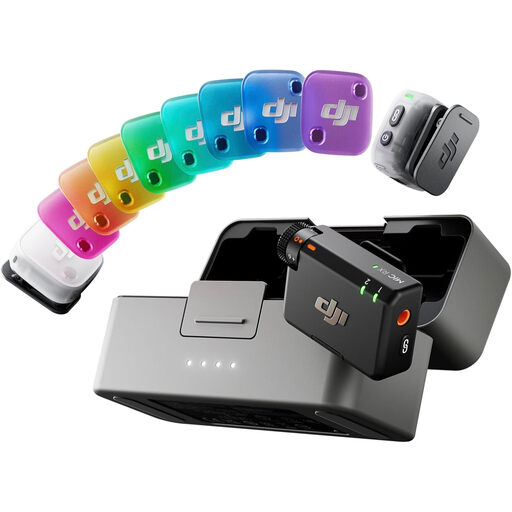 Image unavailable
Consider this wearable wireless setup when the diarist moves or two people may speak. The named bundle has two transmitters, one receiver and a charging case; confirm connection and recording behaviour with your exact phone, camera or computer before buying.
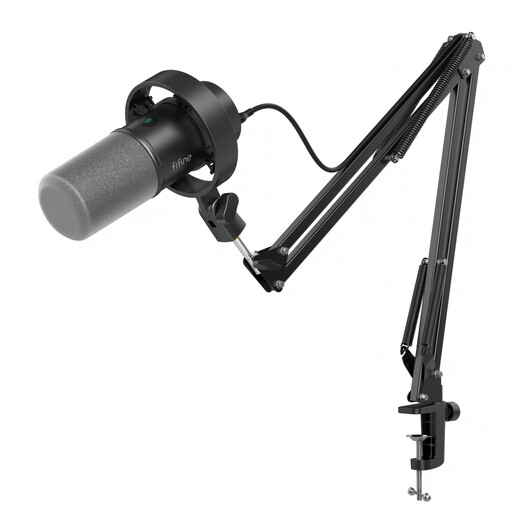 Image unavailable
Consider this fixed-position kit for seated diary narration where you can speak close to the microphone. The title specifies USB/XLR connections, a boom arm, mute button, headphone jack and gain knob. If you plan to use XLR, check the cable you will need and which controls work in that mode.
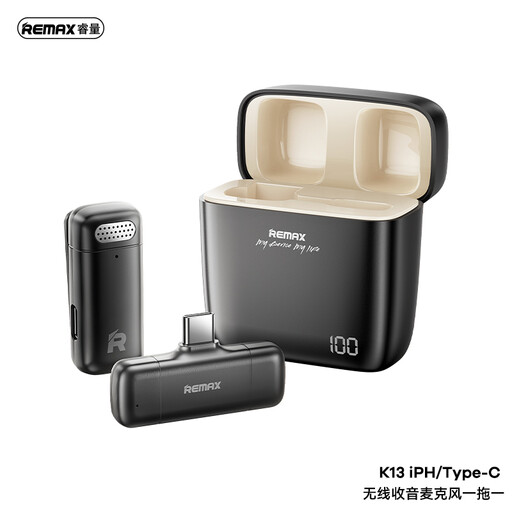 Image unavailable
Consider this one-to-one wireless format when the speaker moves relative to the camera. Its title specifies a USB-C connection; confirm compatibility with your recording device and check that its operating time suits your sessions.
Not if the speaker stays near a camera that remains aimed at them, or if you record narration from a fixed position. Wireless is worth considering when you walk, turn or change your distance from the camera and need the microphone to stay with you.
Yes, provided its recording options suit both tasks. Zoom specifies built-in X/Y microphones for room recording and a 3.5 mm mic/line input on the H1essential; an appropriately connected close microphone is worth considering when one speaker's voice must take priority.
It gives you more flexibility with changing recording levels, not a way to correct microphone distance or unwanted room sound. RØDE specifies onboard 32-bit-float recording for Wireless PRO, while Zoom specifies it for the H1essential; test placement and listen for wind or rehearsal noise regardless.
Make a short take using the device and microphone position you intend to use. Listen through headphones where your setup permits, then check the voice while instruments or other people are active and confirm that the recording is being stored as expected.
The purpose of the recording matters. The Information Commissioner's Office says processing for a purely personal or household activity with no professional or commercial connection falls outside the UK GDPR's scope; where that description does not fit and identifiable voices are captured, assess how the recording will be explained, used and handled. That distinction does not mean every rehearsal-room recording is automatically permitted or prohibited.