What matters when choosing?
Decide whether you can keep a desk microphone close throughout each take. If you cannot, a boom headset avoids relying on one fixed speaking position.
USB boom headset
Choose it when: Someone shares the desk during recording, you move as you speak, or desktop space is scarce.
Trade-off: You have to wear the headset, and its recording and monitoring controls depend on the particular model.
Compact USB desk microphone
Choose it when: You can maintain a close, fixed speaking position and want a desktop setup with headphone monitoring, as offered by the RØDE NT-USB Mini.
Trade-off: A desk microphone takes up space and can still pick up nearby speech or room reflections when poorly positioned.
Dynamic USB/XLR microphone
Choose it when: You can speak close to the microphone and want a USB connection now with the option of an XLR setup later.
Trade-off: The extra connection option and controls add setup decisions; they do not correct the acoustics of a shared room.
| Concern | What to check | Who this matters to |
|---|
| Nearby noise |
Check whether the microphone can stay close to your mouth and, for a desk model, face you without sitting beside the other speaker. |
If someone talks or types beside me, I need my speech to remain the focus of each take. Around 40% of consumers put control of nearby distractions first. |
| Pronunciation review |
Check for direct headphone monitoring and accessible level controls; confirm how you will replay the finished recording. |
When I repeat a phrase, I want to hear problems with the recording before carrying on. For around 30% of consumers, checking their own speech is the primary need. |
| Quick setup |
Match the USB connector and supplied cable to your device, and check the space needed for any stand or mount. |
I need to set up for a short exercise, then free the shared desk again. A compact, straightforward connection comes first for around 30% of consumers. |
Our top recommendations
These Joybuy choices cover dynamic USB/XLR microphones and wired USB headsets for recording speech at a shared desk. Choose between a mounted or desktop speaking position and a microphone worn close to your mouth.
 No image available
FIFINE K688CT USB/XLR Dynamic Microphone Kit with Boom Arm
Consider this kit if you can mount a boom arm to hold the microphone near your speaking position. The product title identifies USB/XLR connections, a mute button, headphone jack and gain knob.
Check that the arm can clamp to your desk and that the included connections suit the way you plan to record; close placement still matters when someone is nearby.
Joybuy
 No image available
FIFINE AM8 USB/XLR Dynamic Microphone with Desktop Stand
Consider this model if you have a fixed place for a desk microphone during each exercise. Its title identifies a desktop stand, USB/XLR connections, mute button and headphone jack.
Check the stand's footprint against your available space and confirm the cable needed for your chosen connection.
Joybuy
 No image available
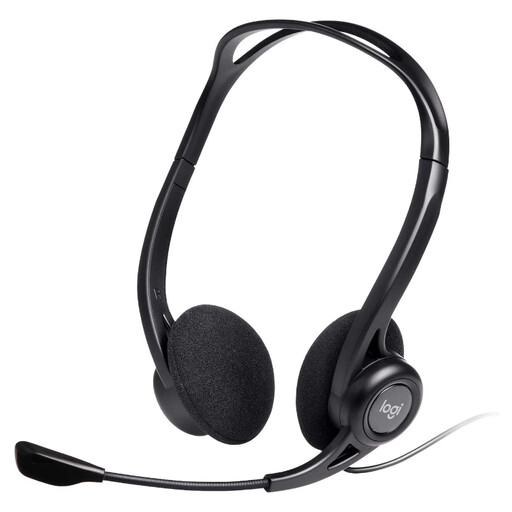
Logitech 960 Wired USB Headset, Black
A headset is worth considering if you cannot reserve space for a desk microphone and need to keep the mic near your mouth. The title identifies a wired USB connection and an inline remote.
Check the connector against your device and confirm whether you can hear the microphone signal live if monitoring matters for your practice.
Joybuy
 No image available
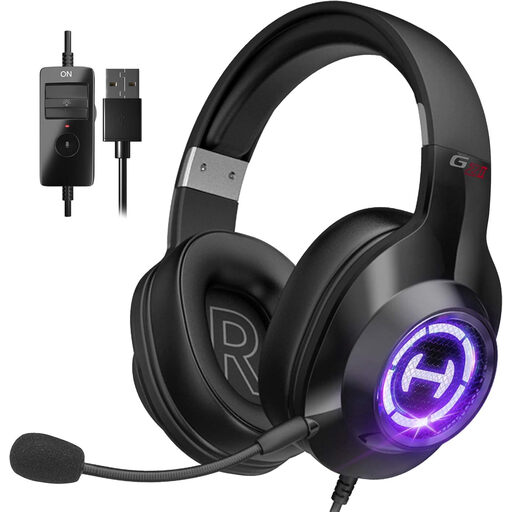
Edifier G2II Wired USB Headset, Black
This headset format may suit an exercise where a desktop microphone would get in the way. The title identifies wired USB use and a 50 mm driver; it names PC, PS4 and Mac as compatible devices.
If close microphone positioning or live monitoring is essential, check those functions for this model before choosing it. Do not rely on noise-cancelling wording as a promise that nearby speech will be absent from recordings.
Joybuy
Frequently asked questions
Should I use a headset if someone else sits beside me?
A boom headset is a practical choice when you cannot keep a desk microphone close and aimed at yourself throughout the exercise. A directional desk microphone remains an option if you can give it a stable position; neither format fully removes nearby speech or room reflections.
Is a cardioid microphone necessary for pronunciation exercises?
No. A cardioid pattern is useful for a single speaker positioned in front of a desk microphone, but a close boom headset is another route. Keep either microphone near your mouth and test it in the room where you will record.
What does headphone monitoring help me check?
Direct headphone monitoring lets you hear the microphone signal while setting up or speaking. On models that provide it, you can listen for intrusive room sound or an unsuitable level before finishing a take; you still need to replay the recording to review your pronunciation.
What should I check on a powered microphone listing in Great Britain?
Check that the seller, manufacturer and exact model are identifiable, and retain the product documentation. The Office for Product Safety & Standards' guidance on the Electrical Equipment (Safety) Regulations 2016 addresses businesses placing electrical equipment on the market in Great Britain; check the applicable position separately if you are buying for use in Northern Ireland.


