
24/7 Customer Support

Free returns

Same-day & Next-day Delivery

Quality Guaranteed

Unlock Your Welcome Offers: FREE Delivery | Up to 80% OFF | Free 30-day JoyPlus trial
Download the APP
Clear audio can make a home video, livestream or podcast easier to follow, but choosing the right microphone involves more than comparing price tags or counting advertised features. The most suitable option depends on your device, recording environment, movement and plans for future upgrades.
Many buyers of microphones for content creation encounter the same avoidable problems: a wireless microphone that does not match their phone, a USB microphone that captures too much room noise, or a supposedly long-range system that performs differently once walls and furniture are introduced. Use the checks below before buying.
A USB-C plug does not automatically mean a microphone works with every USB-C device. Phones, tablets, cameras and computers can differ in software support, port function and available power. Check whether the receiver is designed for your intended device and whether your phone case obstructs the connection.
Also distinguish between:
Noise-cancelling microphone modes can reduce some ambient sounds, but they cannot make every room acoustically quiet. Fans, traffic, keyboard noise and reflections from bare walls may still affect the recording. Strong processing can also alter the character of a voice.
A directional dynamic microphone placed close to the speaker can be useful in a home office or gaming setup. For outdoor filming, a lavalier system with a furry wind muff or adjustable noise-reduction mode may be more practical.
Wireless range figures are usually measured in open spaces with a clear line of sight. Walls, people, metal furniture and radio interference can reduce the working distance. For interviews or livestreams, prioritise stable connection, battery management and a convenient monitoring method rather than relying on the headline range alone.
Start with the device you use most often. Smartphone creators may need a compact receiver, while PC streamers may prefer a desktop microphone with USB connectivity. Musicians and home-studio users should consider an XLR microphone if they already own, or intend to buy, an audio interface.
A dual USB/XLR model offers a route from straightforward computer recording to mixer-based equipment. However, check the limitations: controls such as RGB lighting, gain adjustment and a microphone with mute button may operate only in USB mode.
A cardioid or unidirectional pattern focuses more on sound arriving from the front and can help reduce unwanted sound from behind the microphone. This is useful for gaming, voiceovers and desk-based streaming.
Omnidirectional microphones pick up sound from multiple directions. That can be suitable for a presenter wearing a lavalier microphone, but it also means more surrounding sound may enter the recording.
Dynamic microphones are often practical for spoken-word recording in ordinary rooms because they are designed for close-range use. Condenser microphones can capture more detail but may make room reflections and background noise more noticeable. Neither type is automatically suitable for every creator.
A microphone with headphone jack allows you to hear the incoming signal directly, helping identify low volume, interference or accidental muting before publishing. A physical mute control is also useful during gaming and livestreaming.
For wireless systems, check transmitter runtime, charging-case capacity and whether charging is possible during recording. If a microphone supports local TF-card recording, remember that the card may need to be purchased separately. Treat local recording as a backup feature, not a replacement for checking your main audio feed.
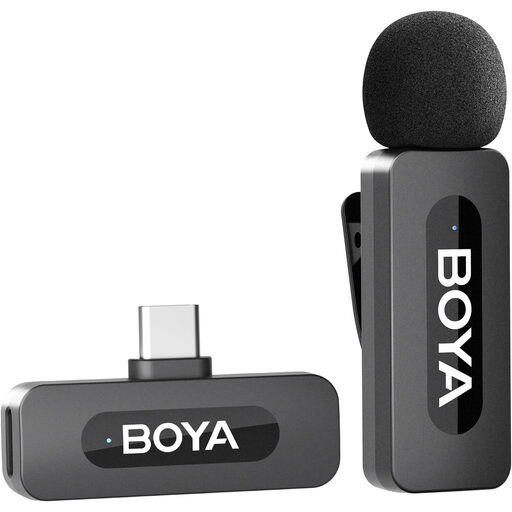
Why This Fits Their Persona: A one-transmitter, one-receiver arrangement keeps the setup straightforward for new smartphone vloggers, YouTubers and short-form video creators using compatible USB-C devices.
Its one-click noise-cancellation control is clearly defined as a feature, rather than a promise that it removes every background sound. Check your phone’s USB-C compatibility before ordering.
USB-C wireless connection; one-transmitter configuration; stated battery life of up to 9 hours.

Why This Fits Their Persona: Suitable for podcasters, voiceover creators and home-studio users who want a desktop setup now with the option to connect to an audio interface later.
The USB and XLR ports are separate connection routes, and the XLR cable is not included. Knowing this helps you budget for an interface and cable if required.
Dynamic cardioid microphone; boom arm, shock mount and C-clamp included; headphone monitoring and mute controls available over USB.
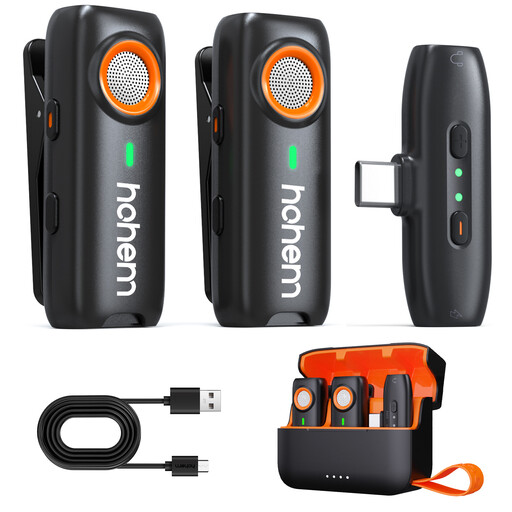
Why This Fits Their Persona: Designed for interviews, online teaching, outdoor vlogging and longer recording sessions where hands-free movement and backup audio are valuable.
The listed 100-metre range applies to open spaces with line of sight, so indoor users should expect less. The TF card is not included and the system is not waterproof.
Three-level DSP noise-reduction modes; up to 20 hours with charging case; TF-card local backup and one-button mute.
We have compiled a complete, real-time list of products that fully satisfy these strict selection criteria and UK safety regulations.
A USB microphone can be suitable for desk-based YouTube videos, gaming and livestreaming when your computer or console supports the connection. Models with a headphone jack, gain control and mute button can simplify monitoring. A wireless lavalier microphone is generally more convenient when you need to move around or record with a phone.
Battery life varies by model and usage. Look at both transmitter runtime and the total capacity supplied by the charging case. Features such as noise reduction, remote control and local recording may affect operating time. Rechargeable batteries also gradually lose capacity, so careful charging and storage can help maintain practical performance.
No. A USB podcast microphone is simpler for direct computer recording. An XLR microphone becomes more useful when you want an audio interface, mixer, multiple microphones or more control over the signal chain. Remember that XLR accessories may not be included, so check the product listing before purchase.