
24/7 Customer Support

Free returns

Same-day & Next-day Delivery

Quality Guaranteed

Unlock Your Welcome Offers: FREE Delivery | Up to 80% OFF | Free 30-day JoyPlus trial
Download the APP
By Joybuy Product Recommendation Officer
Clear audio can make a noticeable difference to podcasts, livestreams, interviews, gaming videos and online lessons. However, choosing between a wireless microphone, USB microphone and XLR microphone is not simply a matter of selecting the model with the longest range or most impressive specification.
The right choice depends on your device, recording environment and preferred workflow. This guide explains the common buying traps, the specifications worth checking and several microphone options for different UK content-creation needs.
“Noise cancellation” can refer to different technologies. A wireless lavalier microphone may use digital signal processing to reduce certain background sounds, while a dynamic microphone can reject some off-axis sound through its pickup pattern. Neither approach guarantees silent recordings in a busy room.
Check whether the microphone offers selectable noise-reduction modes, a windscreen or a directional pickup pattern. You should also consider where the microphone sits. A lavalier clipped close to your mouth and a desktop microphone positioned 5–15 cm away will generally require different gain settings.
A USB-C connector describes the physical shape, not necessarily full device compatibility. Before buying a USB-C wireless microphone, check whether the receiver is designed for your phone, tablet, computer or camera.
An iPhone with a USB-C port may accept a USB-C receiver, while an older iPhone with a Lightning port requires a Lightning wireless microphone. You should also check whether your phone can record while the receiver is connected and whether an adapter is needed.
A low purchase price can become less attractive if essential accessories are excluded. An XLR microphone usually needs an XLR cable and an audio interface or mixer. A microphone with boom arm may include the arm and clamp, but the desk thickness range still matters.
Likewise, a wireless kit may include a charging case but not a TF or microSD card for local backup recording. Read the package contents and connection notes before ordering.
A wireless lavalier microphone is practical for presenters, vloggers and interviewers who move around. Look at:
A wired USB microphone avoids wireless battery management and is suited to desks, home studios and online teaching. An XLR microphone can be connected to a mixer or audio interface, offering a more expandable setup but adding equipment and cabling costs.
A dynamic microphone with a cardioid or unidirectional pattern is often suitable for gaming, podcasting and voice recording in a typical home office. It is designed to focus on sound from the front and reduce some sound arriving from the sides or rear. Position it correctly and speak towards the specified end of the microphone.
A wireless lavalier system is commonly designed for clipped, close-range speech and may use an omnidirectional pickup pattern. This can sound natural when positioned correctly, but it may capture more surrounding sound than a directional desktop microphone.
For livestreaming and gaming, a mute button, gain control and headphone monitoring can be more useful than decorative features. RGB lighting is visual only and, on the FIFINE models listed below, is available through USB rather than XLR.
Check these practical details:
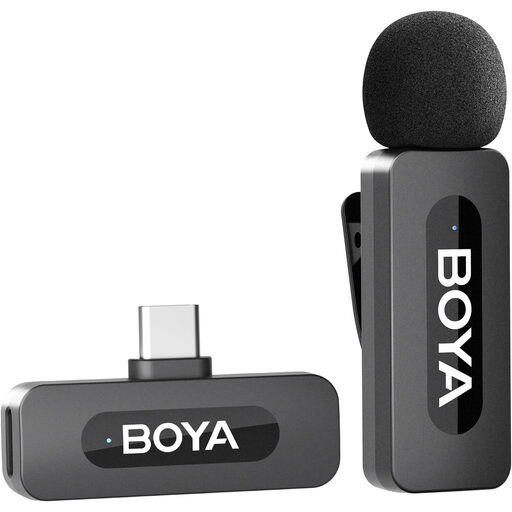
Why This Fits Their Persona: A one-transmitter, one-receiver setup is a straightforward starting point for Android phones and USB-C iPhones used for short videos, lessons and interviews.
The USB-C connection is clearly specified, and the listed battery life is up to 9 hours rather than an unspecified “all-day” claim.
One-click noise-cancellation control and a compact 1 TX + 1 RX configuration.

Why This Fits Their Persona: Suitable for a home-studio user who wants a USB setup now but may later connect an audio interface or mixer through XLR.
The listing states that the XLR cable is not included, making the additional setup cost easier to plan.
Includes a boom arm, shock mount, USB-C cable, mute control, gain control and headphone jack.
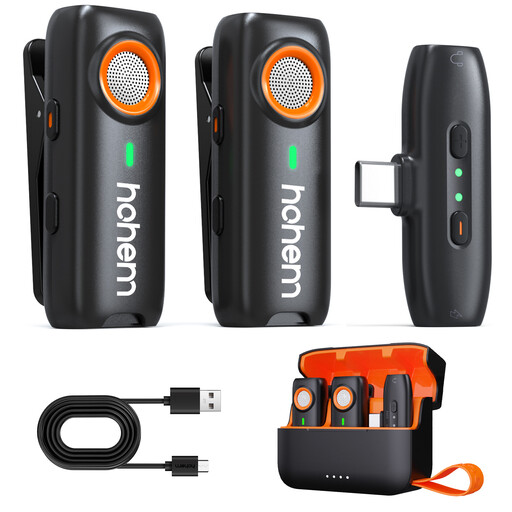
Why This Fits Their Persona: A practical match for journalists, vloggers and outdoor presenters who need hands-free speech capture with a USB-C device.
Its range is stated for open, unobstructed spaces, so buyers can plan around walls and interference rather than treating 100 m as a guaranteed indoor distance.
Three DSP noise-reduction levels, up to 20 hours with the charging case and TF-card backup recording; TF card is not included.

Why This Fits Their Persona: Designed for desk-based gaming, livestreaming and podcasting where mute access, headphone monitoring and setup lighting are useful.
The listing distinguishes USB-only functions, including RGB and microphone controls, from XLR operation.
50 Hz–16 kHz frequency range, unidirectional dynamic pickup, RGB lighting, gain control and a headphone jack through USB.
We have compiled a complete, real-time list of products that fully satisfy these strict selection criteria and UK safety regulations.
Follow the supplied safety information: keep microphones and small components away from young children, protect them from moisture and avoid forcing USB-C or Lightning connectors.
Yes, particularly for interviews, mobile podcasts and two-person recordings. A kit with two transmitters can capture two speakers, while a wired USB or XLR microphone may be more convenient for a fixed desk setup. Check battery life, range and whether the receiver matches your recording device.
The working life depends on handling, cable strain, battery condition and exposure to moisture. Wired microphones avoid rechargeable-battery ageing but still require careful storage. Wireless systems should be charged and stored according to the manufacturer’s instructions, with connectors protected from bending and impact.
Not necessarily. Room reflections, keyboard sounds, fans and microphone distance can affect recordings regardless of price. A suitable pickup pattern, close positioning, a stable stand and sensible gain settings often matter more than decorative features or a high maximum range.