Untreated-room narrator
You record one voice in a reflective room or where background sounds may interrupt. Close placement, a consistent speaking position and a stable mount are important parts of your microphone choice.


For a single narrator in an untreated room, a directional dynamic microphone used close to the voice is a sensible starting point when room and background sound are the chief concerns. Choose USB/XLR if you want to record directly to a computer while keeping an interface option, or XLR-only if you already have suitable recording hardware. A condenser is worth considering when you can control the recording position and want its stated capture characteristics; no microphone removes the need to check placement in the actual room.
You record one voice in a reflective room or where background sounds may interrupt. Close placement, a consistent speaking position and a stable mount are important parts of your microphone choice.
You want to record directly to a computer and monitor the commentary through headphones, but may want to connect the microphone to XLR equipment later. Check compatibility with the device you will actually use.
You already use an XLR interface, mixer or recorder. Before choosing a microphone, check its gain and power requirements alongside your monitoring arrangement.
For a single narrator, start with the sound you can control in the recording position, then choose a connection that fits your equipment.
| Concern | What to check | Who this matters to |
|---|---|---|
| Room and background sound | Check the pickup pattern and whether you can speak close to the microphone while maintaining a consistent position. | If visitor sounds and room reflections distract from my narration, I need to keep my voice prominent without relying on processing. Around 46% of consumers put room and background control first. |
| Connection and workflow | Check whether the exact model offers USB, XLR or both, plus device compatibility and a way to monitor the recording. | I want to record directly to a computer now but keep the option of an XLR setup later. Connection and workflow are the primary concern for around 36% of consumers. |
| Vocal detail | Check whether you can record in a quiet position and meet the selected microphone's mounting and connection requirements. | When I can control my position, I want detailed vocal capture without mistaking low microphone self-noise for a quieter room. Vocal detail comes first for around 18% of consumers. |
RØDE lists 4 dBA self-noise for the NT1 5th Generation. That describes noise from the microphone, not reflections or other sounds in the recording space.
Try the intended speaking position in the commentary location before committing to a condenser setup.
A position that captures too much room sound may mean retakes or additional acoustic work.
An XLR-only microphone needs compatible recording hardware. Gain and power requirements differ by model: Shure specifies at least 60 dB of preamp gain for SM7B voice-over work, while the SM7dB needs 48 V phantom power when its built-in preamp is used.
Check the exact microphone, cable, stand, interface or recorder, available gain, power requirements and monitoring method together.
Shure describes voice-isolation and denoising features on the MV7+, while RØDE lists onboard processing for the PodMic USB. These brand-stated features do not establish how either microphone will perform in your room.
Set a consistent close speaking position and listen for background sound in the intended location before adjusting processing.
The MV7+, MV7X and SM7dB illustrate USB/XLR and XLR-only dynamic routes for spoken-word recording.
The dynamic PodMic USB offers USB and XLR connections; the NT1 5th Generation offers a dual-connect condenser option.
The AT2040 is a hypercardioid dynamic option for a narrator using an XLR interface or recorder.
These USB/XLR dynamic microphones suit a single narrator considering direct computer recording, with an XLR connection available for a compatible interface or recorder. Compare their included mounting arrangements with the position available in your recording space.
 No image available
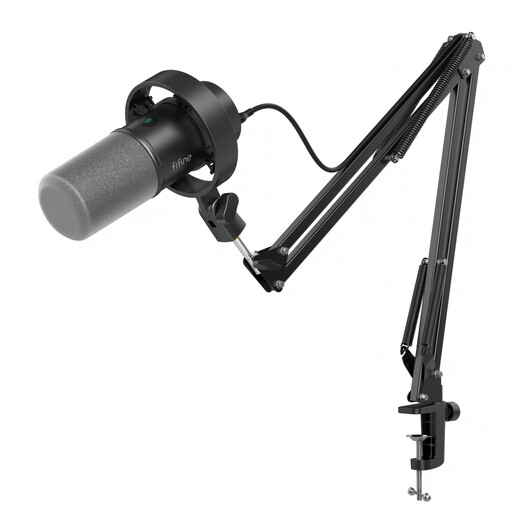
Consider this kit if you need to position a microphone close to one narrator using its boom arm.
The title lists USB/XLR connections, a headphone jack, mute button and gain knob. The XLR cable is not included, and the onboard controls are stated to be inactive in XLR mode.
Check that your mounting surface suits the included clamp, which is specified for desks under 2 inches thick. Test placement where the commentary will be recorded.
 No image available
Consider this model if a desktop stand gives you a workable close speaking position for a single narrator.
The title lists USB/XLR connections, a headphone jack and mute button. An XLR cable and boom arm are not included; the listed RGB and function-key features are unavailable in XLR mode.
Check where the stand can sit and listen to a trial recording in the intended room before settling on a position.
Start by considering a close-address directional dynamic microphone if room and background sound are your main concerns. Shure and Audio-Technica describe relevant dynamic models for directional spoken-word capture, but those brand descriptions do not guarantee a result in your room. A condenser such as the RØDE NT1 5th Generation is a conditional option when you can control the recording position; its stated low self-noise does not remove room reflections.
Yes, if the exact microphone has USB output and is compatible with your laptop. The Shure MV7+ and RØDE PodMic USB offer USB and XLR connections, whereas the Audio-Technica AT2040 is XLR-only and needs compatible external recording hardware. Check the cable supplied with the variant you choose.
Check the requirements of the exact microphone and connection you intend to use. Shure says the SM7dB needs 48 V phantom power to operate its built-in preamp; for SM7B voice-over work, Shure specifies a preamp with at least 60 dB of gain. That SM7B figure should not be applied to every dynamic microphone.
Check the exact variant, the seller's return instructions and the documentation applicable to your delivery location. GOV.UK says online customers generally have 14 days from receiving an item to cancel; remedies for faulty or misdescribed goods are distinct from a change-of-mind return. Electrical-product requirements can differ between Great Britain and Northern Ireland, so check the documentation relevant to where the microphone will be supplied.