For news-bulletin narration in a noisy flat, start with a directional microphone you can position close to your mouth; neither its pickup pattern nor software processing will remove every household sound or room reflection. A dynamic cardioid model with USB suits direct computer recording, while a USB/XLR model also leaves a route to a later interface or mixer. Choose XLR-only if you already have, or intend to assemble, the required recording equipment.
Who is this for?
Noisy-flat bulletin narrator
You read spoken news copy at home and want to keep your voice prominent while limiting sound arriving from the sides and rear. You can position the microphone deliberately, but you cannot rely on it to remove reflections or every outside noise.
Computer-first solo recorder
You want to record straight into a compatible computer and listen to the captured signal as you read, without starting with a separate audio interface.
Upgradeable desk-studio user
You want a direct USB connection now but may later connect the same microphone to an audio interface or mixer through XLR.
What matters when choosing?
Decide how you will connect the microphone before comparing handling accessories: USB enables direct recording on a compatible computer, whereas an XLR-only microphone needs an interface. For a noisy flat, plan where you will place the microphone as carefully as you choose its connection.
| Concern |
What to check |
Who this matters to |
| Focused voice capture |
Check the exact model’s directional pattern and whether you can speak into its intended front or end at a stable, close distance. |
If noise reaches my recording from elsewhere in the flat, I want my voice to remain prominent without assuming the room will become silent. Around 31% of consumers put focused voice capture first. |
| Computer connection and monitoring |
Confirm USB compatibility with your recording device and whether the microphone provides a headphone output for monitoring. |
I need to record a bulletin directly into my computer and hear what the microphone captures while I read. Direct connection and monitoring come first for roughly 31% of consumers. |
| Future XLR connection |
Look for both USB and XLR outputs on the exact model; check which controls work through each connection. |
If I add an interface or mixer later, I would rather keep using the same microphone. Around 23% of consumers make that upgrade path their primary concern. |
| Placement and handling |
Check the mounting arrangement and any pop filter or shock isolation needed for close speech recording. |
Desk knocks, plosive sounds and drifting away from the microphone could interrupt a read, so I need a position I can maintain. That handling need comes first for about 15% of consumers. |
Mistakes to avoid
-
Expecting a cardioid microphone to silence the flat
A cardioid pattern is more sensitive at the front than at the sides and rear, as Sonarworks explains; it does not remove every off-axis sound or room reflection. FIFINE also cautions that the AM8’s cardioid pickup can only do so much in a noisy environment.
Speak into the microphone’s intended pickup side, place it close enough for the model and reduce avoidable noise at its source. Treat model-specific processing as an aid rather than a substitute for placement.
-
Buying XLR-only when you have only a computer
An XLR-only microphone is not a direct USB recording device. Elgato lists an audio interface, three-pin XLR cable and stand or boom arm among the requirements for its Wave DX.
Choose a USB-capable model for a direct computer connection, or confirm the complete XLR recording chain before choosing an XLR-only microphone.
An interface, cable and suitable mount add equipment to the desk setup if you do not already have them.
-
Overlooking speaking distance and desk vibration
Position affects the captured voice level. RØDE recommends speaking approximately 5–10 cm from its PodMic USB; that distance is guidance for that model, not a universal setting.
Check the exact microphone’s placement guidance and bundle contents, then arrange the mount so you can read comfortably without repeatedly moving off-axis.
A compatible boom arm, pop filter or vibration-isolating mount may be needed if your chosen setup does not include one.
Relevant brands to consider
Shure
The MV7+ is a hybrid USB/XLR speech microphone to consider when direct computer recording and a later analogue connection both matter.
- Shure lists USB-C and XLR outputs, headphone monitoring and software-assisted controls for the MV7+.
- Check device and software compatibility for the controls you intend to use; manufacturer-described noise processing is not a promise of a quiet room.
RØDE
The PodMic USB offers a direct-computer route alongside XLR for a later interface or mixer.
- RØDE lists a headphone output, internal pop filter and internal shockmount for this model.
- RØDE recommends positioning the PodMic USB approximately 5–10 cm from the speaker, so consider whether you can maintain that distance while reading.
Audio-Technica
The ATR2100x-USB is a dynamic cardioid option for a USB-first desk setup that retains an XLR connection.
- Audio-Technica lists direct headphone monitoring, USB and XLR cables, and a tripod desk stand for the ATR2100x-USB.
- Consider whether a desk-mounted tripod will keep the microphone steady and away from surface vibration in your setup.
FIFINE
The AM8 is a USB/XLR dynamic cardioid model for buyers comparing direct computer recording with an XLR option.
- FIFINE describes USB connection and monitoring features for the AM8.
- FIFINE cautions that cardioid pickup has limits in noisy spaces; check the exact bundle and connection-specific controls before buying.
Elgato
The Wave DX represents an XLR-only desk-recording route for someone assembling or already using an interface-based setup.
- Elgato specifies a dynamic cardioid microphone with an XLR connection for the Wave DX.
- It requires an audio interface, XLR cable and suitable stand or boom arm rather than connecting directly to a computer by USB.
Joybuy microphone choices
These USB/XLR dynamic microphones suit direct computer recording of spoken bulletins while leaving an XLR connection available for a later interface or mixer. Choose between their desk arrangements according to how you can position the microphone while reading.
 No image available
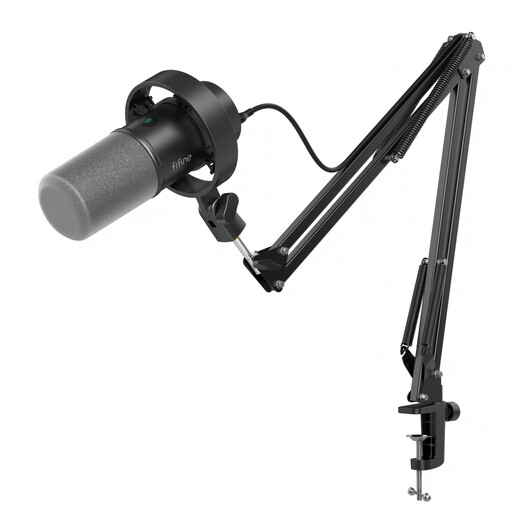
FIFINE K688CT USB/XLR dynamic microphone kit with boom arm
For reading bulletins directly into a computer while retaining an XLR option for a later recording setup.
The kit title specifies a boom arm, mute button, headphone jack and gain knob. Check that its clamp fits your desk and that you have the cable and interface needed before using XLR.
View on Joybuy
 No image available
FIFINE AM8 USB/XLR dynamic microphone with desktop stand
For a computer-first bulletin setup where a desktop stand is practical and an XLR connection may be useful later.
The title specifies a mute button and headphone jack alongside the stand. Consider whether the stand lets you keep a consistent speaking position without picking up desk movement, and check what an XLR setup would require.
View on Joybuy
Common questions
Will a cardioid microphone remove noise from my flat?
No. A cardioid microphone favours sound arriving from the front over sound from the sides and rear, but it cannot remove every neighbour, appliance or room reflection. Aim it correctly and reduce avoidable noise while recording.
How close should I speak when recording a bulletin?
Follow the guidance for your exact microphone and keep your position consistent. RØDE recommends approximately 5–10 cm for the PodMic USB; do not assume that distance applies to every dynamic microphone.
Do I need an audio interface for computer recording?
Not for a microphone with a USB output supported by your computer. An XLR-only model needs an interface: Elgato also specifies an XLR cable and a stand or boom arm for its Wave DX.
What should I check when buying a microphone for Great Britain?
Check the applicable conformity marking and documentation for the exact product listing. Department for Business and Trade guidance covers products placed on the market in England, Scotland and Wales; processes differ for Northern Ireland. A marking does not indicate how well a microphone will handle room noise.
What should I do with an old USB microphone?
Use an appropriate electrical-waste collection or retailer take-back route rather than putting it in ordinary household rubbish. UK waste electrical and electronic equipment guidance addresses recovery, reuse and recycling; check the collection arrangements available where you live.


