What matters when choosing?
For a small-booth oral-history interview, work out where the microphone can sit and what the room sounds like, then choose the connection and monitoring arrangement that fits your recording device.
| Concern |
What to check |
Who this matters to |
| Room and table noise |
Check the pickup pattern, feasible speaking distance and a stable mounting arrangement that limits table vibration. |
If the booth has hard surfaces or a table participants may touch, I need to hear and manage those sounds before recording. Roughly 42% of consumers put acoustic control first. |
| Simple, monitored recording |
Confirm USB compatibility with your device and whether the microphone provides direct headphone monitoring. |
When recording straight to a computer, I want to hear a level or noise problem while I can still address it. For around 33% of consumers, an easy-to-monitor setup is the primary concern. |
| A repeatable setup |
Check whether the exact model offers both USB and XLR, and which mounting and plosive-control accessories come with it. |
If I expect further interviews, I want to keep a consistent microphone position and have the option of using an interface later. About 25% of consumers prioritise that flexibility. |
Joybuy microphones for close-address recording
These two FIFINE dynamic microphones suit a close-address, USB-or-XLR recording setup. Choose between the boom-arm kit and the desktop-stand model according to where the microphone can sit; neither removes the need to check booth noise and recording-device compatibility.
 No image available
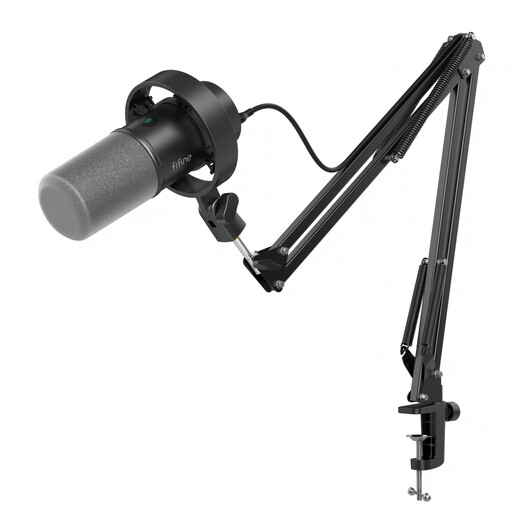
FIFINE K688CT USB/XLR Dynamic Microphone Kit with Boom Arm
Consider this kit if a boom arm would help you position a microphone for close-spoken interviews without placing its stand in the middle of the table.
The product name specifies USB/XLR connections, a mute button, headphone jack and gain knob. Check that the desk can take the clamp: the stated limit is under 2 inches thick.
The microphone’s controls operate only in USB mode, and an XLR cable is not included. Confirm the connection and port you intend to use.
View on Joybuy
 No image available
FIFINE AM8 USB/XLR Dynamic Microphone with RGB Light and Desktop Stand
Consider the AM8 if a desktop stand fits your interview layout and you can keep the supporting table still.
The product name specifies USB/XLR connections, a mute button and headphone jack. If table knocks are likely, check whether the mounting arrangement provides the isolation you need.
Its controls operate only in USB mode. An XLR cable and boom arm are not included, so check the accessories and device connection required for your setup.
View on Joybuy
Frequently asked questions
How close should a table microphone be to the interviewee?
The International Association of Sound and Audiovisual Archives advises placing a table-standing microphone no farther than 18 inches (45 cm) from the interviewee’s mouth. Arrange it so both speakers can be heard, then listen to a test recording and adjust their positions if one voice is too quiet.
Will a small booth automatically give me a clean recording?
No: the University of Leicester’s oral-history guidance warns that hard surfaces can create echo. Reduce audible distractions, avoid touching the microphone or its table, and test the booth with the microphone in its intended position before the interview.
Can one microphone record both the interviewer and the interviewee?
One table microphone can work if both voices are positioned and monitored carefully. If you cannot hear the interviewer clearly without compromising the interviewee’s recording, consider two microphones and check that your recording equipment can accept them.
Do I need an audio interface for a USB/XLR microphone?
You do not need an audio interface to use the USB recording route on a model that supports direct connection to your device. An interface or mixer becomes relevant if you choose its XLR route or need additional microphone inputs; check the exact model’s connections and required cables.
What conformity information should I check when buying?
For Great Britain, GOV.UK guidance updated on 21 August 2026 says CE marking continues to be recognised alongside UKCA for many products, but the requirements depend on the product. Ask the seller which information applies to the exact microphone and any included mains-powered accessory. Northern Ireland follows different processes, so check the applicable requirements if the product will be supplied there.


