Mini-PC peripheral users
You need Bluetooth for a nearby mouse, keyboard, controller, printer or audio device without adding much clutter to a compact desk.


Check whether the mini PC already has working Bluetooth before adding an adapter. For nearby keyboards, mice and other peripherals, choose a general-purpose adapter that supports the installed operating system; if the PC’s position makes connections unreliable, an adjustable antenna offers more control over placement. Beside a bright window, check physical fit and exposure to heat rather than choosing by Bluetooth version alone.
You need Bluetooth for a nearby mouse, keyboard, controller, printer or audio device without adding much clutter to a compact desk.
Your mini PC sits in an awkward position, or connections drop out. Being able to move the adapter or adjust its antenna matters more than keeping it as small as possible.
Your main aim is to connect headphones or speakers. Check the transmitter’s pairing features and compatibility with both the host and audio device before treating it as an alternative to a general Bluetooth adapter.
Decide whether you need general Bluetooth for the mini PC or only audio output, then check operating-system support and how the adapter will fit beside the window.
Choose it when: Nearby peripherals need Bluetooth through the mini PC’s operating system and a small USB adapter fits the available port.
Trade-off: A nano design leaves little room to change the radio’s position if the port is obstructed or close to other USB equipment.
Choose it when: The PC’s position makes antenna orientation important or you need more flexibility around a crowded desk.
Trade-off: It takes up more space than a nano dongle, and adjusting the antenna does not guarantee a particular range.
Choose it when: Your specific goal is sending audio to compatible Bluetooth headphones or speakers.
Trade-off: Its stated audio role does not establish support for mice, keyboards or other general Bluetooth peripherals.
| Concern | What to check | Who this matters to |
|---|---|---|
| Compatibility and device role | Confirm the installed operating system is listed for the exact adapter, and distinguish a general Bluetooth adapter from an audio-only transmitter. | If I need one mini PC to connect a keyboard as well as headphones, both the software support and the adapter’s role have to match. Around 38% of consumers would put compatibility and device role first. |
| Connection placement | Check whether the USB port is obstructed or close to USB 3.0 equipment; consider whether you can reposition the radio or adjust its antenna. | When connections drop out at my desk, I need room to change where the adapter sits. Roughly 37% of consumers would make connection reliability and placement their primary concern. |
| Desk fit and window exposure | Check clearance around the port and the model’s operating-temperature specification if direct sun heats the setup. | I want the adapter to fit beside the window without protruding awkwardly or sitting in sustained heat. About 25% of consumers would prioritise compact fit and the window-side environment. |
Avantree describes products such as the DG80P as USB audio adapters for headphones. An audio-output role does not establish that the device will add operating-system-level Bluetooth for a mouse, keyboard or printer.
For mixed peripherals, look for a general adapter with stated support for your mini PC’s operating system. For audio-only use, check the transmitter’s stated host and headphone or speaker compatibility.
ASUS qualifies its USB-BT500 distance figures as open-space measurements and distinguishes classic Bluetooth from Bluetooth Low Energy. A furnished room and the mini PC’s position are different conditions.
If placement appears to be the problem, try another suitable USB position or a short extension before deciding that a different Bluetooth version is needed.
Intel documents that certain USB 3.0 devices and cables can interfere with wireless devices using the 2.4 GHz band.
If Bluetooth connections drop out, separate the adapter from nearby USB 3.0 devices or cables where practical, or reposition it using a short USB extension.
The operating systems listed for specific adapters differ: TP-Link lists Windows 11 for the UB500 and UB500 Plus, while ASUS’s cited UK USB-BT500 specification lists Windows 8.1, Windows 10 and Linux.
Match the exact model and hardware revision against the mini PC’s installed operating system before buying.
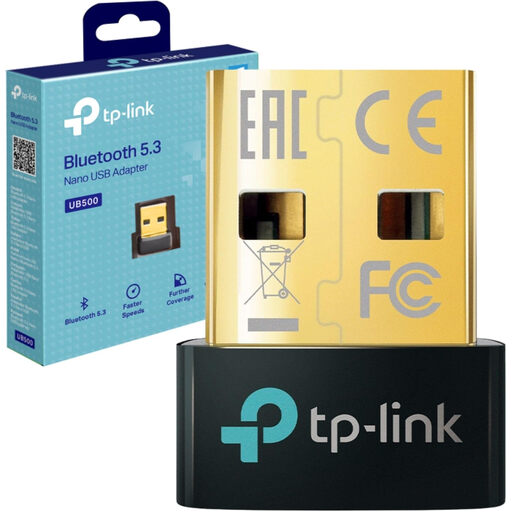
Its UB500 and UB500 Plus illustrate the choice between a nano general-purpose adapter and a larger model with an adjustable antenna.
The USB-BT500 is a compact USB-A Bluetooth 5.0 option for an operating system covered by its stated specifications.
Its USB Bluetooth audio range is relevant when the main task is sending sound to compatible headphones or speakers.
This compact general-purpose adapter is a choice for adding Bluetooth to a mini PC used with nearby peripherals. Confirm the PC’s operating system and available USB port before choosing it.
 No image available
Suited to a compact mini PC setup where Bluetooth is needed for nearby peripherals, headphones or speakers.
You need one to add Bluetooth only if the mini PC lacks working Bluetooth. Microsoft says a USB adapter can add Bluetooth to a Windows device that does not have it; if Bluetooth is already present but unreliable, check its driver and connection before adding another adapter.
Check whether the adapter fits the available port and whether direct sun heats the mini PC or USB area beyond the product’s stated operating conditions. TP-Link specifies 0°C to 40°C for the UB500 and UB500 Plus; window brightness alone is not a reason to choose a higher Bluetooth version.
Plug in an adapter compatible with your Windows version, turn on Bluetooth in Windows settings, make the accessory discoverable and select it from the device list. If detection or pairing fails, Microsoft advises checking for Bluetooth driver updates through Device Manager or Windows Update, then restarting.