Detail-first craft sellers
If listings need to show engravings, threads, teeth or surface texture, lens magnification and control over a close-up’s narrow depth of field deserve particular attention.


Choose the camera system around the smallest tool detail you need to photograph, rather than the body alone. A lens specified for 1:1 magnification matters when tiny markings must fill the frame; if keeping several parts of a static close-up sharp is the recurring difficulty, also consider a body with documented focus bracketing and stacking. For whole-tool photographs and occasional video, check framing, screen position and the close-focus capability of the exact lens you plan to use.
If listings need to show engravings, threads, teeth or surface texture, lens magnification and control over a close-up’s narrow depth of field deserve particular attention.
If most photographs show complete tools or sets against a controlled backdrop, repeatable framing matters more often than life-size magnification.
If you also film demonstrations, check how the camera focuses on an item brought towards it and whether its screen works at your planned camera angle. Video features do not replace a suitable close-up lens for stills.
For home-studio craft-tool photography, start with the photograph or demonstration you make most often, then check the body and exact lens as a pair.
| Concern | What to check | Who this matters to |
|---|---|---|
| Fine detail and depth of field | Check the lens’s maximum magnification and the exact body’s focus-bracketing and stacking functions. | If tiny markings or teeth need to fill the photograph, I need a way to capture detail across the parts that matter. Around 37% of consumers would put this close-up requirement first. |
| Repeatable whole-tool framing | Check the supplied lens’s framing range and whether the screen suits your tripod or overhead position. | When photographing complete tools and sets for listings, I want to change framing without rebuilding the setup for each item. Roughly 27% of consumers would make this workflow their primary concern. |
| Stills and demonstrations | Check video focus behaviour when an item moves towards the camera and the screen position at your filming angle. | If I film a process as well as photograph the finished tool, I need the same setup to accommodate both. Around 18% of consumers would prioritise this combined use. |
| Manual focus and lighting space | Check for a manual-focus aid and the lens’s working distance from its front to the subject. | For close-ups of reflective tools, I want to judge focus while leaving room to position the lights. About 18% of consumers would put that handling requirement first. |
The body alone does not determine how much of a tiny feature fills the frame. Canon UK specifies up to 1:2 magnification for the RF 35mm F1.8 Macro, while Nikon UK specifies 1:1 for the NIKKOR Z MC 50mm f/2.8 and Sony UK specifies 1:1 for the E 30mm F3.5 Macro.
Decide how small a detail you need to show, then check the exact lens’s magnification, working distance and mount compatibility.
Changing to a different close-up lens later may also mean adjusting the camera position and lighting.
Canon UK notes that depth of field is typically very narrow in close-up photography. Focus can be accurate on one part of a tool while another part lies outside the focused plane.
For a static subject, use stable support and check which parts are sharp; consider focus bracketing and stacking when several depth planes need coverage.
Sony UK specifies a 2.4 cm working distance from the front of the E 30mm F3.5 Macro at its close-working setting. That leaves little room between lens and tool for lighting a reflective surface.
Check the lens-to-subject distance against your planned light positions before choosing a close-up lens.
A cramped setup may call for different light placement or a lens with a longer working distance.
An EOS R route for static close-up stills where covering several focus planes is important.
A Z-mount route for buyers combining detailed stills with occasional product demonstrations.
An E-mount route for photographers who want manual-focus feedback alongside a 1:1 macro lens option.
These kits pair mirrorless cameras with zoom lenses for framing whole tools and filming demonstrations. If small features must fill the frame, check the exact supplied lens’s close-focus specifications and plan the close-up lens separately where needed.
 No image available
The supplied zoom gives you framing options for whole-tool photographs. Check that lens’s magnification and minimum focus distance if small markings must fill the frame; also confirm the body’s close-up focus workflow if you need several depth planes sharp.
 No image available
The supplied zoom is suited to changing the framing of whole tools, and the rotating screen is worth considering for a tripod-mounted setup. Confirm the exact lens’s close-focus specifications before relying on it for tiny details, and check the body’s focus-bracketing workflow if that matters to your stills.
 No image available
This camera-and-zoom kit is a choice to examine if demonstrations accompany your whole-tool photographs. Its title specifies 4K60p video; for close-up stills, check the kit lens’s magnification and minimum focus distance, as well as the body’s focus-bracketing functions if required.
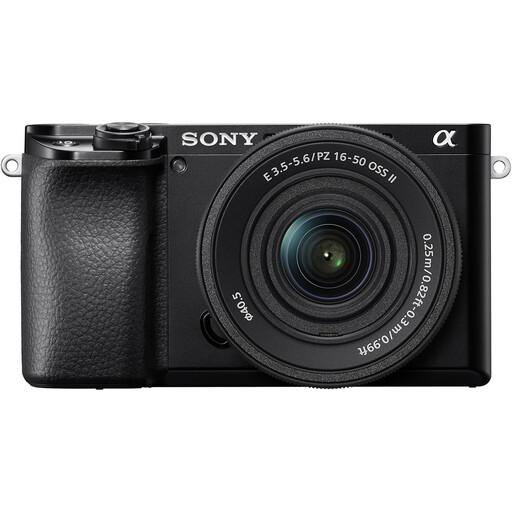 No image available
A zoom-equipped kit can suit repeatable whole-tool framing. Confirm the exact lens included in this kit, particularly its magnification and minimum focus distance, before choosing it for fine-detail photographs; check focus-bracketing support separately if needed.
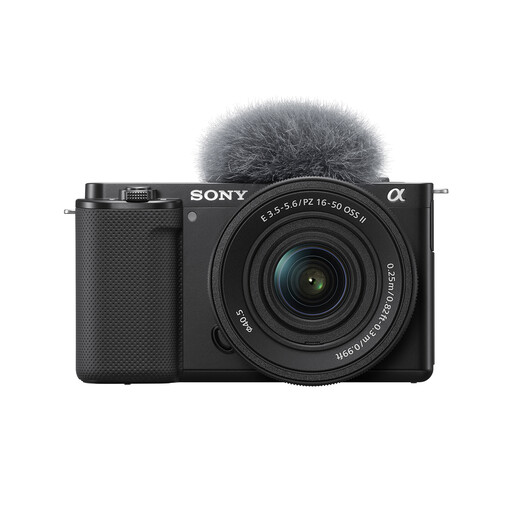 No image available
Consider this zoom kit if you photograph whole tools and also film demonstrations. The vari-angle screen can be assessed against your planned camera position; check the supplied lens’s close-focus specifications before depending on it for small details.
A 1:1 lens is worth considering when very small features need to fill the frame; it is not necessary for every photograph of a whole tool. Canon UK specifies up to 1:2 magnification for the RF 35mm F1.8 Macro, compared with 1:1 for the macro lenses cited by Nikon UK and Sony UK.
At high magnification, the focused area can be very shallow, so an accurately focused edge does not make the whole tool sharp. For a static tool, stabilise the camera and subject, then check whether separate focus positions or a documented bracketing-and-stacking workflow cover the detail you need.
Check working distance as well as lens magnification, because the space between the lens and tool determines where lights can go. Sony UK specifies 2.4 cm from the front of its E 30mm F3.5 Macro at its close-working setting; test whether that distance accommodates your lighting arrangement.
For a standard UK online goods contract, the Consumer Contracts Regulations 2013 generally provide a cancellation period ending 14 days after you receive the goods, subject to applicable exceptions. Check the seller’s return process and carriage terms before ordering; a change-of-mind cancellation is distinct from remedies for faulty, damaged or misdescribed goods.