Detail-focused patch sellers
If listings need enlarged views of stitching, borders or texture, lens magnification and careful focusing deserve more attention than video features.


Choose the lens system before the camera body. For enlarged photographs of stitching or small lettering, look for a compatible lens with stated 1:1 magnification; for whole-patch listings, a less powerful close-focusing lens may give you the framing you need. Whichever route you choose, consistent lighting and white balance matter when the white backdrop and thread colours need to look alike across a batch.
If listings need enlarged views of stitching, borders or texture, lens magnification and careful focusing deserve more attention than video features.
If you photograph many patches against the same white backdrop, repeatable framing, exposure and colour are important from one listing to the next.
If tabletop space is limited, you may want an interchangeable-lens APS-C body and a lens that fits around your lighting setup.
For embroidered patches on white, decide how much close-up detail the photographs must show, then check whether the lens and lighting setup can deliver consistent framing and colour.
Consider it when: You want a 24.2 MP APS-C body and expect to choose an RF close-up lens for your patch size.
Keep in mind: Canon UK states that the RF 35mm F1.8 Macro reaches 1:2 magnification, while the RF 100mm F2.8L Macro reaches 1.4x; they are not interchangeable choices for enlarged detail.
Consider it when: Stitching and border close-ups are a primary task and you want a Z-mount lens that Nikon UK states reaches 1:1 magnification.
Keep in mind: At high magnification, a raised patch may need careful focus and aperture testing to keep the intended details sharp.
Consider it when: You want a Sony APS-C body with a compatible lens that Sony UK states reaches 1:1 magnification.
Keep in mind: Sony UK specifies a 2.4 cm minimum working distance for the E 30mm F3.5 Macro, leaving limited space for lights near the patch at closest focus.
| Concern | What to check | Who this matters to |
|---|---|---|
| Close-up detail | Check the exact lens's maximum magnification and whether its closest framing suits the patch. Nikon UK describes 1:1 as life-size reproduction on the sensor; a lens labelled macro may offer less. | If small lettering or individual threads must be visible, I would put close-up framing ahead of body extras; around 42% of consumers put detail first. |
| Colour consistency | Check white-balance controls and keep the light source consistent. Canon UK advises setting white balance manually when automatic white balance does not give natural-looking colours. | When photographing colour variants for the same catalogue, I need the white background and threads to look consistent across sessions; around 33% of consumers prioritise that colour consistency. |
| Tabletop workflow | Check working distance at the intended framing and allow space for the camera, support and lights. Confirm the lens supplied with any kit. | If I mainly need repeatable whole-patch listings in a small space, an easy-to-arrange setup matters more than extreme close-ups; roughly 25% of consumers put that workflow first. |
Maximum magnification varies by lens. Canon UK specifies up to 1:2 for the RF 35mm F1.8 Macro, while Nikon UK and Sony UK specify 1:1 for the Z MC 50mm f/2.8 and E 30mm F3.5 Macro respectively.
Decide whether you need whole-patch photographs or enlarged thread details, then check the supplied lens's stated magnification before choosing a camera kit.
A separate macro lens may be needed if the supplied lens cannot frame the details you want.
Changing or mixed light can affect how the white backdrop and thread colours appear between photographs.
Use consistent lighting and test a manual or custom white-balance setting if automatic white balance does not produce natural-looking colours.
At its closest focus, Sony UK specifies just 2.4 cm of working distance for the E 30mm F3.5 Macro. That leaves little physical room between lens and subject.
Lay out the camera, patch, background and lights at the framing you intend to use before settling on a lens.
Body resolution alone does not determine close-up framing, focus across raised stitching or consistent colour.
Plan the lens, camera support and lighting alongside the body, and test focus and aperture on a patch with raised details.
These camera-and-lens routes illustrate different close-up choices; check the exact body, mount and lens combination rather than assuming every lens in a brand's range suits the same patch photographs.
The EOS R50 is an APS-C RF-mount body for buyers considering a Canon close-up lens alongside whole-patch photography.
The Z50II and NIKKOR Z MC 50mm f/2.8 form a Nikon Z route for buyers who make enlarged embroidery details a priority.
The α6400 and E 30mm F3.5 Macro are a Sony E-mount APS-C route for whole-patch images and close-up framing.
These Sony APS-C camera kits are starting points for whole-patch photographs. Before relying on a supplied zoom for enlarged stitching details, check its exact close-focusing specifications; a compatible macro lens may be a separate choice.
 Image unavailable
Consider this kit for whole-patch framing, then check whether its supplied zoom focuses closely enough for your smallest patches.
Sony UK specifies a 24.2 MP APS-C sensor and RAW recording for the α6400. Confirm the supplied lens's magnification and the white-balance controls you need for colour-critical batches.
 Image unavailable
Consider this camera-and-zoom kit for whole-patch photographs, provided the supplied lens frames your patches closely enough.
Check that lens's maximum magnification and close-focus distance before planning enlarged embroidery crops. For consistent colour across a batch, check the camera's white-balance controls and use steady lighting.
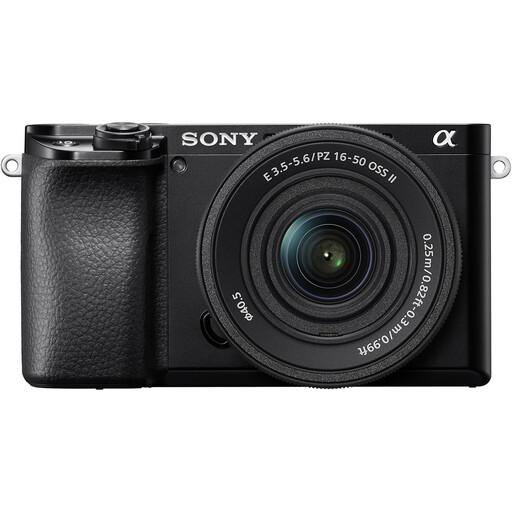 Image unavailable
Consider this kit for whole-patch framing, subject to checking the exact zoom supplied with it.
The lens is described with conflicting focal ranges, so confirm its model and range before buying. Check its close-focus distance and magnification for detail crops, and the camera's white-balance controls for repeatable colour.
Not necessarily: a lens that focuses closely enough for your patch size may suit whole-patch listings, while 1:1 magnification is more relevant to enlarged views of fine lettering, borders and threads. Nikon UK describes 1:1 as life-size reproduction on the sensor; check the exact lens rather than relying on the word macro in its name.
White balance affects how the camera renders the colour of the light, so a white backdrop can take on a cast when the setting does not suit the lighting. Keep the light source consistent and check white balance before a batch; Canon UK advises setting it manually when automatic white balance does not produce natural-looking colours.