What matters when choosing?
For a fixed textile setup, establish lighting and colour control first. Then decide whether remote capture, room to crop or occasional video would change how you work.
| Concern |
What to check |
Who this matters to |
| Consistent fabric colour |
Check white-balance controls for the exact body and whether RAW editing fits your workflow. Keep the lighting consistent between batches. |
I want white fabric and coloured items to look consistent from one batch to the next, not merely sit against a white backdrop. Around 36% of consumers put colour consistency first. |
| Capture and review workflow |
Check whether the exact camera supports phone-based remote shooting or your intended computer software, operating system and file destination. |
When photographing item after item, I need a way to check each frame without repeatedly handling the camera. Around 29% of consumers prioritise the capture and review workflow. |
| Detail and cropping |
Compare the body's effective pixels with the crops you plan to deliver; check that the lens frames textiles at your working distance. |
If I need close views of weave or labels, or several crops from one photograph, I want enough detail in the source file. Roughly 21% of consumers make cropping and detail their primary concern. |
| Occasional video |
Decide whether clips are part of your listings, then check the exact model's recording modes and any required audio or storage setup. |
I mainly need still photographs but may also show how a fabric drapes or catches the light. Around 14% of consumers put combined stills and video capability first. |
Relevant brands to consider
These examples describe particular camera models and workflows, not capabilities shared by every body from a brand.
Canon
The EOS R50 is a compact APS-C option for a phone-assisted tabletop workflow; Canon also discusses the higher-resolution EOS R5 in its product-photography guidance.
- Canon specifies a 24.2MP APS-C sensor for the EOS R50 and describes remote settings and capture through Camera Connect.
- Check the complete package: Canon's EOS R50 body listing says a USB-C charger is not included. Resolution and remote features do not replace controlled lighting.
Sony
The α6400A is relevant if RAW capture and a computer-connected workflow are important to your textile catalogue.
- Sony specifies a 24.2MP APS-C sensor, 14-bit RAW and Adobe RGB support for the α6400A, and describes USB capture and direct computer storage through Remote Camera Control.
- Confirm support for your exact camera model, software and operating system before relying on computer control.
Nikon
The Z50II is a Nikon DX option for buyers considering an electronic viewfinder, USB-C connectivity and in-camera Picture Controls.
- Nikon specifies 20.9 million effective pixels and 31 Picture Controls for the Z50II.
- Picture Controls do not replace lighting and white-balance checks for textiles. Nikon's Z50II body listing says a charger is not included.
Mirrorless cameras on Joybuy
These APS-C lens kits and full-frame options are relevant to a fixed textile setup. For each one, check lens framing at your working distance and the colour or remote-capture functions your process requires.
 No image available
Sony Alpha ZV-E10 II K with 16–50 mm f/3.5–5.6 power zoom lens
Consider this APS-C kit if you want a supplied zoom lens for tabletop framing and may also use video. The title specifies 26 megapixels and 4K 60p recording. Check how the lens frames folded textiles at your working distance, and confirm computer-capture compatibility if you need it.
View on Joybuy
 No image available
Sony A6400 with 16–50 mm power zoom lens
This APS-C lens kit is an option for a fixed tabletop composition. Check whether the supplied lens frames your textiles at the intended distance; if computer capture or custom white balance is essential, confirm those functions for this exact kit rather than assuming it shares another model's workflow.
View on Joybuy
 No image available
Sony Alpha 7 III with 28–70 mm zoom lens
Choose between this full-frame lens kit and an APS-C option according to the framing and workflow you need, rather than sensor format alone. Check whether the supplied 28–70 mm lens gives you the required textile framing at your working distance, and confirm any required colour-control or computer-capture functions.
View on Joybuy
 No image available
Sony A6700 with 16–50 mm lens
This APS-C lens kit offers another way to frame a fixed textile shot. Its title identifies a 16–50 mm lens; check its framing at your intended distance and confirm white-balance or computer-capture functions if either is central to your process.
View on Joybuy
 No image available
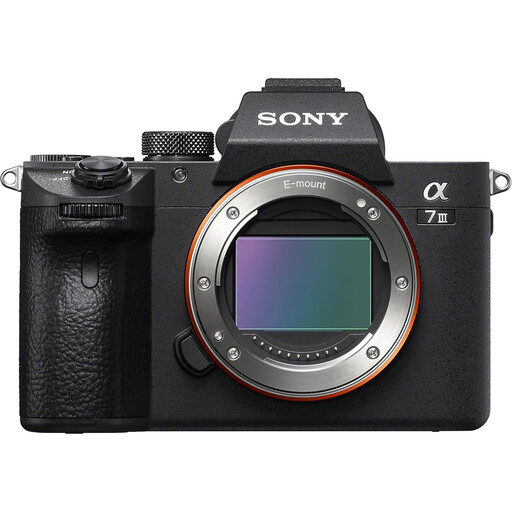
Sony Alpha 7 III full-frame camera body
This listing may suit a setup where you intend to choose the lens separately. Check the box contents before ordering: the body-only title and package description differ on lens inclusion. If a lens is needed, confirm its compatibility and framing for your working distance; also check computer-capture support if required.
View on Joybuy
Frequently asked questions
Do I need a mirrorless camera to photograph folded textiles on white?
Not necessarily: start with controlled lighting, a clean background and consistent framing. Adobe describes these as foundations of product photography and notes that a high-resolution phone can be an option. Consider a mirrorless camera when interchangeable lenses, repeatable controls, remote shooting or a RAW workflow address a specific need in your process.
How can I keep white and coloured fabrics consistent between shoots?
Set the lighting first, then check white balance under that light before each batch. Canon explains that custom white balance can be set using a white object photographed under the specific light source; consult the exact camera's instructions for its controls.
When is computer-connected capture useful for a textile catalogue?
It is worth considering when you want to review and store successive images at the workstation while shooting. Sony describes changing settings, capturing over USB and saving recorded data directly to a computer through Remote Camera Control. Confirm that your exact camera, application and operating system support the intended workflow.
What should I check about faults and warranties when buying in the UK?
Keep the order details and distinguish the retailer's voluntary warranty from your statutory rights. Under section 23 of the Consumer Rights Act 2015, when a trader is required to repair or replace faulty goods, it must do so within a reasonable time, without significant inconvenience, and bear the necessary costs. Check the applicable remedy for your particular fault rather than assuming a warranty is your only option.


