For home-studio origami, choose a mirrorless camera around the close-focus lens and the depth of field your models need, rather than megapixels alone. For layered folds, focus bracketing, stable support and controllable lighting make a multi-frame workflow practical; for flatter models, an appropriate aperture and a screen you can use from tabletop angles may be enough.
Who this setup suits
Detail-first origami photographers
If your models have deep layers or protruding folds, you may need several focus positions to show detail from front to back. Plan for a close-focus lens, stable support and consistent lighting as well as a body that can bracket focus.
Home-studio beginners
When you photograph small models from above or near table level, a movable screen can make framing easier. Check the chosen lens’s close-focus specifications and leave room in the setup for lighting and camera support.
Photo and video makers
If you also film tutorials or demonstrations, screen positioning and video features may affect your choice. They do not, on their own, keep folds at different distances sharp in a still photograph.
What matters when choosing a camera
Decide how closely the lens must frame your models and whether one exposure can show enough depth before comparing convenience features on camera bodies.
| Concern |
What to check |
Who this matters to |
| Sharpness across layered folds |
Check the exact body’s focus-bracketing function and the chosen lens’s close-focus specifications. |
When I photograph a layered model, I want its foreground and rear folds to remain legible; around 31% of consumers put front-to-back sharpness first. |
| Controlled light and paper colour |
Check exposure controls and plan lighting that can be positioned and diffused for the required aperture. |
If I use a smaller aperture for more depth of field, I need enough light without harsh shadows on the paper; roughly 31% of consumers prioritise lighting and colour consistency. |
| Flexible tabletop framing |
Check the screen’s movement at your shooting angles and how securely the camera mounts on your support. |
Working close to a table, I need to see the framing from above or low down without disturbing the model; about 19% of consumers put flexible framing first. |
| A complete close-up system |
Check lens-mount compatibility and the exact lens’s minimum focus distance and maximum magnification; account for support and lighting too. |
I want to frame small models closely while keeping room for the lens and studio equipment I need; around 19% of consumers prioritise the complete close-up system. |
Common buying pitfalls
-
Choosing by megapixels instead of close-up depth of field
At close distances, folds at different depths can fall outside the sharp area of a single frame. More pixels do not resolve that depth-of-field problem.
Decide whether your models need focus stacking, then check focus bracketing on the exact body and close-focus performance on the exact lens.
A stacking setup may also call for a tripod or copy stand, suitable lighting and software to combine the frames.
-
Treating stabilisation as a substitute for a tripod
Image stabilisation addresses camera shake, but a sequence of focus-shifted images also benefits from repeatable framing and a still subject.
For tabletop focus stacks, keep the camera on a stable tripod or copy stand and avoid moving the model between frames.
-
Using a smaller aperture without planning the light
A higher f-number increases depth of field but lets less light through the lens. Light aimed directly at folded paper can also create distracting shadows.
Test exposure at the aperture your model needs, then position and diffuse the light to control shadows.
Lights, diffusion material and stands take additional space in a small studio.
-
Assuming a bundled zoom is suitable for every close-up
The ability to fill the frame with a small model depends on the specific lens and your working distance, not just the camera body.
Check the bundled lens’s minimum focus distance, maximum magnification and mount compatibility before deciding whether it meets your needs.
Camera brands to consider
Canon
The EOS R50 is an APS-C option to examine if focus bracketing and composition from tabletop angles matter to you.
- Canon UK identifies the EOS R50 as supporting focus bracketing.
- Check the close-focus performance of the particular RF or RF-S lens you intend to use; body features do not establish what a bundled lens can frame.
Sony
The APS-C α6700 combines a focus-bracketing route for static models with in-body stabilisation for other shooting situations.
- Sony UK says the α6700 can capture up to 299 sequentially focus-shifted images and lists five-axis in-body stabilisation.
- For a tabletop focus stack, keep the camera supported; stabilisation does not hold the framing constant across a multi-frame sequence.
Nikon
The APS-C Z50II is worth considering when composing from awkward tabletop positions is a priority.
- Nikon UK describes a vari-angle touchscreen and an electronic viewfinder that previews the effect of setting changes.
- If automated focus stacking is central to your work, confirm the Z50II’s exact bracketing workflow before choosing it.
Fujifilm
The APS-C X-M5 is a compact camera to consider when still photographs and other content share the same setup.
- Fujifilm lists a 26.1-megapixel sensor and in-camera Film Simulation options for the X-M5.
- Before planning layered-model stacks, confirm the focus-shifting workflow and a compatible close-focus lens for this camera.
Joybuy camera kits for home-studio origami
These interchangeable-lens Sony kits offer different starting points for photographing origami indoors. Compare the included lens with the size of your models, and check the exact camera’s focus-bracketing function if you expect to stack images.
 No image available
Sony A6700 APS-C camera with 16–50mm lens
For layered, stationary models, the A6700 offers a focus-bracketing workflow: Sony UK says it can capture up to 299 sequentially focus-shifted images. Keep the camera and model still and plan to combine the frames afterwards.
This kit includes a 16–50mm lens. Check that lens’s minimum focus distance and maximum magnification against the size of your origami models.
View on Joybuy
 No image available
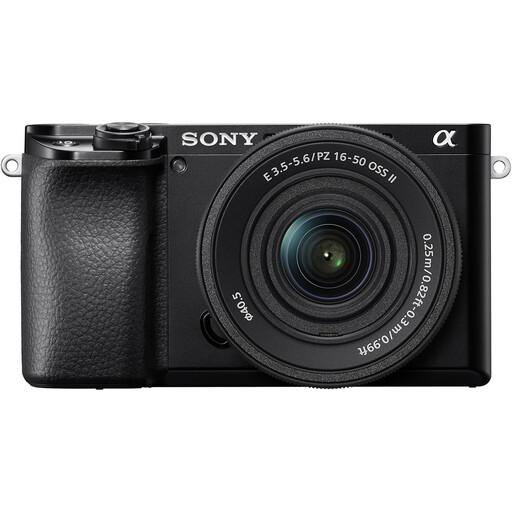
Sony A6400 APS-C camera with 16–50mm power zoom lens
For tabletop stills where one exposure gives sufficient depth of field, this interchangeable-lens kit is a starting point. If you need automated focus stacks, check the A6400’s bracketing function before choosing it.
The included lens is a 16–50mm power zoom. Check its close-focus specifications for your smallest models.
View on Joybuy
 No image available
Sony A6100 APS-C camera with 16–55mm zoom lens
For an interchangeable-lens tabletop setup, this kit pairs an APS-C camera with a zoom lens. Confirm the A6100’s focus-bracketing function if sharpness across deep folds requires a multi-frame stack.
The listed lens is a 16–55mm zoom; check its minimum focus distance and maximum magnification for close framing.
View on Joybuy
 No image available
Sony Alpha 7 III full-frame camera with 28–70mm zoom lens
Consider this full-frame kit if you also want it for photography beyond your origami studio; sensor format alone does not settle close-up depth of field. Check the Alpha 7 III’s focus-bracketing workflow if layered models are your priority.
The kit includes a 28–70mm zoom lens. Confirm its close-focus specifications before relying on it for small models.
View on Joybuy
 No image available
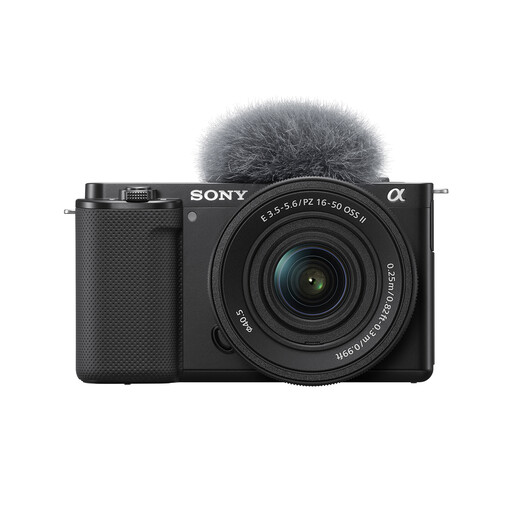
Sony ZV-E10K vlog camera with 16–50mm power zoom lens
If you photograph origami and also make videos, this interchangeable-lens kit covers both uses. For layered stills, check the ZV-E10K’s focus-bracketing workflow rather than assuming video features address depth of field.
The included lens is a 16–50mm power zoom. Confirm its minimum focus distance and maximum magnification for your models.
View on Joybuy
Questions about photographing origami
Do I need a full-frame camera for origami photography?
No: an APS-C camera can be a suitable choice for this work. Canon UK identifies focus bracketing on the APS-C EOS R50, while Sony UK describes it on the APS-C α6700; for close-up models, also choose a lens that frames them as needed and plan how you will control depth of field.
When should I use focus bracketing instead of one photograph?
Use focus bracketing when important folds lie at different distances and one close-up exposure cannot show enough of them sharply. Canon UK identifies the EOS R50 as a bracketing-capable body, and Sony UK says the α6700 can capture sequential focus-shifted images; keep the model, camera and lighting steady, then combine the frames.
Why might I need more light at a smaller aperture?
A smaller aperture increases depth of field but lets less light through the lens. Nikon School explains the depth-of-field relationship, while Canon UK notes that additional close-up lighting can help when stopping down; position and diffuse light to manage shadows on folded paper.
Is a tripod useful if my camera has stabilisation?
Yes, particularly when a static origami model needs several focus-shifted frames. Sony UK describes the α6700’s in-body stabilisation as compensation for camera shake, but stable support helps keep framing repeatable throughout a tabletop bracket sequence.


