PCB documentation photographers
If you photograph complete boards, connectors or assemblies for build records or listings, your priorities are consistent framing, legible markings and repeatable lighting.


For whole-board PCB records, choose a mirrorless camera and lens that can frame the board from the camera height available in your studio. If individual solder joints or traces need to fill the frame, consider a compatible true 1:1 macro lens instead. At high magnification, plan for rigid support and lighting, and check the exact lens mount, magnification and working distance before buying.
If you photograph complete boards, connectors or assemblies for build records or listings, your priorities are consistent framing, legible markings and repeatable lighting.
When solder joints, traces or component markings must occupy much of the image, lens magnification and stable, precise focusing become central to the choice.
If the same camera will cover PCBs and other stills or video, consider the wider lens system and recording workflow alongside your close-up needs.
Decide whether you mainly need complete-board records or frame-filling component detail before comparing camera bodies. Nikon UK defines 1:1 magnification as reproducing a subject life-size on the sensor; it is useful for small details, not a requirement for every board photograph.
Choose when: You mainly photograph complete boards and also want a camera for general stills.
Trade-off: Check the supplied lens’s maximum magnification before relying on it for frame-filling component photographs.
Choose when: Small pads, markings or solder joints need to take up a substantial part of the frame.
Trade-off: High magnification calls for careful focusing and support, while a short working distance can leave little space for lighting.
| Concern | What to check | Who this matters to |
|---|---|---|
| Close-up detail | Compare the exact lens’s maximum magnification and working distance; check for 1:1 if tiny features must fill the frame. | I need solder joints or trace sections to appear large enough to examine, rather than just recording the complete board. Around 33% of consumers put close-up detail first. |
| Repeatable whole-board images | Check framing from your available camera height and allow for a rigid tripod or copy stand. | For a series of board records, I want consistent framing without camera movement changing each shot. Repeatability comes first for around 27% of consumers. |
| Depth of field | For raised components at close range, check precise focusing controls and the exact body’s focus-bracketing features if you need a multi-frame workflow. | When components sit at different heights, I need to decide how to keep the important details acceptably sharp. Around 20% of consumers prioritise that focusing workflow. |
| System flexibility | Confirm lens-mount compatibility and consider the body, required lenses, support and lighting together. | I also use my camera for other home-studio work, so I would rather add specialist close-up equipment only if I need it. That flexibility is the main concern for around 20% of consumers. |
A mirrorless body does not determine how large a small PCB feature appears on the sensor. Nikon UK describes 1:1 as life-size reproduction; a lens with a lower maximum ratio reproduces the feature smaller.
Decide whether you need whole-board records or large images of individual components, then check the exact lens’s maximum magnification and focusing distance.
If the supplied lens cannot give you the scale you need, adding a macro lens means another item in your setup.
Resolution does not change a lens’s maximum reproduction ratio. A camera with more pixels does not, by itself, make a tiny solder joint fill the frame.
Establish the lens magnification and required framing distance first; compare body resolution for the files and cropping you need afterwards.
Sony UK specifies a minimum working distance of 2.4 cm from the front of its E 30mm F3.5 Macro to the subject. At that closest setting, positioning lights around a PCB can be awkward.
Lay out the board, camera position and lighting before selecting a short-working-distance lens.
Your preferred lighting arrangement may call for smaller lights, diffusers or a lens that leaves more working room.
High magnification makes a narrow focus plane and camera movement harder to manage. Canon UK recommends a tripod or other support for still-life macro photographs.
Plan a rigid camera position and avoid touching the camera during exposure; check what triggering options your chosen body offers.
A support and a controlled lighting arrangement also take up space in a home studio.
Canon’s RF/RF-S system is a route to consider if you want an APS-C body for whole-board work with the option of a separate macro lens.
Nikon’s Z system is relevant if you want a native macro-lens route alongside a camera for general stills.
Sony’s E-mount system offers an APS-C camera route for broader studio use and a native lens option for 1:1 close-ups.
These camera-and-zoom kits are choices to consider for whole-board photographs and wider camera use. Check the included lens’s close-focus specifications before treating any kit as a solution for frame-filling component detail.
 No image available
Consider this supplied-zoom kit for whole-board records if it frames your boards at your planned camera height.
For small component images, check the included 16–50 mm lens’s maximum magnification and working distance.
 No image available
For complete-board photographs and other stills, check whether the supplied zoom gives you the framing you need in your studio.
The kit includes a 28–70 mm zoom; confirm its maximum magnification and working distance before planning component close-ups.
 No image available
Consider this kit if you want a camera for whole-board photographs and a RAW workflow for other studio stills; Sony UK specifies RAW recording for the α6700.
The supplied lens is 16–50 mm. Check its close-focus magnification for PCB details, and confirm focus-bracketing features on the exact body if your workflow requires them.
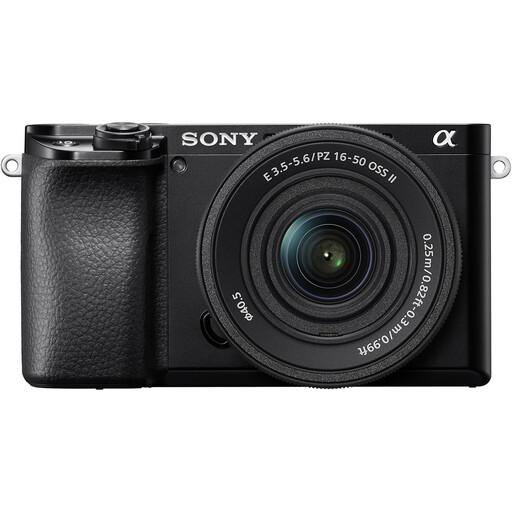 No image available
This interchangeable-lens kit is worth considering for complete-board records if the supplied zoom fits your framing distance.
Confirm the exact included lens before buying, then check its maximum magnification and working distance if you also need close component photographs.
No, provided a standard or close-focusing lens can frame the whole board from your available camera position. Consider true macro when individual components need to appear much larger; Nikon UK defines 1:1 magnification as life-size reproduction on the sensor.
A rigid support helps keep a static PCB and camera in consistent positions while you focus and shoot at close range. Canon UK recommends a tripod or other support for still-life macro photography; check that your chosen support holds the camera securely above your work area.
No; check the exact body’s manual for the focus-bracketing or focus-shift function your workflow requires, and whether image assembly happens in-camera or separately. Keep the board and camera fixed if you plan to combine multiple focus positions.
Keep unwanted electrical products and batteries out of household rubbish. GOV.UK advises recycling electrical waste and batteries through appropriate collection routes; check which local collection point accepts each item.