Small-tool detail documenters
You need close-up images of markings, cutting edges, textures, fasteners or miniature components, so lens magnification matters more to you than video conveniences.


Choose the lens and tabletop setup around the smallest detail you need to show before paying for more camera-body features. A standard zoom can be a starting point for full-tool photos, while fine markings or components that must fill the frame call for checking a true 1:1 macro lens. Controlled lighting, a clean backdrop and stable positioning remain important whichever mirrorless body you choose.
You need close-up images of markings, cutting edges, textures, fasteners or miniature components, so lens magnification matters more to you than video conveniences.
You photograph complete tools against a white background and want their shape and colour to remain easy to assess across a batch of listings.
You take listing photos and record tool demonstrations, making screen positioning, autofocus behaviour and video features relevant alongside still-image quality.
Start with the smallest feature your photos must show, then plan the lighting and support needed to repeat the shot. Consider video features separately if demonstrations are part of the job.
| Concern | What to check | Who this matters to |
|---|---|---|
| Close-up detail | Check the exact lens mount, maximum magnification and working clearance. A macro label alone does not establish 1:1 magnification. | If fine engraving or a small fastener must fill my photo, I need to choose the lens around that detail. Around 42% of consumers put close-up detail first. |
| Repeatable white-background photos | Plan stable camera support, controllable lighting and a clean backdrop; check that the camera lets you repeat exposure settings. | When I photograph a batch of tools, I want their shape and colour to remain clear from image to image. For around 33% of consumers, a repeatable tabletop workflow is the primary need. |
| Stills and demonstrations | Check the screen's movement and the exact body's video and product-focus features; confirm what lens the bundle contains. | If I also show tools on camera, I need to frame and focus demonstrations without making the still-photo setup awkward. Mixed stills and video come first for around 25% of consumers. |
Adobe's product-photography guidance emphasises controlled lighting and a clean background. More resolution cannot, by itself, make illumination even or remove shadows.
Plan the backdrop, lights and camera position, then try the arrangement with both a reflective and a matte tool.
Lights, diffusion, background materials and stable support may be needed in addition to the camera.
Canon specifies its RF 35mm F1.8 Macro IS STM at up to 1:2 magnification, while Sony specifies the E 30mm F3.5 Macro and Nikon specifies the NIKKOR Z MC 50mm f/2.8 at 1:1. Those differences matter when a tiny feature must occupy more of the frame.
Compare maximum magnification, focus distance and mount compatibility against the smallest detail you need to photograph.
If the chosen lens cannot frame that detail as required, a separate macro lens may be needed.
Canon notes that close-up photography can leave very little depth of field. A tool's face and raised components may not all appear sharp at the same focus setting.
Keep the camera steady, try aperture and focus settings on the actual tool, and inspect the image at its intended display size before shooting a batch.
A camera body's features do not establish the magnification of its kit lens. The Sony α6400 listing identifies a 16–50 mm power zoom, whereas Sony's 1:1 E 30mm F3.5 Macro is a different lens.
Check the exact bundle contents and lens model, then assess whether that lens can frame your smallest required detail.
Canon's EOS R50 is an APS-C RF-mount route for tool photos, with RF and RF-S lens options.
Sony's APS-C E-mount options include the α6400 and a separate E 30mm F3.5 Macro lens for small details.
Nikon's Z50II combines an interchangeable-lens APS-C system with a demonstration-oriented Product Review Mode.
These Sony mirrorless listings offer starting points for full-tool photos or mixed stills and demonstrations. Check each bundle's lens before relying on it for small-detail work; a camera body or standard zoom does not establish 1:1 macro capability.
 No image available
Consider this kit if you photograph complete tools and also record demonstrations. The listing names a 16–50 mm lens, 26 MP stills and 4K60p video. If tiny markings must fill the frame, check the supplied lens's maximum magnification and close-focus distance.
 No image available
Consider this listing for full-tool photos where adjustable ISO and shutter speed matter to your tabletop workflow. Its title names a 16–50 mm lens and the description states a 26 MP sensor, but the included-components list does not name the lens. Confirm the bundle contents and lens magnification before ordering for close-up detail.
No image available
The supplied zoom offers a framing starting point for complete-tool listing photos, while the 180° tilting screen may help with tabletop composition. The listing states 24.2 MP stills and 4K video. Check the zoom's maximum magnification if small components must fill the image.
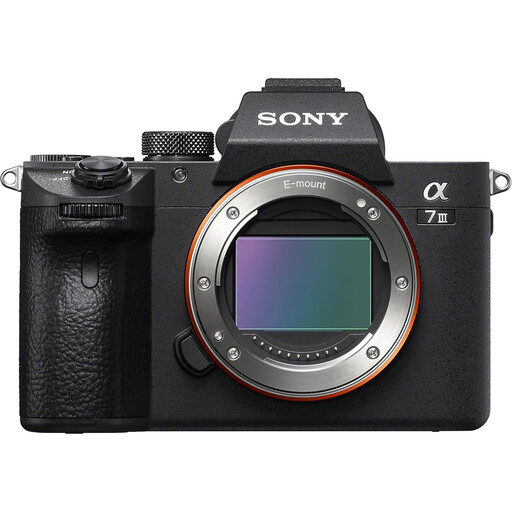 No image available
This full-frame body is a camera-system option if you intend to select a lens for your tool sizes and detail requirements. The description states a 24.2 MP sensor and manual exposure modes. Its body-only title conflicts with description text mentioning a 28–70 mm lens, so confirm exactly what the bundle includes before buying.
Not for every shot: a standard zoom can work for a complete tool that fits comfortably in the frame. Consider a 1:1 macro lens when markings or small components need to appear large; Canon explains that 1:1 reproduces the subject at life size on the sensor.
No. Adobe's product-photography guidance points to controlled lighting and a clean background; sensor resolution cannot make lighting even or remove shadows on its own.
A tripod or other stable support is useful when photographing stationary tools at close range. Canon advises keeping the camera fixed for still-life macro work; test focus and aperture on the tool before repeating the setup across a batch.
Confirm the exact camera variant, included lens, mount compatibility and seller terms before ordering. GOV.UK says customers generally have 14 days from receiving an online purchase to tell the seller they wish to cancel, subject to applicable exceptions; check those separately from the remedies available for faulty or misdescribed goods.