Choose the lens system around the smallest tool detail you need to show: a compatible 1:1 macro lens is the starting point for frame-filling engravings or mechanisms, while a close-focusing lens may suit wider bench scenes and occasional detail shots. Check working distance as well as magnification, because a lens positioned very close to a tool can leave little room for lighting; an adjustable screen or product-video focus mode addresses a different part of the job.
Who needs which approach?
Fine-detail tool sellers
If listings or documentation must show small engravings, teeth or mechanisms, start with the lens’s maximum magnification. Then check whether its working distance leaves room to light the tool: Sony UK specifies just 2.4 cm from the front of its E 30mm F3.5 Macro at the closest working position.
Workbench-content creators
If you photograph tools on a bench and also record demonstrations, consider how you will frame shots from above or beside the work surface. Canon UK specifies a vari-angle screen for the EOS R10, while Nikon UK describes a Z50II mode that shifts focus to an item held in front of the camera.
General craft photographers needing occasional close-ups
If whole tools, work in progress and finished projects make up most of your photographs, a lens suited to wider scenes may be a more useful starting point than maximum magnification alone. For occasional details, compare its close-focus specification with the smallest feature you need to show.
What matters when choosing?
For craft-tool photography, settle the required close-up scale before choosing a camera body. The following systems illustrate different ways to balance detail, bench framing and demonstrations; their lens specifications do not determine how sharp an entire tool will appear in a particular set-up.
Nikon Z50II with NIKKOR Z MC 50mm f/2.8
Consider it when: fine-detail stills and demonstrations with an item held up to the camera are both priorities. Nikon UK specifies 1:1 magnification for the lens and describes Product Review Mode for the body.
Allow for: the 1:1 specification does not ensure that every part of a tool will be sharp; check the lens’s view on the Z50II and plan focus and lighting for the actual subject.
Sony α6400 with E 30mm F3.5 Macro
Consider it when: a compact E-mount lens with 1:1 magnification suits small tabletop details, as specified by Sony UK.
Allow for: Sony UK states a 2.4 cm minimum working distance from the lens front, which can restrict space for lights or diffusers at the closest position.
Canon EOS R10 with RF 35mm F1.8 IS Macro STM
Consider it when: adjustable-screen framing and wider craft photographs matter alongside occasional close-ups. Canon UK specifies a vari-angle screen for the EOS R10.
Allow for: Canon UK Store specifies up to 1:2 magnification for this lens, rather than the 1:1 maximum specified for the Nikon and Sony lenses above.
| Concern |
What to check |
Who this matters to |
| Fine details and lighting clearance |
Compare the exact lens’s maximum magnification and working distance at close focus. |
I need small marks or mechanisms to fill the frame without crowding out my lighting. Around 33% of consumers put close-detail reproduction first. |
| Workbench framing |
Check the screen’s range of movement and whether controls remain accessible on your planned support. |
When the camera sits above a bench, I need to compose without looking straight through it. For around 27% of consumers, flexible framing is the primary concern. |
| Demonstration video |
Check focus behaviour when presenting a tool, plus the required recording format and memory card. |
I also show tools to the camera, so I care about how focus responds during a demonstration. Tool-video handling comes first for around 20% of consumers. |
| Wider scenes and occasional close-ups |
Compare the lens’s maximum magnification with the smallest detail you must show. |
Most of my photographs show a whole tool or workspace, with close details only sometimes needed. Around 20% of consumers prioritise that broader craft-photo use. |
Buying pitfalls
-
Choosing the body before the close-up lens
Macro capability depends on the exact lens, not the camera body. Nikon UK and Sony UK specify 1:1 magnification for the lenses discussed here, while Canon UK Store specifies up to 1:2 for the RF 35mm F1.8 IS Macro STM.
Decide how small a feature must appear prominently, then check compatible lenses for magnification, focusing distance and working clearance before settling on a body.
-
Assuming closer focusing is always easier to use
At its closest working position, Sony UK specifies only 2.4 cm between the E 30mm F3.5 Macro’s front and the subject. That leaves little physical space to position lighting around a tool.
If your tools are reflective, tall or awkward to light, assess working clearance alongside the magnification specification.
-
Expecting body features to solve close-up sharpness
An adjustable screen can help with composition, and a product-review focus mode can help when presenting an item on video. Neither removes the shallow depth of field that Canon UK cautions about in close-up photography.
Check focus placement, aperture, support and lighting using the type of tool and framing you intend to photograph.
-
Confusing online cancellation with fault remedies
GOV.UK guidance distinguishes cancellation of most online consumer orders from remedies for faulty goods. The cancellation period generally extends to 14 days after the goods are received; a retailer’s voluntary returns or warranty terms are separate.
Keep your order record and check the seller’s cancellation process without assuming its policy replaces your statutory rights if a camera or lens is faulty.
Brands to consider for these camera systems
Nikon
The Z50II and NIKKOR Z MC 50mm f/2.8 pairing is relevant when life-size tool details and item-focused demonstrations share the brief.
- Nikon UK specifies 1:1 macro magnification for the lens and describes Product Review Mode on the Z50II.
- Check the FX-format lens’s framing and handling on the APS-C Z50II; magnification alone does not settle lighting or depth of field.
Sony
The E 30mm F3.5 Macro is an E-mount lens to consider for small tabletop subjects when 1:1 reproduction matters.
- Sony UK specifies 1:1 maximum magnification for this lens.
- Its specified 2.4 cm minimum working distance from the lens front can constrain lighting placement at close focus.
Canon
The EOS R10 and RF 35mm F1.8 IS Macro STM pairing is relevant to wider craft photographs with occasional close-ups.
- Canon UK specifies a vari-angle screen for the EOS R10, and Canon UK Store specifies up to 1:2 magnification for the lens.
- That lens’s stated maximum magnification is lower than the 1:1 maximum of the Nikon and Sony lenses discussed here.
Joybuy product choices
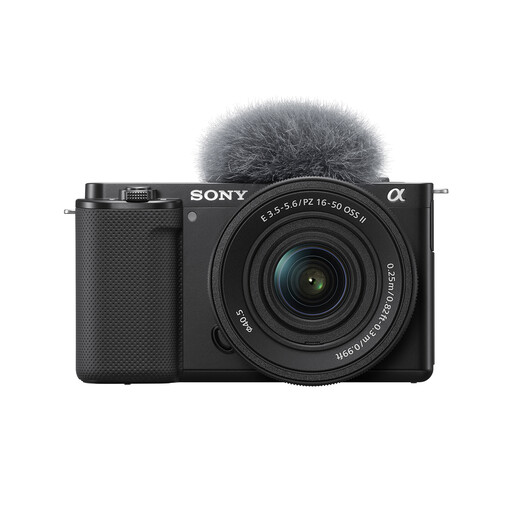
This Sony camera-and-zoom kit is a starting option to assess for wider workbench photographs and craft video. If tiny tool details must fill the frame, check the included lens’s close-focus capabilities before relying on this kit for that task.
 No image available
Sony ZV-E10K with 16–50mm Power Zoom Lens
Consider this interchangeable-lens camera kit for wider craft scenes or tool demonstrations. Its included lens is a 16–50mm power zoom; check its maximum magnification and working distance if small engravings or mechanisms must fill the frame.
View on Joybuy
Common questions
Do I need a 1:1 macro lens to photograph craft tools?
Choose a 1:1 macro lens if very small engravings, teeth or mechanisms need to occupy a large part of the frame; wider tool and workspace photographs may not require it. Nikon UK and Sony UK specify 1:1 magnification for the macro lenses discussed here, whereas Canon UK Store specifies up to 1:2 for the RF 35mm F1.8 IS Macro STM. Check the exact lens rather than relying on the word “macro” in its name.
Why does working distance matter for tool close-ups?
Working distance determines how much space remains between the front of a lens and the tool for positioning light. Sony UK specifies a minimum of 2.4 cm for its E 30mm F3.5 Macro, so assess whether your lighting will fit when shooting near its closest position.
How should I change lenses around a dusty workbench?
Move to a clean area and switch the camera off before changing lenses. Sony UK also recommends changing lenses only when necessary and pointing the camera body downwards during the change; follow the camera maker’s guidance if dust later appears in images.
Can I cancel an online camera order in the UK?
For most UK online consumer purchases, GOV.UK guidance provides a cancellation period extending to 14 days after you receive the goods. Check how to notify the seller and keep your order record. Cancellation of an unwanted order is separate from remedies if the camera or lens is faulty.


