For close photographs of painted miniatures, choose a mirrorless system around a compatible close-focusing lens, stable support and a workable way to keep more of the subject sharp; sensor size alone does not settle the choice. In-camera focus stacking can simplify repeatable shots of stationary figures, while resolution matters more when you expect to crop. Check the exact body, lens and included kit before committing, particularly if changing window light will affect a multi-frame sequence.
Who is this for?
Regular miniature photographers
If you photograph individual painted figures often, a repeatable way to extend depth of field may matter more to you than making every composite manually. OM SYSTEM and Canon document camera-based stacking workflows, but the available features depend on the exact body.
Detail-focused portfolio and listing photographers
If you crop into painted details or make portfolio and listing images, resolution is worth considering alongside a suitable macro lens, a tripod and careful focusing. Extra pixels cannot restore detail that was out of focus in the original shot.
One-system photo and video users
If the camera also needs to serve everyday photography or video, consider the lens mount and wider handling as well as miniature work. A versatile body is still only a close-up solution if you can pair it with a lens that frames your figures as intended.
What matters when choosing?
Start with the lens and the size of miniature you want to frame, then decide whether your priority is an easier depth-of-field workflow, room to crop, control under window light or wider use of the same system.
| Concern |
What to check |
Who this matters to |
| Depth of field |
Check whether the exact body and firmware offer focus bracketing, an in-camera composite, or both. |
I photograph single figures repeatedly and want more of each one sharp without assembling every image by hand. Around 36% of consumers put that focus-workflow need first. |
| Crop detail |
Compare effective resolution and the compatible macro lenses you could use, rather than relying on sensor size alone. |
Small painted features need to remain clear after I crop an image for a listing or portfolio. For around 29% of consumers, retaining crop detail is the primary concern. |
| Window-light shooting |
Check RAW options and how you will keep the camera steady; stabilisation does not align a focus-stack sequence. |
When daylight changes, I need a setup that lets me manage exposure without moving the camera between frames. That flexibility comes first for around 21% of consumers. |
| Wider system use |
Confirm lens-mount compatibility, the intended macro lens’s magnification and any adapter restrictions. |
I want the same camera for miniatures and other photos or video, so the lenses available beyond tabletop work matter to me. Around 14% of consumers make wider system use their first priority. |
Mistakes to avoid
-
Assuming the supplied zoom is a macro lens
Filling the frame with a small figure depends on the lens’s close-focus capability, not simply on the camera body. Canon specifies 1.4x magnification for its dedicated RF 100mm F2.8L Macro IS USM; that figure should not be assumed for a kit zoom.
Identify the exact lens supplied, then check its magnification, minimum focus distance and working distance against the size of your miniatures.
-
Relying on stabilisation to align a focus stack
A stack uses several frames that need to line up. Canon recommends a sturdy tripod for this work and notes that remote triggering avoids jarring the camera as the shutter is released.
Plan for stable support and a way to trigger the camera without touching it when alignment is important.
-
Confusing focus bracketing with a finished stack
Bracketing captures frames at different focus positions; stacking combines them. Sony’s α7 IV firmware version 6.02 adds Focus Bracket shooting, which does not by itself establish that the camera produces the final composite.
Check the exact model manual and installed firmware for the workflow you want, including where the frames are combined.
If the camera only captures the sequence, combining it may also take desktop software and editing time.
-
Overlooking changes in window light
A multi-frame sequence takes time. If daylight shifts while you capture it, the frames can differ in brightness or colour even when the focus positions are correct.
Keep the setup still, use consistent exposure and white-balance settings where appropriate, and retake a sequence if the light changes noticeably. Controlled diffused lighting is worth considering when repeatability matters.
Brands to consider for this setup
OM SYSTEM
A route to examine if producing a close-up composite in-camera is central to your workflow.
- OM Digital Solutions documents Focus Stacking for the OM-1 Mark II, combining images focused at different distances.
- Check the particular body, compatible lens and settings; a still camera and subject remain important while the sequence is captured.
Canon
An RF-mount option with both close-up workflow features and dedicated macro lenses to assess.
- Canon UK specifies a 32.5MP APS-C sensor for the EOS R7 and documents its in-camera focus bracketing and stacking. Its RF 100mm F2.8L Macro IS USM is specified at 1.4x magnification.
- Check the body-to-lens pairing and the lens supplied with any kit; the camera body’s features do not establish a kit zoom’s macro magnification.
Sony
An E-mount option to consider when miniature photographs share a camera system with other photo or video work.
- Sony UK specifies a 33.0MP full-frame sensor for the α7 IV; its version 6.02 firmware adds Focus Bracket shooting.
- Confirm the installed firmware, intended close-focusing lens and how you would combine bracketed frames.
Nikon
A Z-mount option for buyers assessing one full-frame system for miniature images and broader use.
- Nikon UK specifies a 24.5MP full-frame sensor and 14-bit NEF RAW options for the Z5II.
- Check the intended lens and any adapter restrictions. If an in-camera stacking composite is essential, confirm that capability for the exact body and firmware before ordering.
Joybuy product choices
These interchangeable-lens Sony APS-C kits are choices to assess if you also want a camera for general stills or video. Before choosing one for painted miniatures, check the supplied lens’s close-focus capability and the body’s focus workflow; a kit lens and a stable shooting setup are separate considerations.
 No image available
Sony Alpha ZV-E10 II K with 16–50 mm f/3.5–5.6 power zoom
Consider this APS-C kit if the camera will serve stills and video as well as miniature photography. The listed variant has 26 megapixels and a 16–50 mm f/3.5–5.6 kit zoom. Check that lens’s magnification and working distance, and confirm the body’s focus-bracketing or stacking workflow if you need a repeatable deep-focus result.
Joybuy
 No image available
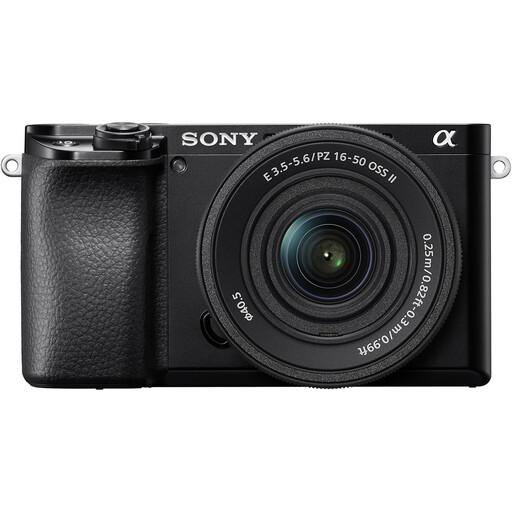
Sony A6400 with 16–50mm power zoom lens
This APS-C interchangeable-lens kit suits a buyer who wants a supplied zoom while considering a separate close-up lens for miniature details. Check the zoom’s magnification and working distance, and confirm the camera’s focus-bracketing or stacking options before planning a multi-frame workflow.
Joybuy
 No image available
Sony A6100 APS-C with zoom lens
Consider this interchangeable-lens camera if you want one APS-C body for miniatures and other photography. Confirm the exact zoom supplied before ordering: the product title identifies a 16–55mm lens, while the accompanying lens description identifies a 16–50mm lens. Then check its close-focus magnification and the body’s focus workflow for your intended miniature shots.
Joybuy
Questions and answers
Do I need focus stacking for every painted miniature?
No; it is useful when you want more of a close miniature sharp from front to back than one focused frame gives you. Canon documents in-camera bracketing and stacking for the EOS R7 and EOS R10, but check the feature on the particular body you intend to buy.
Is a tripod worth using if the camera has stabilisation?
Yes, particularly for a stationary subject photographed across several focus positions. Canon recommends sturdy support to help align stack frames; remote triggering can also avoid moving the camera as you take the shot.
Should I choose a macro lens before deciding between full-frame and APS-C?
Check the lens early if filling the frame with a small figure is your aim: its close-focus magnification is central to that decision, whereas sensor size alone does not provide macro magnification. Confirm the lens’s working distance as well as its compatibility with your chosen body.
What lens compatibility checks matter before buying a body?
Identify the exact lens mount and the macro lens you intend to use, then check whether an adapter is required and whether restrictions apply. Nikon specifies Z-mount lenses for the Z5II and an adapter for F-mount lenses; Canon advises checking lens compatibility for the particular camera.


