What matters when choosing?
Decide whether your primary task is recording tiny features, keeping components at different heights sharp, or setting up and clearing away efficiently; that choice determines which lens and support checks deserve attention first.
| Concern |
What to check |
Who this matters to |
| Readable close detail |
Check the exact lens’s maximum magnification and whether its field of view includes the smallest feature you need with enough surrounding context. |
If I need to inspect tiny markings or solder joints later, an overview alone will not serve my purpose. Around 42% of consumers put close-detail reproduction first. |
| Sharpness at different heights |
Check the camera’s focus-bracketing or stacking functions and allow for rigid support when photographing a stationary board. |
When I record a populated board, I need raised parts and lower traces to remain useful in the same record. Roughly 33% of consumers prioritise sharpness across those different heights. |
| Shared-bench practicality |
Check the space needed for the assembled kit, screen position, cable routing and storage between sessions. |
I need to set up over the board and then leave the communal surface clear for the next person. About 25% of consumers make that shared-space practicality their primary concern. |
Relevant camera systems for reference
Compare the particular body and lens combination you would use; these manufacturer-stated features do not establish how a complete setup will perform on your board.
Canon
Canon’s EOS R system is worth examining if you want a stated focus-stacking workflow alongside RF macro-lens options for detailed PCB records.
- Canon UK specifies a 32.5-megapixel APS-C sensor for the EOS R7, while Canon states that the body supports in-camera focus bracketing and stacking. Canon specifies up to 1.4x magnification for the RF 100mm F2.8L Macro IS USM.
- Check whether the lens and support leave enough room for lights and the whole board on your bench; higher magnification does not make components at different heights sharp in one exposure.
Nikon
Nikon Z offers a DX body and a 1:1 macro-lens option for buyers balancing close detail with a movable workshop setup.
- Nikon UK lists a 20.9-megapixel DX sensor and vari-angle touchscreen for the Z50II, and specifies 1:1 reproduction for the NIKKOR Z MC 50mm f/2.8. Nikon also describes a direct USB streaming workflow for the Z50II.
- The Z MC 50mm f/2.8 has a stated 0.16 m minimum focus distance. Check physical clearance for lighting at the close-up framing you require, and check USB compatibility with your intended computer workflow.
Sony
Sony E-mount is relevant if you are considering an APS-C body with a dedicated macro lens for small PCB features.
- Sony UK specifies a 26.0-megapixel APS-C sensor for the α6700 and up to 1:1 magnification for the FE 90mm F2.8 Macro G OSS.
- Sony UK lists a 0.28 m minimum focus distance and 602 g weight for that macro lens. Check the resulting field of view, lighting clearance and bench depth for your board.
Joybuy products for whole-board views
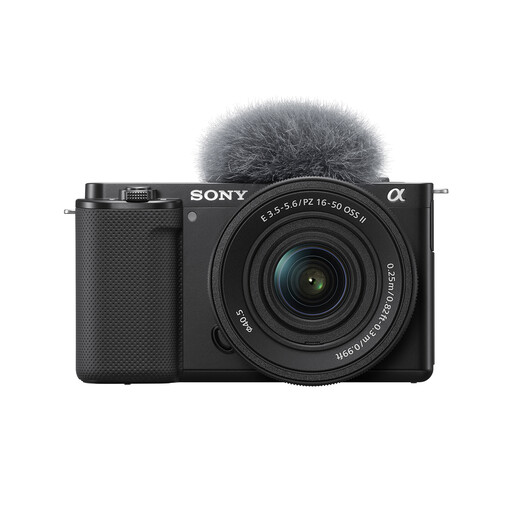
This standard-zoom kit is a choice to consider for whole-board context images, rather than assuming the included lens will reproduce small markings or solder joints at inspection scale.
 No image available
Sony ZV-E10K with 16–50mm power zoom lens
Consider this kit for whole-board context photographs; it includes a 16–50mm power zoom lens.
For readable small features, check the included lens’s maximum magnification and minimum focus distance against your board. If components at different heights must appear sharp, check the exact camera’s focus-bracketing workflow before relying on this kit for those records.
Joybuy
Questions about PCB photography
Do I need a macro lens to photograph an entire PCB?
Not necessarily for a whole-board overview, but check the lens before relying on that image to show small markings, pads or joints. Its maximum magnification, minimum focus distance and field of view determine whether the detail you need can fill enough of the frame.
Why are some parts of my close PCB photograph out of focus?
Components at different heights can fall outside the narrow depth of field of a close-up exposure. For a stationary board, rigid support and focus bracketing may help; Canon UK describes stacking as combining frames focused at slightly different distances.
Can image stabilisation replace a tripod or copy stand?
Do not rely on stabilisation alone when you need a repeatable camera position or aligned frames for focus stacking. Canon UK advises sturdy support for stacked images, and the board must remain still between exposures.
What should I check about disposing of old camera equipment in the UK?
Check the available collection or recycling arrangements for the camera and its electronic accessories before disposing of them. GOV.UK identifies the Waste Electrical and Electronic Equipment Regulations 2013, as amended, as the legislation underpinning UK arrangements for waste electrical and electronic equipment; check the applicable arrangements for batteries separately.


