Command-heavy strategy players
If you regularly assign commands, groups or camera actions to shortcuts, you may want more of those actions on the mouse rather than reaching for the keyboard each time.


Choose an MMO-style mouse with a thumb-button grid if you want many frequently used strategy commands within reach and can press its side buttons without changing your grip. A less crowded multi-button mouse makes more sense for a smaller set of shortcuts. Check software compatibility, connection options and hand fit before buying; a large display alone does not establish a required DPI or button count.
If you regularly assign commands, groups or camera actions to shortcuts, you may want more of those actions on the mouse rather than reaching for the keyboard each time.
If you play extended campaigns, the shape of the mouse and the reach to its thumb buttons may matter more to you than the maximum number of controls.
If you move between a gaming setup and everyday computing, consider how the mouse connects to each computer and where you can configure its buttons.
Decide which game actions you would actually put on the mouse before choosing a button layout. Then check whether you can reach those controls comfortably and configure them on the computers you use.
| Concern | What to check | Who this matters to |
|---|---|---|
| Access to commands | Count the actions you use often and compare reachable programmable controls. Check that the required remapping or profiles work with your computer. | If I frequently switch groups or use camera shortcuts, I want those actions close to hand. Around 46% of consumers would put direct command access first. |
| Thumb reach and fit | Check shape, orientation and side-button spacing against your grip. The adjustable 12-button Key Slider is specific to the CORSAIR Scimitar Elite Wireless. | During a long campaign, I need to press the intended button without shifting my grip. For around 27% of consumers, comfortable reach is the primary concern. |
| Connection and setup | Check the stated connection modes, receiver and charging arrangements, and software compatibility for the exact model. | If I move between a gaming desk and another computer, I need a connection and binding setup that works in both places. Manageable setup comes first for around 27% of consumers. |
A thumb grid is useful only when you can identify and press the buttons you intend to use. CORSAIR's Scimitar Elite Wireless has a repositionable side panel, but that adjustment is specific to the model.
List your most-used game actions, then assess whether a smaller layout covers them or a thumb grid is worth learning. Check side-button position against your grip before buying.
CORSAIR describes the Scimitar Elite Wireless 2.4 GHz connection as its gaming-oriented mode and Bluetooth as suited to everyday computing. Its available modes should not be assumed to apply to other mice.
For that model, check whether you can accommodate the 2.4 GHz receiver at your gaming desk. If you also want Bluetooth or wired use, confirm those modes on the exact mouse you choose.
Remapping and profiles can depend on a maker's software and the computer used to configure them. Razer, CORSAIR and Logitech G publish separate software information for their mice.
Check the exact model, operating system and software version before relying on custom bindings. If you switch computers, also check whether your settings can be retained on the mouse.
The Naga line is relevant if you want an MMO-style mouse with a dense set of controls for game bindings.
The Scimitar Elite Wireless offers a thumb-panel layout for players considering extensive mouse bindings.
The G502 X line is relevant if you want multiple customisable controls without a full MMO thumb grid.
These mice offer smaller sets of game controls to consider if you do not need a full MMO thumb grid. Compare their stated buttons and connection modes with the actions you intend to bind; check fit and configuration separately.
 No image available
Consider this model if you want several commands on a wireless mouse without choosing a 12-button thumb grid.
The product name states 10 programmable buttons and a weight of 53g. Check side-button reach and whether A HUB supports the features you need on your computer; low-power mode requires an updated driver.
 No image available
This model is worth considering if you want a smaller command set and a choice of connections when moving between computers.
The product name lists Bluetooth, 2.4G and USB-C modes. Check whether its six listed buttons cover your bindings and whether the charging dock mentioned in the name is included. Confirm the exact variant's weight if that affects your choice.
 No image available
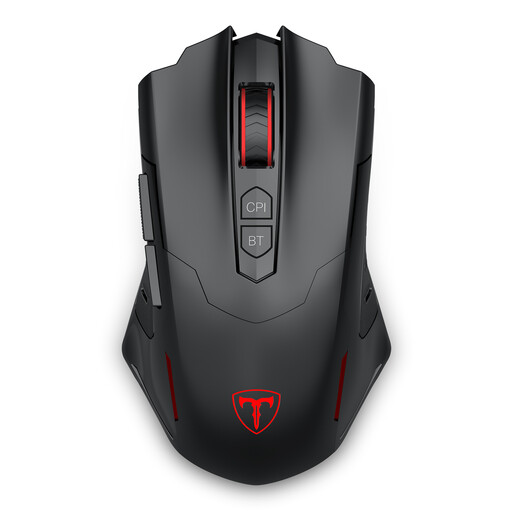
Consider this mouse if seven programmable buttons would cover your preferred shortcuts and you want to choose between wireless connection modes.
The product name states 2.4G and Bluetooth connectivity and 8000 DPI. Check the dimensions for your grip, plus software compatibility and whether custom bindings remain available when you switch computers.
 No image available
This wired option may suit a fixed gaming desk if you need only a few quick-access commands.
The product name describes programmable buttons, but check how to configure them and whether the required software works with your computer. Make sure a cable suits the position of your large-screen setup.
Choose enough reachable controls for the commands you will actually assign, rather than working towards a fixed number. Logitech G lists 13 customisable controls for the G502 X LIGHTSPEED, while CORSAIR lists 16 for the Scimitar Elite Wireless and Razer lists 21 for the Naga V2 HyperSpeed; the denser layouts are useful only if their additional buttons suit your grip and bindings.
For the CORSAIR Scimitar Elite Wireless, its 2.4 GHz receiver is the manufacturer's gaming-oriented wireless option. CORSAIR describes Bluetooth as suited to everyday computing, so it may be more useful when keeping a USB port free matters to you; check the modes offered by any other model separately.
Check the exact mouse's configuration requirements before relying on remaps, macros or profiles. Razer describes those functions in Synapse, while Logitech G and CORSAIR provide G HUB and iCUE respectively; confirm model and operating-system compatibility, particularly if you use more than one computer.
Check the seller's return instructions before buying if hand fit or thumb reach is uncertain. Keep your order record and assess the button layout promptly once you receive the mouse, following the applicable return instructions if you decide it does not suit you.