What should you check before choosing?
Start with network suitability, then decide whether the connection needs to serve a phone, a tablet or several devices.
Phone tethering
Consider it when: You already have a compatible phone and need occasional laptop access on a plan that permits tethering.
Trade-off: Sharing uses the phone’s data allowance and battery; Apple says carrier availability and charges can vary.
Dedicated mobile hotspot
Consider it when: Several devices need one connection regularly, or you want to keep your phone available for other use.
Trade-off: It adds a device to charge and manage, as well as a compatible mobile-data service.
Cellular tablet
Consider it when: The tablet is your main work device and you want it to connect directly to mobile data.
Trade-off: Do not assume it can also connect your laptop; check hotspot sharing on the exact tablet and plan.
| Priority |
What to check |
Your needs |
| Local network |
Use Ofcom’s Map Your Mobile for recurring postcodes, then check shortlisted operators’ coverage and service-status information. Maps are guides, not guarantees inside a building or vehicle. |
I need a connection at my work stops and regular travel locations, not just a network with broad national coverage. |
| Data plan |
Compare your recent usage with expected laptop, video-call and other off-Wi-Fi use. Check the provider’s allowance, tethering terms and any speed, fair-use or travel restrictions. |
My allowance needs to cover the work I actually do away from Wi-Fi without assuming I need an unlimited plan. |
| Device sharing |
Check whether the phone, hotspot or tablet can share data with the devices you use. For a hotspot, compare the exact model’s stated connection limit; check for a wired port if your setup needs one. |
Will I connect only the tablet itself, or keep a laptop and other devices online at the same time? |
| Compatibility |
Confirm the exact model’s supported bands, SIM or eSIM format and compatibility with the chosen operator and plan. Check the country variant rather than relying on a similar model name. |
I want the device and data service to work together at the locations where I plan to use them. |
| Travel-router setup |
Check whether the router has its own cellular modem or needs an upstream connection such as a phone, hotspot or Ethernet. Confirm the input and operating mode you intend to use. |
If I need my own local Wi-Fi at a temporary desk, I still need a working source of internet for the router to share. |
Joybuy mobile-internet device options
These options cover dedicated 4G or 5G hotspots for sharing a connection and cellular tablets for tablet-first work. Choose a suitable network and plan for the places you use before comparing their hardware.
 No image available
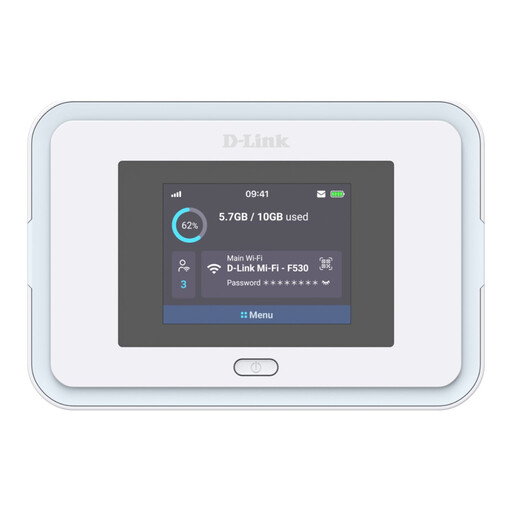
D-Link F530 5G NR AX3000 Wi-Fi 6 Mobile Hotspot
A dedicated hotspot to consider when several devices need a connection away from fixed broadband. The name specifies 5G NR and AX3000 Wi-Fi 6; check its exact UK bands, SIM requirements and compatibility with your chosen operator and plan.
Joybuy
 No image available
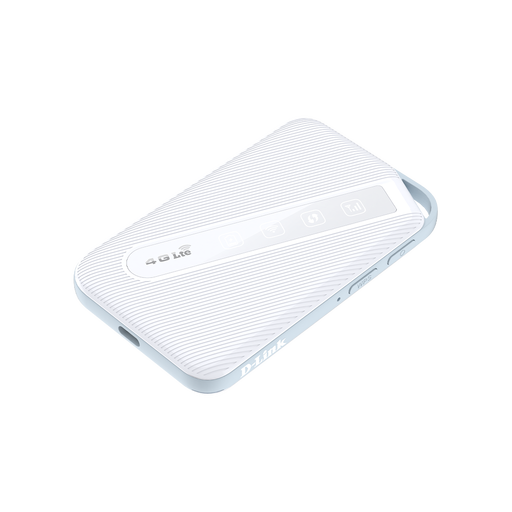
D-Link DWR-932W 4G LTE AX300 Wi-Fi 6 Mobile Hotspot
A 4G hotspot option for sharing mobile data during travel or temporary work. The name specifies AX300 Wi-Fi 6; confirm the exact UK LTE bands, SIM requirements and operator compatibility before selecting a plan.
Joybuy
 No image available
TECLAST ArtPad Pro 12.7-inch 4G LTE Tablet, 2025 Edition
For work done mainly on the tablet itself, the name specifies dual-SIM 4G LTE, a 2K display and an included stylus. Check its UK radio bands and SIM provisioning; if a laptop also needs access, confirm hotspot sharing on the exact tablet and plan.
Joybuy
 No image available
OPPO Pad SE OPD2420 EUN LTE Tablet, 128GB/6GB, Twilight Blue
An LTE tablet option if the tablet is your main device while travelling. Check the OPD2420 EUN model’s radio bands, SIM format and operator compatibility; confirm hotspot sharing separately if you need to connect a laptop.
Joybuy
 No image available
Teclast T65 13.4-inch 120Hz Dual-SIM 4G Tablet, 2026
For tablet-first mobile use, the name specifies dual-SIM 4G and a 13.4-inch 120Hz display. Confirm the exact model’s UK bands, SIM provisioning and operator compatibility; check hotspot sharing if other devices must use its connection.
Joybuy
Common questions
Should I choose a network before a hotspot or cellular tablet?
Yes. Ofcom recommends checking coverage and performance where you go, including work locations. Use Map Your Mobile for relevant postcodes, then check the shortlisted operator’s own information; a map cannot guarantee service at a precise indoor location.
Can I use my phone’s data connection for a laptop?
A compatible phone can share its cellular connection through tethering. Apple documents this for iPhone Personal Hotspot but notes that carrier availability and charges vary, so check your phone, plan, device limit and charging arrangements before relying on it for work.
Does a 5G hotspot automatically beat a 4G option for travel work?
No. A 5G device needs compatible local coverage and a suitable plan to use 5G. Compare the networks at your actual work stops and check the exact hotspot’s compatibility rather than deciding from the 5G label alone.
What should I check on an imported mobile-data device?
Check its exact model number, supported UK network bands, SIM or eSIM arrangements and compatibility with your intended operator. Country variants can differ, so also check the supplied product documentation, charger details and warranty territory.
What if my chosen mobile network performs poorly?
Compare another network at the locations causing difficulty before changing service. Ofcom says UK mobile customers can switch provider by sending a free text message; also confirm that your device accepts the replacement provider’s SIM or eSIM.


