What to check when choosing
For mobile-layout debugging, settle how you will move between devices and which keys need direct access before weighing shortcut customisation against a larger typing layout.
| Concern |
What to check |
Who this matters to |
| Device switching |
Check the number of remembered devices and how you switch between them; confirm keyboard compatibility with your phone or tablet. |
If I enter test data on a computer and mobile device, I want to change the keyboard connection without pairing it afresh. Around 31% of consumers put cross-device switching first. |
| Desk space and key access |
Compare the actual arrow, navigation and function keys with the space available beside a phone or tablet stand. |
A test device needs a place on my desk, but I still use navigation keys while debugging. For around 25% of consumers, preserving space without losing essential keys is the primary concern. |
| Shortcut configuration |
Check whether the exact model supports the remapping you need and whether configuration works with your computer. |
Repeated editor and developer-tools commands make configurable keys worth considering if I am willing to set them up; around 19% of consumers prioritise that workflow. |
| Extended typing |
Consider the keyboard’s layout and desk footprint alongside typing noise and your wider workstation arrangement. |
When coding and writing fill a long home-office session, I care about a workable typing setup that does not disrupt others. Comfort and noise come first for around 25% of consumers. |
Joybuy keyboards for this setup
These keyboards cover compact and larger desk arrangements for mobile-layout debugging. Compare their key layouts with your shortcuts, and check the exact device-switching behaviour before choosing one for a computer-and-phone setup.
 No image available
HyperX Alloy Rise 75 Wireless Keyboard UK
Consider its compact arrangement if a mobile test device needs space beside your main keyboard.
Check the selected variant’s physical UK key map against your debugging shortcuts, and confirm keyboard compatibility with your phone or tablet.
View on Joybuy
 No image available
HP 960 Ergonomic Split Layout Wireless Keyboard with Padded Wrist Rest
Consider the split layout if extended typing is a priority and you can arrange it alongside your mobile test device.
The named configuration includes a padded wrist rest. Check its key legends and the compatibility of any phone or tablet you intend to use with it.
View on Joybuy
 No image available
Hyper® HyperSpace Next Bluetooth Wireless Keyboard (UK) – White
This is a route to consider if you want a UK-labelled keyboard and have room for a larger typing layout beside your test device.
The product name specifies Bluetooth and the White variant. Check the connection and switching instructions for the devices in your setup.
View on Joybuy
 No image available
AULA F75 75% Tri-Mode Wireless Keyboard, US QWERTY
The 75% layout is worth examining when desk width is limited but you also want several connection options.
The product name lists wired, Bluetooth and 2.4G modes, PBT keycaps and RGB backlighting. Its stated layout is US QWERTY; check the key positions and the device-pairing method if you normally use UK legends or switch devices frequently.
View on Joybuy
 No image available
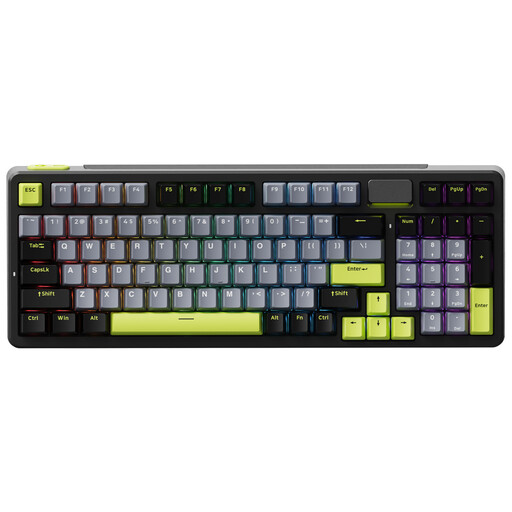
Rapoo V700DIY 96% Tri-Mode Mechanical Keyboard, US QWERTY, Gasket Mount-BG
Consider the 96% layout if keeping a near-full-size key arrangement matters more to you than choosing a smaller board.
The product name identifies wired, Bluetooth and 2.4 GHz modes and a US QWERTY layout. Check the physical key map and how Bluetooth pairing and switching work for your devices.
View on Joybuy
Frequently asked questions
Can one keyboard work with both my computer and phone during testing?
Yes, if the exact keyboard can pair with both devices and the phone accepts Bluetooth keyboard input. Logitech says Easy-Switch can remember up to three devices on compatible keyboards; check the switching controls and any app-specific shortcuts before relying on them during a test session.
Which size of keyboard suits responsive-layout debugging?
A compact or 75% keyboard suits a desk that needs room for a phone or tablet stand, provided its layered keys do not disrupt your shortcuts. Consider tenkeyless when direct navigation keys matter but a numpad does not, or a full-size layout when the numpad and familiar spacing justify its greater footprint. Compare actual key maps, not just size labels.
Do I need to choose a UK-ISO variant?
Choose a UK-ISO variant if you rely on UK key positions and legends; it is not a requirement for every user. Keychron offers UK layouts within its ISO range, but ISO products can have other regional variants, so check the selected configuration and its photographs.
Will a different keyboard fix an uncomfortable home-office setup?
A keyboard change alone may not address the arrangement of your desk, display, pointing device and mobile test equipment. The Health and Safety Executive’s workstation guidance considers equipment, furniture, working conditions and individual needs together; assess how the whole setup works before relying on a single accessory.


