Student working at a small desk
You use a laptop for coursework and responsive-layout checks, then need to put the mouse away or carry it in a bag. A compact shape matters, but check how it fits your hand rather than choosing by slimness alone.


For laptop-based layout and menu checks in a small student room, start with a compact mouse whose connection suits your laptop; consider click noise if you share the space, and give hand fit more weight if you work for long periods. A mouse cannot confirm how a menu behaves under real touch input: Chrome describes Device Mode as an approximation, so finish your checks on a phone or tablet in the intended browser.
You use a laptop for coursework and responsive-layout checks, then need to put the mouse away or carry it in a bag. A compact shape matters, but check how it fits your hand rather than choosing by slimness alone.
You need to know whether phone users can operate the menu, not just whether it fits a narrow desktop viewport. Chrome for Developers distinguishes Device Mode from running a page on a mobile device; use a real touch device for final checks.
You spend extended sessions coding and testing, so button reach, handedness and the position of the mouse on your desk deserve attention. Logitech’s hand-fit guidance recommends checking that you can reach the buttons and wheel comfortably.
Choose a mouse for the laptop work you actually do, then plan a separate real-device check for the mobile menu. Portability, hand fit and extra controls matter differently depending on which need drives your choice.
| Concern | What to check | Who this matters to |
|---|---|---|
| Desk and bag space | Compare the mouse’s shape with your available desk space and grip; check its connection method and click-noise description. | If I work beside a laptop on a crowded desk and carry the mouse away afterwards, easy storage is my main need; around 34% of consumers put compact use first. |
| Real touch interaction | Use desktop device emulation for early checks, then test opening, closing and scrolling on a phone or tablet in the intended browser. | A menu that looks right on my laptop still needs to work under a finger; roughly 33% of consumers make real touch validation their primary concern. |
| Comfort over long sessions | Check button and wheel reach, handedness and whether the shape supports your preferred grip. | When coursework keeps me at the desk for hours, a mouse I can reach and hold comfortably matters more than the slimmest shape; about 20% of consumers prioritise fit. |
| Pointer control and connections | Check the exact model’s supported connection modes, laptop compatibility and controls against the work you do. | If I regularly adjust fine details or move between devices, flexible desktop control becomes my deciding need; around 13% of consumers put it first. |
A desktop pointer does not reproduce every touch interaction. Chrome for Developers describes Device Mode as an approximation, while MDN Web Docs notes that touch events can involve simultaneous touch points.
Use the mouse for laptop navigation and early responsive checks, then operate the finished menu on a real phone or tablet in the intended browser.
A slim mouse is easier to store, but its shape may not suit your hand during extended work. Portability alone does not settle questions of button reach or palm support.
Check how naturally your fingers reach the buttons and wheel. If fit drives your choice, compare fuller and vertical shapes as well as travel mice, and keep the mouse within easy reach on the desk.
Connection and operating-system requirements depend on the model. Microsoft Support, for example, specifies Windows 10 or 11 and Bluetooth 4.0 or later for Surface Arc Mouse setup.
Check the exact mouse’s requirements against your laptop, and establish whether it uses Bluetooth, a USB receiver or both.
A replaceable-battery mouse and a rechargeable one create different routines. Old mice and batteries also need an appropriate electrical-waste or battery collection route rather than ordinary rubbish disposal; GOV.UK provides UK recycling guidance.
Choose a power arrangement you can manage and check the collection options available locally.
Replaceable batteries need replenishing; a rechargeable mouse needs access to charging when its battery runs low.
Its range includes slim travel mice, compact mice with additional desktop controls, and vertical models. The differences matter more here than the brand name alone.
The Orochi V2 is a compact wireless option to consider if the mouse will also be used for portable gaming or receiver-based desktop work.
Surface Arc Mouse is a flat-storing Bluetooth option for a Windows setup where carrying space is a priority.
These mice cover compact laptop control, alternative connections and a larger ergonomic shape for desktop work. Choose by the fit and connection your setup needs; whichever mouse you use, check the final menu on a real touch device.
 No image available
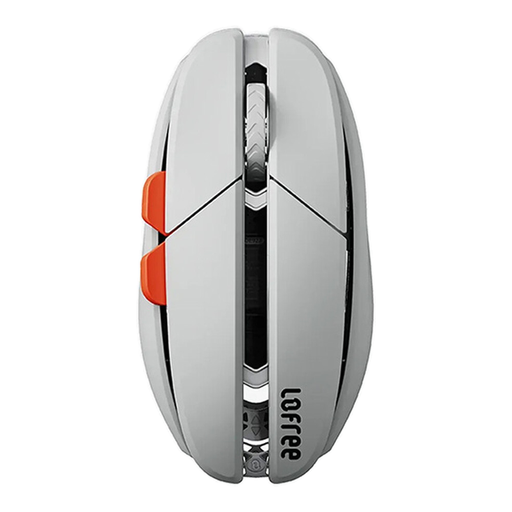
Consider this model if you want cable-free laptop control and quiet clicks in a shared room; assess its shape against your hand.
The product name specifies Bluetooth and 2.4G modes, adjustable DPI levels and one AA battery. Its quiet-click description is a product claim, not a measured noise comparison.
 No image available
Consider its connection options if you also use the mouse for desktop tasks beyond basic menu checks; check the physical fit and click noise if those decide your purchase.
The named variant has a magnesium-alloy frame and PC shell, a PAW3950 laser sensor, and Bluetooth, 2.4G and wired connection modes.
 No image available
This is an option for laptop navigation if a USB-receiver connection suits your setup. Check your laptop’s port or adapter arrangements and the click noise if you work near others.
The product name specifies an ambidextrous design, four buttons, a 1600 DPI optical sensor and a 2.4 GHz nano receiver; it does not identify a Bluetooth mode.
 No image available
Consider this shape if support during longer laptop sessions matters more to you than a slim travel mouse. Check hand fit and how much desk space you can give it; an ergonomic name does not guarantee comfort or prevent injury.
The named variant includes a detachable wrist rest.
 No image available
Its connection and pointer settings may matter if you use the mouse for other desktop work as well as menu checks. The described fit is aimed at medium-to-large hands; check the shape and click noise against your own setup.
The product name specifies a PAW3311 sensor, adjustable DPI up to 24000, Bluetooth, 2.4G and USB-C modes, and a stated weight of 63 g. Those features do not replace touch-device testing.
No. A mouse can help you inspect layout and desktop interactions, but it cannot confirm real touch behaviour. Chrome for Developers calls Device Mode an approximation, and MDN Web Docs explains that touch events differ from mouse events; test the finished menu on a phone or tablet.
Yes, they are useful for early checks. Chrome Device Mode can show a mobile-sized viewport, and Chrome’s Sensors tools can force touch input for debugging. Follow up in the intended mobile browser on a real device before treating the menu check as complete.
Choose by the connection the exact mouse supports and the ports and Bluetooth capability your laptop has. Bluetooth may leave a USB port free; a receiver needs a compatible connection. Requirements vary by model: Microsoft Support specifies Windows 10 or 11 and Bluetooth 4.0 or later for Surface Arc Mouse setup.
Do not rely on changing mice alone. Check that the mouse sits within easy reach and review your workstation and activity; University Hospitals Sussex NHS Foundation Trust advises positioning the mouse without overstretching. Seek medical advice if symptoms persist or worsen.
Use an appropriate electrical-waste and battery collection route rather than putting them in ordinary household rubbish. GOV.UK provides guidance on recycling electrical products and batteries; check your local collection arrangements for the items you have.