For home-office accessibility review, choose a monitor with a colour mode suited to your work and a comfortable, adjustable setup; consider a repeatable calibration workflow if colour-critical work is frequent. Even a calibrated display cannot establish accessibility conformance: check actual contrast ratios with a tool and make sure information is not conveyed by colour alone.
Who is this for?
Accessibility reviewers working mainly in sRGB
If you review text, interface states, charts and status messages, a suitable colour mode and a readable workspace help you inspect designs. W3C Web Accessibility Initiative guidance still calls for contrast calculations and cues beyond colour.
Creators who also review accessibility
If you repeatedly compare visual assets across web, photography, video or design work, consider how you will maintain the monitor's colour state. The calibration method matters more when consistent colour review is a regular task.
Hybrid workers setting up a home desk
Screen position, reflections and the laptop connection matter alongside colour review during long work sessions. The Health and Safety Executive notes that display-screen equipment rules can apply to permanent or long-term home working; individual setups need consideration.
What matters when choosing?
Start with the colour space you review, then decide whether maintaining a calibrated display is a recurring need; check how the screen fits your desk and laptop before settling on a model.
Monitor with an sRGB mode
Consider it: Your main task is reviewing web interfaces and documents at one home workstation.
Keep in mind: Factory calibration is a starting point, not a substitute for later colour maintenance or software contrast checks.
External-calibrator workflow
Consider it: You regularly compare colour-sensitive work and need a repeatable monitor state.
Keep in mind: Confirm support for the exact monitor and calibrator; a separate device may be needed. ASUS describes monitor-side calibration on supported ProArt displays, not every model.
Built-in calibration sensor
Consider it: Colour-critical checks are frequent and scheduled calibration would suit your workflow.
Keep in mind: This specialist capability may be more than occasional accessibility review requires. EIZO says its ColorEdge CG2700S can calibrate automatically at designated times.
| Concern |
What to check |
Who this matters to |
| Accessible-content review |
Look for a suitable sRGB mode, and plan to test actual designs with a contrast tool and inspect non-colour cues. |
If I review interfaces, I need to judge text contrast and whether states remain understandable without colour alone; around 42% of consumers put this review need first. |
| Colour consistency |
Check the exact model's calibration method and whether it needs a compatible external device. |
When I compare visual assets regularly, I need a practical way to maintain a consistent display state; for around 33% of consumers, that is the primary concern. |
| Home-workstation fit |
Check stand or mounting adjustment, reflections, desk space and whether USB-C video and power meet your laptop's requirements. |
I spend long periods at my desk and need the screen positioned comfortably with a workable laptop connection; this comes first for around 25% of consumers. |
Buying pitfalls
-
Treating a wide gamut as an accessibility pass
Colour coverage and calibration do not calculate contrast or show whether colour is the only information cue. W3C Web Accessibility Initiative guidance addresses both contrast and the use of colour.
Review the design in its intended colour mode, test foreground and background pairs with a contrast tool, and inspect labels, icons and states for non-colour distinctions.
-
Assuming factory calibration lasts indefinitely
A factory-calibrated starting state does not remove the need to maintain consistency. Calibration methods differ by monitor model.
Check the exact model's supported software, compatible calibrators and whether settings can be retained by the display.
A model without a built-in sensor may require a separate calibrator.
-
Choosing panel specifications before planning the desk
Reflections and screen position can make a home workstation harder to use comfortably, regardless of the monitor's colour specifications.
Check desk depth, stand adjustment or VESA mounting, lighting and the cable route before choosing a screen size.
An unsuitable supplied stand may mean using a monitor arm or adjusting the workspace.
-
Assuming any USB-C connection will power a laptop
USB-C connectivity alone does not establish that a monitor supplies enough power or supports the laptop's video connection.
Compare the monitor's stated USB-C video and power-delivery capabilities with the laptop manufacturer's requirements.
Brands to consider
BenQ
The DesignVue PD2706U illustrates a 27-inch 4K option for sRGB-focused design and web-content work.
- BenQ UK lists 100% sRGB, 100% Rec.709 and 95% P3 coverage for the PD2706U, alongside a factory calibration report and USB-C connectivity.
- Its factory specifications do not establish lasting accuracy or WCAG conformance; plan separately for colour maintenance and accessibility testing.
EIZO
ColorEdge is relevant to recurring colour-management work; the 27-inch WQHD CG2700S is one documented example.
- EIZO says the CG2700S has a built-in sensor that can calibrate automatically at designated times.
- Its 2560 × 1440 resolution is lower than that of a 4K display, and scheduled calibration may be unnecessary for occasional accessibility review.
ASUS
Supported ProArt displays offer monitor-side calibration workflows for buyers who regularly manage colour.
- ASUS says ProArt Calibration can work with supported external calibrators and store colour parameters in a supported monitor.
- Check the exact model, software and calibrator compatibility; a built-in sensor is not a feature of every ProArt display.
Dell
The UltraSharp PremierColor UP2720QA is a documented 27-inch 4K example with integrated calibration hardware.
- Dell UK lists a built-in calibration sensor, wide colour-space coverage and height, pivot, swivel and tilt adjustment for the UP2720QA.
- Dell labels this model unavailable on its UK product page; check current availability rather than planning a purchase around it.
Joybuy monitor choices
These monitors offer different starting points for home-office colour review, from sRGB-oriented displays to a model described with built-in calibration hardware. Check the exact variant's colour mode and calibration workflow against your task; none replaces testing the design itself.
 No image available
ASUS ProArt Display PA32UCG-K 32-inch 4K monitor
Consider this model if frequent colour-sensitive review makes its stated calibration capability relevant; confirm the exact variant's calibration workflow before buying.
The product name specifies an IPS Mini LED display, HDR support and Thunderbolt 3. These features do not establish accessibility conformance.
View on Joybuy
 No image available
ASUS ProArt PA278CV IPS WQHD monitor
For web and interface review, check that its colour settings suit your sRGB workflow; confirm the calibration method if ongoing colour consistency matters.
The product name identifies an IPS panel and WQHD resolution. Test actual designs with a contrast tool rather than relying on display specifications.
View on Joybuy
 No image available
BenQ MA270UP 27-inch 4K Nano Glossy IPS monitor
Consider this model for a home desk where a 4K display and USB-C connection suit your laptop setup; check laptop compatibility and how reflections affect your workspace.
The product name specifies a height-adjustable stand. If you review standard web colours, confirm whether the exact model has a selectable sRGB mode and a suitable calibration workflow.
View on Joybuy
 No image available
iiyama ProLite XUB2792UHSU-B6 27-inch 4K monitor
This 4K model is an option to examine for a detailed home-office workspace; confirm its sRGB mode and calibration approach if repeatable colour review is important.
The product name specifies a 16:9 display. Use a separate tool to assess the contrast of the content you review.
View on Joybuy
 No image available
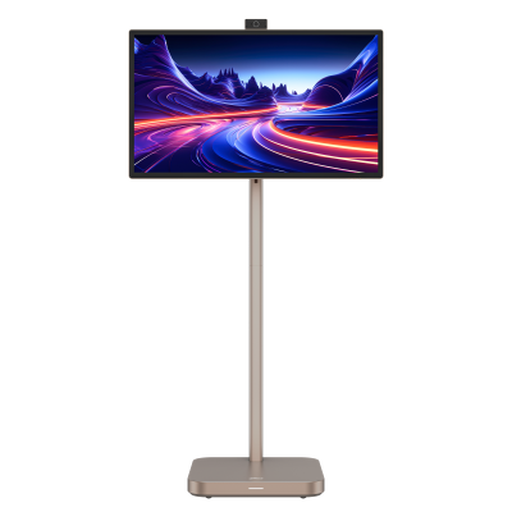
Dahua Explorer 31.5-inch 4K portable smart monitor
Consider its large display and built-in battery only if those suit how you use your home workspace; check that the screen and stand fit the desk.
The product name specifies Android 11 and 8GB+128GB. Confirm the exact panel type, colour mode and calibration workflow before relying on it for repeated colour review.
View on Joybuy
Frequently asked questions
Can a colour-accurate monitor prove that a page meets WCAG contrast requirements?
No. W3C Web Accessibility Initiative guidance sets a contrast ratio of at least 4.5:1 for normal text and says colour must not be the only visual means of conveying information. Calculate contrast for the actual foreground and background colours, then inspect whether labels and states have non-colour cues.
When should I recalibrate a monitor used for colour review?
Follow the exact model's supported calibration workflow and the consistency your work requires. ASUS describes regular calibration for consistent colour accuracy on supported ProArt workflows, while EIZO says the ColorEdge CG2700S can be scheduled to calibrate automatically.
Do home-working display-screen rules apply to my monitor setup?
They can apply to employees who use display-screen equipment while working at home. The Health and Safety Executive says this includes permanent or long-term home working and can include routine work split between home and a workplace; an individual workstation assessment matters more than choosing any one monitor specification.
Should I check for UKCA or CE marking on a monitor for Great Britain?
Check the marking and documentation applicable to the exact product. GOV.UK guidance for products placed on the Great Britain market says CE marking continues to be recognised alongside or in place of UKCA marking where the relevant product-regulation requirements align; Northern Ireland follows different processes.


