What matters when choosing?
For allotment records on a small desk, settle the physical fit first, then decide whether workspace, laptop connections or longer-session setup is your main reason to choose one monitor over another.
| Concern |
What to check |
Who this matters to |
| Desk fit and positioning |
Measure clear desk width and depth against the dimensions with stand. Check height adjustment or mounting options if the screen would sit too low. |
I have little room behind my harvest log and need the screen at a workable height without crowding the desk; around 33% of consumers would put desk fit and positioning first. |
| Space for records and plans |
Compare native resolution at the intended screen size and consider whether your usual layout needs documents side by side. |
When I compare spreadsheet columns with a planting calendar, I want to see more information without choosing a much larger screen; roughly 27% of consumers would make information density their primary concern. |
| Laptop connection |
Check the laptop’s USB-C video capability and charging requirement against the monitor’s stated connections and power delivery. |
I bring my laptop to the desk often and want fewer connections to make each time; about 20% of consumers would prioritise simplifying that laptop setup. |
| Longer-session setup |
Check screen adjustment and whether you can position the display without troublesome glare. Treat reader modes as additional features, not a substitute for placement. |
During a longer session updating crop records, I need a screen position that remains comfortable to use; around 20% of consumers would put that setup concern first. |
Joybuy monitors for this setup
These monitors cover Full HD record-keeping, a QHD option for denser layouts and a USB-C model to consider for a compatible laptop. Check each monitor’s footprint and connections against your own small-desk arrangement; the 24.5-inch MSI model deserves a particularly careful fit check.
 No image available
iiyama ProLite XB2492HSU 24-inch Full HD monitor
Consider this Full HD model if you mainly enter harvest dates, weights and notes. Check its dimensions with stand against your available desk depth and confirm that its connections suit your computer.
View on Joybuy
 No image available
ASUS ProArt PA24ACRV IPS QHD monitor
Consider this QHD model if comparing spreadsheet and calendar information is a priority. Confirm its dimensions with stand before choosing it for a shallow desk; if you plan to connect a laptop by USB-C, also check video and charging compatibility.
View on Joybuy
 No image available
Samsung Essential S3 S31D (LS24D310EAUXXU)
Consider this model for straightforward harvest-record entry. Measure the space available for its stand and check whether the screen can reach a suitable height in your setup.
View on Joybuy
 No image available
ASUS ZenScreen MB249C IPS USB-C monitor
Consider this USB-C model if you want a laptop connection option and flexible placement. Check video and charging compatibility with your laptop, the supplied mounting arrangement and the space it will occupy. Confirm its weight before choosing a mounting position.
View on Joybuy
 No image available
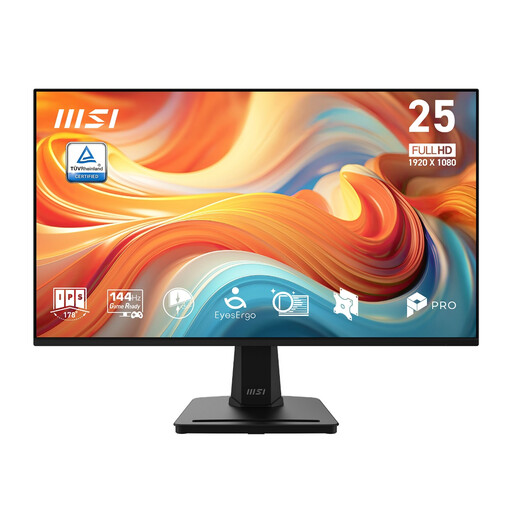
MSI PRO MP251 E14L 24.5-inch Full HD 144 Hz IPS Adaptive-Sync
Consider this Full HD model if a 24.5-inch screen fits your record-keeping desk. Check its dimensions with stand carefully: it is larger than the 23.8-inch format used for the compact routes above. If screen height is an issue, check the available adjustment and mounting options.
View on Joybuy
Frequently asked questions
How can I tell whether a 23.8-inch monitor will fit my desk?
Compare your clear desk width and depth with the monitor’s dimensions including its stand, not just its diagonal screen size. BenQ, for example, lists the GW2490E at 540 × 182 mm with stand. Allow for positioning too: the Health and Safety Executive advises a viewing distance of about an arm’s length, with the top of the screen near eye level.
Is Full HD or QHD more useful for harvest spreadsheets?
Choose QHD when fitting more columns or reference material into your working layout matters most; Dell lists the 23.8-inch P2425D at 2560 × 1440. Full HD may meet your needs if you usually enter records in one window at a time; BenQ lists the 23.8-inch GW2490E at 1920 × 1080. Check the stand and connections as well as resolution.
Will any USB-C laptop work with a USB-C monitor?
No single USB-C connector shape establishes both display and suitable charging support. Check your laptop’s external-display capability and charging requirement against the exact monitor specification. ASUS lists display and data connectivity with up to 65 W charging for the VA24ECPSN, but those are capabilities of that monitor, not a compatibility guarantee for every laptop.
What matters during longer harvest-planning sessions?
Prioritise a workable screen position, viewing distance and glare control. The Health and Safety Executive advises placing the display directly in front of you, with its top near eye level and roughly an arm’s length away. Reader modes or flicker-reduction features do not replace those setup checks.
What should I check about energy information and after-sales terms?
Check the applicable energy label and product information sheet for the exact monitor: UK government guidance covers electronic displays within its energy-information rules. Read the current seller terms for that listing separately, distinguishing any voluntary return or warranty offer from statutory rights rather than assuming terms shown for one model apply to another.


