Animators working near a window
If you arrange storyboards, keyframes or frame sequences in daylight, reflections can get in the way of judging detail. Screen position matters alongside the monitor's surface treatment.


Control window reflections before choosing a brighter monitor: the Health and Safety Executive advises positioning screens to avoid glare, often by keeping them from facing windows or bright lights. Then look for a matte or anti-glare screen and colour specifications that match your animation work. If daylight still makes the display difficult to use after repositioning it, compare typical brightness ratings rather than relying on a peak figure.
If you arrange storyboards, keyframes or frame sequences in daylight, reflections can get in the way of judging detail. Screen position matters alongside the monitor's surface treatment.
If animation assets also need review for illustration, video or print, check the colour space required for delivery and the exact monitor's calibration claims. Keep lighting consistent when making colour decisions.
If the external screen needs to show frames, a timeline and references while connecting to a laptop, check the display connection, charging requirements and room to position the screen away from reflections.
Start with the desk and window: the Health and Safety Executive advises arranging the screen to avoid glare and bright reflections. Once its position works, compare the screen surface, colour requirements and connections for your own workflow.
| Concern | What to check | Who this matters to |
|---|---|---|
| Daylight glare | Check for a matte or anti-glare surface and whether you can move the screen out of the window's reflection. Compare typical brightness if daylight remains troublesome after that change. | If window reflections obscure frame thumbnails or dark line work, I need a readable view before extra display features help me. Around 50% of consumers put glare control and readability first. |
| Colour consistency | Match the stated colour-space coverage and calibration information to the required delivery standard; assess important colours under controlled lighting. | When reviewing animation alongside other creative assets, I need to know which colour space I am judging and under what lighting. Colour consistency comes first for around 30% of consumers. |
| Workspace and connections | Check resolution, screen size, stand adjustment and the laptop's required input and charging compatibility. | If my timeline, frames and references must stay visible together, I need a layout that fits my desk and connects to my laptop. Roughly 20% of consumers prioritise that workspace and connection need. |
A reflected window can remain distracting on a brighter panel. The Health and Safety Executive recommends arranging the desk and screen to avoid glare or bright reflections.
Try a position that does not face the window and use blinds or curtains where practical. Then judge whether the display is readable in the daylight you actually work in.
Colour-space coverage and calibration claims do not, by themselves, establish how an animation app, export or review device will display an asset.
Check the delivery colour space, the exact model's calibration information and your software's colour-management settings. Make important colour decisions under consistent lighting.
Dell lists specifications for the U2723QE, but its product page identifies that model as unavailable. Those figures should not be treated as specifications for the U2725QE.
Check the exact model number and its current screen, connection and stand details before ordering.
A screen that cannot be positioned clear of reflected light may remain awkward to use, regardless of its display specifications. BenQ lists 150 mm of height adjustment for the 31.5-inch PD3225U, while ASUS lists 100 mm for the 32-inch PA32UCXR.
Measure the desk and check the exact model's stand movement and mounting compatibility against the position you need.
The PD3225U is a reference point for a larger 4K creative desk where colour modes and laptop connectivity matter.
The UltraSharp U2725QE is worth considering for a 27-inch 4K, hub-oriented desk setup with adjustable positioning.
The PA32UCXR is a specialist reference point when bright-room use coincides with demanding colour or HDR review.
The VP2786-4K is relevant when animation work overlaps with illustration, soft-proofing or print-oriented colour review.
These monitors offer different ways to arrange animation frames near a bright window, from a conventional WQHD desk display to larger 4K and ultrawide layouts. Check each model's surface, physical fit and colour requirements; none replaces controlling a reflected window.
 No image available
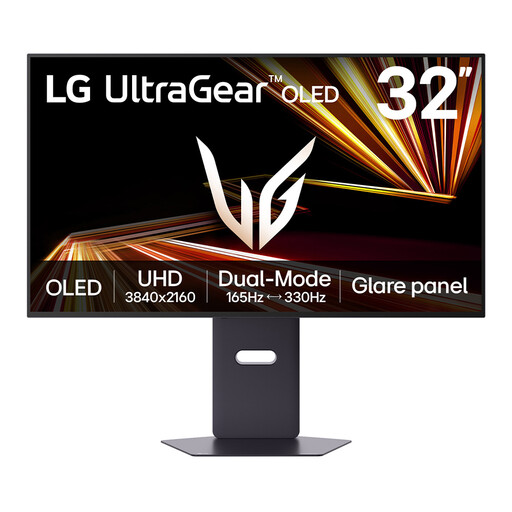
Consider this model if an OLED 4K display fits your frame-review workflow. Check the exact model's screen treatment and typical brightness for your daylight conditions before buying.
 No image available
Consider the 32-inch 4K screen if your frame layout needs room alongside colour-focused creative work. The product name also identifies HDR, 120 Hz and Thunderbolt 3; check laptop compatibility and typical brightness rather than using a peak brightness figure to judge daylight readability.
 No image available
Consider this screen if WQHD gives you enough room for frames and timeline panels. Its stated resolution is 2560 × 1440, not 4K; check that the available workspace and frame detail meet your needs, and position the screen clear of window reflections.
 No image available
The 32-inch 4K format may suit a larger frame-arranging layout if it fits your desk. The product information warns of image-retention risk with prolonged static images, which matters for persistent timeline and tool panels; check typical brightness for daylight use.
 No image available
Consider the ultrawide format if you want frames and editing panels spread across one screen and have room to position it away from window reflections. Its stated 32:9 Dual QHD resolution is 5120 × 1440, not 4K UHD; check the desk fit, viewing position and typical brightness before choosing it for a bright room.
Not on its own: a brighter panel can still show a reflected window. The Health and Safety Executive advises arranging the screen to avoid glare or bright reflections, often by keeping it from facing windows or bright lights; blinds or curtains can help manage the light before you assess brightness.
No particular model or brightness level is prescribed in the Health and Safety Executive guidance cited here. The HSE says employers must assess workstation risks for workers who use display screen equipment daily as part of their normal work, continuously for an hour or more; screen glare and reflections should be addressed in that assessment.
Start with enough workspace for your frames, timeline and references, then check colour needs and glare control. Dell specifies 120 Hz for the U2725QE, while BenQ and ASUS list 60 Hz for the cited creative displays; refresh rate does not replace the resolution, surface or colour specifications your work requires.
A hood can shield the display from some ambient light during controlled colour review. ViewSonic describes a detachable hood for the VP2786-4K, and ASUS lists one for the PA32UCXR; neither removes the need to position the screen away from direct window reflections.