Frequent side-by-side reviewers
If you repeatedly move between a translation, its source and your notes, consider whether you need to change the screen’s height, distance and angle during a session rather than leave it in one position.


Choose a single-monitor arm by checking your display-only weight, VESA mounting pattern, available mounting space and how far you need to move the screen while comparing texts. An articulated arm suits frequent changes of height and distance; a pole-mounted arm may suit a screen that usually stays in one position. Neither replaces arranging the screen, keyboard and source documents comfortably.
If you repeatedly move between a translation, its source and your notes, consider whether you need to change the screen’s height, distance and angle during a session rather than leave it in one position.
If source documents and a keyboard compete for space, check where the screen will sit and how far the arm extends or folds back. Desk-edge and rear clearance matter as well as screen size.
Start with your monitor’s VESA pattern and weight without its stand, then check the mounting arrangement. A stated screen-size range alone cannot establish that an arm will fit.
Consider it when: You often bring the screen closer for reading and move it back for typing.
Allow for: The display must fall within the exact arm’s supported weight range, including any minimum load.
Consider it when: The screen usually stays at one height, but you still want to adjust its angle or orientation.
Allow for: Check its reach if you need to pull the screen forward, and confirm that its clamp or grommet arrangement fits your desk.
| Concern | What to check | Who this matters to |
|---|---|---|
| Frequent repositioning | Check lift, reach, tilt and rotation against the positions you actually use. The monitor must also fall within the arm’s full rated weight range. | If I alternate between close reading and typing, I want to move the screen without rearranging everything else. Around 36% of consumers put repositioning first. |
| Monitor and mount fit | Match the display-only weight and VESA pattern to the exact arm variant; check desk thickness and edge clearance for a desk clamp. | I need to know the arm fits my existing monitor and mounting surface before considering its adjustments. Compatibility is the primary concern for around 29% of consumers. |
| Document space | Measure usable desk depth, rear clearance and where the screen needs to sit relative to your source documents. | When notes and source pages share a small desk, I need room to read and write without placing them awkwardly around the screen. Around 21% of consumers prioritise that layout. |
| Low-interruption setup | Check the stated cable route and leave enough cable length for the intended movement; assess stability within the rated load. | I want cables out of my reading space and a screen that holds its chosen position. Keeping the setup manageable comes first for around 14% of consumers. |
A matching diagonal does not establish VESA or weight compatibility. Some arms specify a minimum as well as a maximum display load.
Check the monitor’s VESA hole pattern and weight without its stand against the stated range for the exact arm variant.
An arm may fit the monitor yet lack a usable desk edge or enough room to move clear of a wall, shelf or divider.
Measure the mounting surface, rear clearance and intended reach. Confirm which mounting hardware comes with the selected variant.
A grommet installation may require a compatible accessory that is not included with the arm.
Screen adjustment does not settle where the keyboard, chair and documents should go. The Health and Safety Executive advises positioning the top of the screen near eye level and the screen about an arm’s length away.
Once the arm is installed, arrange the keyboard and source documents so you can work without repeatedly twisting or leaning towards the display.
Duronic’s DMG51X2 product-page wording is inconsistent about supported screen size and capacity, making those limits important to resolve before purchase.
Confirm the current manual or seller specification for the precise variant, including its supported monitor weight, size and VESA pattern.
The M2 Pro is an adjustable option for lighter single monitors.
The cited range includes a pole-mounted single-monitor arm and an articulated gas-powered model.
The cited LX desk arm provides a reference for a monitor requiring a different rated load range.
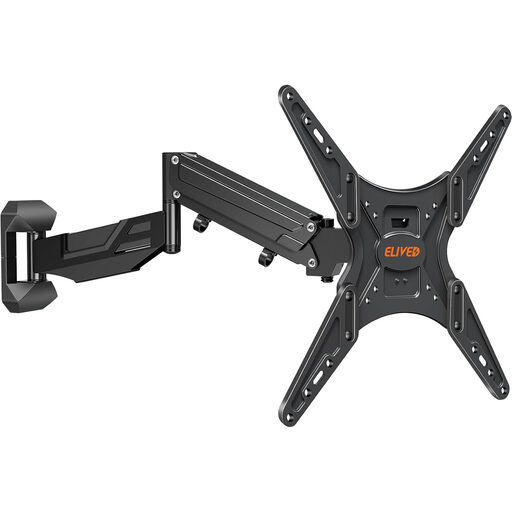
This gas-spring option mounts to a suitable wall rather than a desk. Consider that distinction before comparing its screen movement with desk-clamp arms for translation review.
 No image available
Consider this wall-mounted arm if you need to reposition a single screen and have a suitable solid, load-bearing wall; do not install it into non-load-bearing drywall.
The product name specifies VESA 100 × 100 to 400 × 400 mm and a 25 kg maximum. Check your display-only weight and VESA pattern against the mount’s full supported range, including its minimum load, before ordering.
Place it about an arm’s length away, with the top near eye level, in line with Health and Safety Executive guidance. Arrange the screen and keyboard so you do not need to twist your back to work.
Measure your monitor’s weight without its stand, its VESA pattern and the reach you need over your documents. Check the desk thickness and clamp clearance for a desk arm, or the suitability of the mounting wall for a wall arm; then match those measurements to the exact product variant.
Consider the whole workstation, not just the arm. The Health and Safety Executive says employers must carry out a workstation assessment for workers who use display screen equipment daily as part of normal work, continuously for an hour or more.
That depends on the arm and how you intend to mount it. Duronic states that the DM251X2 includes a desk clamp but that its compatible grommet is sold separately; check the included hardware for the exact variant you choose.