For bank-statement work beside a bright window, start with screen positioning, a matte or anti-glare finish and a stand you can adjust. A 27-inch QHD monitor is a practical choice for documents and spreadsheets; consider 4K if its larger pixel grid matters to your work. Check laptop connections separately, and plan for window reflections even if the screen has an anti-glare finish.
Who this choice matters to
Bright-window statement checker
If you compare transactions, PDFs and online banking beside a window, screen position and reflections can shape your choice. The Health and Safety Executive advises adjusting screens and lighting to avoid reflections and glare.
Dense-spreadsheet multitasker
If you keep statements and spreadsheets visible together, compare resolution as well as screen size. Dell and BenQ list 27-inch QHD models at 2560 × 1440, while LG lists a 27-inch 4K model at 3840 × 2160; your preferred display scaling also matters.
Single-cable laptop worker
If you connect a laptop at the desk each day, USB-C display and charging functions may simplify the setup. Check the laptop’s video output and charging requirements against the exact monitor: BenQ and LG specify different power-delivery capabilities for the models discussed below.
What to check before buying
Settle where the screen can sit relative to the window, then choose the resolution you need for your documents and check laptop connections if you intend to use them.
| Concern |
What to check |
Who this matters to |
| Reflections and positioning |
Check the exact screen finish and stand adjustment. Plan where the panel will face relative to the window; the Health and Safety Executive advises adjusting screens and lighting to avoid glare. |
If daylight reflects across transaction rows, I need to change the screen position rather than rely on its coating alone. Around 42% of consumers put reflection control first. |
| Document workspace |
Compare 27-inch FHD, QHD and 4K resolution, then consider whether your computer output and preferred display scaling suit the choice. |
Keeping a statement and spreadsheet visible together matters more to me than minimising the pixel grid. Document workspace comes first for around 33% of consumers. |
| Laptop connection |
Check USB-C video support and the monitor’s power-delivery rating against your laptop’s requirements. |
When I reconnect my work laptop, I want the required display and charging functions through fewer cables. For around 25% of consumers, that connection is the primary need. |
Buying pitfalls
-
Choosing by screen size alone
A 27-inch screen does not tell you how many pixels are available for statement columns. BenQ lists its GW2790 at 1920 × 1080 and GW2790QT at 2560 × 1440; LG lists the 27UP85ZK-W at 3840 × 2160.
Decide whether FHD, QHD or 4K fits the documents you normally keep on screen, allowing for your preferred zoom and display scaling.
-
Expecting a coating to solve a badly placed screen
A matte or anti-glare description does not mean a monitor can face a window without distracting reflections. The Health and Safety Executive advises adjusting screens and lighting to avoid glare.
Check the possible screen angles at your desk and whether you can reposition the display or control the daylight.
-
Assuming every USB-C port can dock a laptop
USB-C functions and charging ratings depend on the exact monitor. BenQ specifies 65W power delivery for the GW2790QT, while LG specifies charging up to 90W for the 27UP85ZK-W.
Match the monitor’s video and charging functions to your laptop’s requirements before planning a one-cable setup.
If those requirements do not match, you may still need a separate charger, dock or adapter.
-
Changing the monitor without reviewing the workstation
For UK workers who use display screen equipment daily as part of normal work, continuously for an hour or more, the Health and Safety Executive says employers must carry out a workstation assessment. A new display does not replace that assessment.
For a regular work setup, consider the desk, chair, input devices, lighting and screen position alongside the monitor.
Relevant brands to consider
BenQ
The GW2790QT is a reference point for a 27-inch QHD desk setup with a matte screen and USB-C; its specifications should not be assumed to apply to other BenQ models.
- BenQ lists the GW2790QT at 2560 × 1440, with 350 nits typical brightness, 110 mm height adjustment and USB-C power delivery rated at 65W.
- BenQ lists the GW2790 instead at 1920 × 1080 and 250 nits typical brightness. Check the full model name before relying on the QHD model’s features.
Dell
The P2725DE is an office-oriented QHD option to examine if stand adjustment and laptop connectivity matter.
- Dell lists a 27-inch 2560 × 1440 IPS display with anti-glare treatment, up to 150 mm height adjustment, USB-C hub functions, Ethernet and 90W power delivery.
- Check your laptop’s compatibility and the display’s position relative to the window; those specifications do not establish reflection-free viewing.
LG
The 27UP85ZK-W is a 27-inch 4K model to consider when document detail and a compatible USB-C laptop connection are priorities.
- LG lists a 3840 × 2160 IPS display, height, pivot and tilt adjustment, and USB-C for display, data and charging up to 90W.
- Confirm the screen finish and your laptop’s requirements, and plan the display position separately for the bright-window setting.
Joybuy monitors for this setup
These monitors offer QHD or 4K options for comparing statements and spreadsheets at a desk. Check each model’s screen finish, positioning and laptop connections against your bright-window setup rather than treating resolution alone as the deciding feature.
 No image available
ASUS ProArt PA278CV IPS WQHD
For statement and spreadsheet work where WQHD suits your workspace, consider this IPS model. Check the screen finish and stand movement against your window position, and confirm USB-C video and charging requirements before planning a one-cable laptop setup.
View on Joybuy
 No image available
ASUS ProArt PA27DCE-K OLED 4K UHD
For dense documents, this model offers a 4K UHD pixel grid. Check its screen finish and laptop connections for your setup. If you leave static tables displayed for long periods, take account of the stated OLED burn-in risk.
View on Joybuy
 No image available
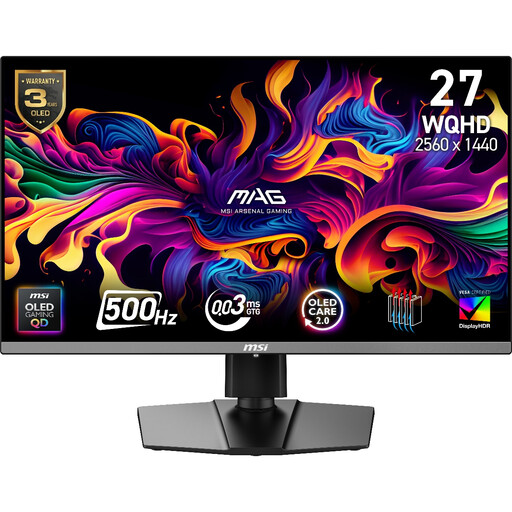
MAG 272QP QD-OLED X50 27-inch WQHD 500Hz
For statement work on a 27-inch WQHD screen, assess this gaming monitor by its document-work fit rather than its refresh rate. Check the screen finish, stand adjustment and laptop connections for your desk.
View on Joybuy
 No image available
MSI MD272UPSW 27-inch 4K UHD Smart Monitor with Google TV
For detailed statements on a 27-inch display, this IPS model specifies 4K UHD resolution. Its title also specifies USB-C 65W; check laptop video output and charging needs, and confirm the screen finish for your window position.
View on Joybuy
 No image available
iiyama ProLite XUB2792UHSU-B6 27-inch 4K UHD
For detailed spreadsheets, this 27-inch 4K UHD model is another option to assess. Check its screen coating for the bright-window position and confirm any USB-C video or charging functions your laptop requires; a Matte Black colour description does not establish the screen finish.
View on Joybuy
Common questions
Will a brighter monitor solve glare from a nearby window?
Not on its own: a brightness setting does not remove light reflected from the screen. The Health and Safety Executive advises adjusting screens and lighting to avoid reflections and glare, so consider the display angle and daylight control as well.
Should I choose QHD or 4K for bank statements?
Choose a 27-inch QHD model if its 2560 × 1440 pixel grid suits the documents you keep visible; consider 4K if you need the larger 3840 × 2160 grid. Dell and BenQ list QHD models, while LG lists the 4K 27UP85ZK-W. Check your computer’s output and your preferred scaling before deciding.
Can one USB-C cable connect and charge my laptop?
Yes, if the exact monitor and laptop support the required video and charging functions. BenQ specifies 65W power delivery for the GW2790QT, and LG specifies charging up to 90W for the 27UP85ZK-W; compare those capabilities with your laptop’s requirements.
Does a new work monitor replace a workstation assessment?
No. For UK workers who use display screen equipment daily as part of normal work, continuously for an hour or more, the Health and Safety Executive says employers must carry out a workstation assessment. The monitor is only one part of the working setup.


