What matters when choosing
Start with the amount of readable document space you need, then check whether the monitor fits your desk and connects to your computer as intended.
| Concern |
What to check |
Who this matters to |
| Text and workspace |
Compare resolution, screen shape and readable text size at your preferred operating-system scaling. |
If I compare terms across two documents, I need both panes visible without shrinking the text too far. Around 36% of consumers put text and workspace first. |
| Laptop connection |
Confirm USB-C video compatibility, the monitor’s power-delivery rating and the cable required. |
A laptop-led study setup is easier for me to manage when the display connection also meets my charging needs. Around 29% of consumers prioritise that connection. |
| Screen placement |
Check desk depth, stand adjustment and reflections from your study lighting. |
For long reading sessions, I need to position the screen without crowding my desk or facing distracting glare. Around 21% of consumers make placement their primary concern. |
| Study controls |
Check whether the model has speakers, usable audio controls and brightness settings that suit your room. |
In a quiet study, I want control over audio and screen settings rather than features I will not use. Around 14% of consumers put those controls first. |
Monitors for glossary work on Joybuy
These monitors offer 4K desktop-display options for text-heavy glossary work, from 27-inch models to larger screens. Compare their stated features with your desk space, lighting and laptop requirements; the list does not establish which screen will feel comfortable in your study.
 No image available
Dahua 32-inch 4K 165Hz Curved OLED monitor
Consider this larger curved display if you want room for glossary documents and can accommodate its shape and size on your desk.
The product name specifies 3840 × 2160 resolution, 165Hz refresh rate and USB-C with 65W power delivery. Check whether your laptop supports video over USB-C and whether 65W meets its charging needs.
If quiet-study operation matters to you, check the speaker controls and operating noise before buying.
View on Joybuy
 No image available
iiyama ProLite XUB2792UHSU-B6 27-inch 4K monitor
The 27-inch 4K format is worth considering if you want a conventional desktop size for two readable glossary panes.
Check the available stand adjustments for your desk position. If you plan to use one USB-C cable for your laptop, confirm video and charging compatibility before relying on that arrangement.
View on Joybuy
 No image available
BenQ MA320UP 32-inch Nano Glossy IPS 4K monitor
Consider its larger 4K workspace if you regularly keep several glossary sources visible and have sufficient desk depth.
The product name specifies an IPS panel, Nano Glossy finish, USB-C and a height-adjustable stand. Check reflections from your study lighting and confirm the features you need with your particular computer.
View on Joybuy
 No image available
MSI MD272UPSW 27-inch 4K Smart Monitor
This 27-inch display is a conventional-size 4K option for reading and comparing glossary entries.
The product name lists an IPS panel, Google TV, Dolby Audio and USB-C with 65W power delivery. Decide whether the smart and audio features suit a quiet study, and check laptop video compatibility and charging needs.
View on Joybuy
 No image available
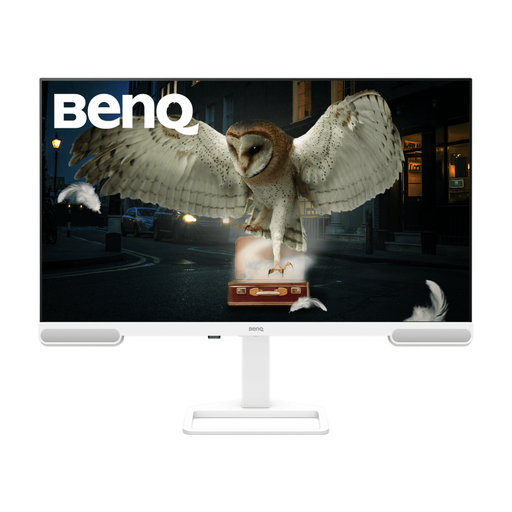
BenQ EW3290U 4K Ultra HD monitor
Consider this larger 4K desktop option if your glossary workflow benefits from more physical screen space.
The product name states 3840 × 2160 resolution and a 31.2-inch size, while other supplied specifications give 31.5 inches. Confirm the exact dimensions before checking desk fit, and verify the connections you need for your laptop.
View on Joybuy
Frequently asked questions
Do I need 4K to build a bilingual glossary?
No, but text sharpness is a reason to consider a high-resolution display when you read dense entries throughout the day. RTINGS associates high resolution and pixel density with sharp text on the ASUS PA32QCV; Dell and LG also list 27-inch 4K options. Check that your preferred operating-system scaling leaves text readable and enough room for your documents.
Can one USB-C cable display my laptop screen and charge it?
It can if your laptop supports video over USB-C and the monitor supplies enough power for that laptop. Dell lists up to 90W power delivery for the U2725QE, and LG lists 90W for the 27U730A-B but up to 15W for the 27U631A-B. Check the cable too: LG says one is not included with the 27U631A-B.
How much desk space should I allow for a larger monitor?
Allow enough depth to view the screen at a comfortable distance as well as room for its stand. Ergotron advises placing a monitor at least 51 cm from your eyes and increasing the distance for larger screens. Measure your desk and check the model’s dimensions and adjustment range before choosing a 32-inch display.
What if a monitor arrives faulty or does not match its description?
Contact the seller about the fault or discrepancy rather than assuming you must use the manufacturer’s warranty. Citizens Advice explains that faulty or misdescribed goods can give rise to legal remedies and that a warranty adds to, rather than replaces, legal rights. Keep your purchase record and the details of the problem.


