For bird-survey analysis beside a bright window, position the monitor to reduce reflections before choosing a screen finish; brightness or HDR alone will not resolve a reflected window. Choose a 27-inch 4K display when dense maps and parallel data views need the extra pixels, consider QHD for less detailed work, and accept Full HD only if its smaller workspace suits your tasks. If you use a laptop, check USB-C video support and charging requirements separately.
Who is this for?
Window-side survey-data analysts
If you read bird-count tables, charts, maps or reports beside a bright window, screen placement matters alongside detail. The UK Health and Safety (Display Screen Equipment) Regulations 1992 address disturbing glare and reflections in workstation design.
Laptop-based field-data reviewers
If you return from fieldwork to analyse results on a laptop, a monitor with USB-C may help simplify your desk connection. Check whether your laptop supports video through that connection and whether the monitor can supply the power it needs.
Detail-first map and spreadsheet users
If you keep dense records, detailed maps and several analysis windows open, compare native resolution at the screen size you intend to use. The cited 27-inch models include 4K, QHD and Full HD options, with different amounts of pixel detail.
What matters when choosing?
For bird-survey work beside a bright window, check where the screen can sit before comparing resolution, laptop connections and stand adjustment.
| Concern | What to check | Who this matters to |
|---|
| Window reflections |
Check the screen finish and whether the stand or mount lets you angle the display away from the window. |
If a window reflection obscures chart labels, I need to change the screen position and keep the data legible; around 36% of consumers put reflection control first. |
| Map and table detail |
Compare native 27-inch resolutions: 4K at 3840 × 2160, QHD at 2560 × 1440 and Full HD at 1920 × 1080. Confirm your computer can output the chosen resolution. |
When I compare detailed maps with survey records, I need enough pixels for both; roughly 29% of consumers prioritise detail and workspace. |
| Laptop connection |
Confirm video support through the relevant USB-C connection and compare the monitor’s power delivery with the laptop’s charging requirement. |
If I move my fieldwork laptop to a desk for analysis, I want the display connection to work without assuming it can also replace my charger; around 21% of consumers put laptop integration first. |
| Adjustment for lighter work |
Check height and angle adjustment, then decide whether the native resolution suits your usual records and charts. |
For routine records rather than fine map detail, I would favour a screen I can position comfortably; approximately 14% of consumers prioritise this practical fit. |
Buying pitfalls
-
Relying on an HDR or brightness label to solve glare
A bright window can still appear as a reflection on the screen. Display specifications cannot compensate for every desk position.
Assess the screen’s position relative to the window first, then consider its surface finish and the adjustments available on its stand.
-
Assuming USB-C will replace the laptop charger
USB-C charging capability differs by model. Dell lists up to 140W for the U2725QE, LG up to 90W for the 27UP850K-W and BenQ 20W for the GW2790TC; those figures do not establish compatibility with your laptop.
Check the laptop’s video connection, charging requirement and cable requirements before planning a one-cable setup.
-
Choosing 27-inch Full HD without considering map detail
At the same 27-inch size, Full HD has fewer native pixels than QHD or 4K for maps, tables and parallel windows.
Compare the resolutions using the detail and number of windows your work requires; Full HD remains an option when the reduced workspace is acceptable.
-
Treating an eye-comfort label as the whole desk setup
Screen features do not replace suitable positioning and lighting. The Health and Safety Executive’s guidance considers the workstation and work conditions, not just the monitor.
Check stand adjustment and reflections in the complete setup. Where display-screen work meets the assessment conditions, ensure the employer’s workstation assessment covers it.
Relevant brands to consider
Dell
Dell UK lists 27-inch UltraSharp models that provide distinct resolution options for desk-based analysis, including the 4K U2725QE and QHD U2724D.
- Dell specifies an anti-glare, anti-reflective surface, ambient-light sensor and up to 140W power delivery for the U2725QE.
- Those features do not remove a direct window reflection. Check the exact model’s connections and how it can be positioned at your desk.
LG
LG UK describes the 27UP850K-W as a 27-inch 4K IPS monitor with an adjustable stand and USB-C power delivery up to 90W.
- Its stated resolution and USB-C functions are relevant to detailed work with a compatible laptop.
- A DisplayHDR 400 designation does not establish how it will handle a window reflection. Confirm availability and the surface finish before choosing this model.
BenQ
BenQ lists the GW2790TC as a 27-inch Full HD IPS monitor with a matte screen and an adjustable stand.
- Its matte finish and stand adjustments are relevant when positioning a screen for lighter document and spreadsheet work.
- Full HD offers fewer native pixels than the cited 27-inch QHD and 4K models. BenQ rates its USB-C power delivery at 20W, so check laptop charging needs separately.
Joybuy monitors for this setup
These 4K and WQHD monitors are options for desk-based bird-survey analysis. Compare their screen finish, positioning and connections against your window and computer before choosing.
 No image available
ASUS ProArt PA27DCE-K OLED 4K UHD
Consider this 4K display when detailed maps and tables are central to your work; check how its screen can be positioned relative to the window.
For long sessions with static tables or dashboards, review the model’s image-retention guidance. Confirm USB-C video and charging suitability if you plan to connect a laptop that way.
View on Joybuy
 No image available
ASUS ProArt PA278CV IPS WQHD
Its WQHD resolution is an option for spreadsheets and charts when 4K-level map detail is not essential. Check the screen finish and stand adjustment against your window-side position.
If laptop charging matters, confirm the model’s USB-C power delivery against your laptop’s requirement.
View on Joybuy
 No image available
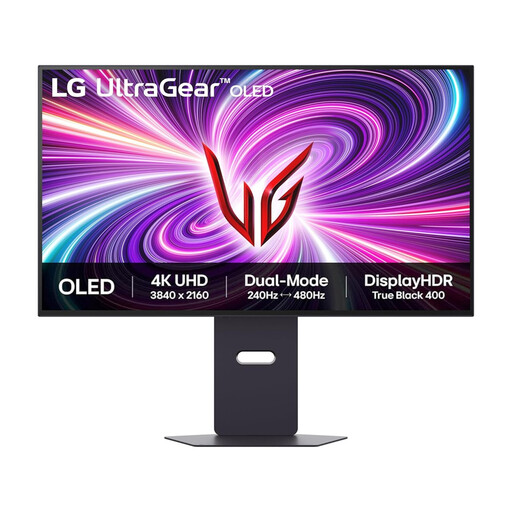
LG UltraGear 32GS95UV-B 32-inch 4K OLED Dual Mode
The 32-inch 4K format is worth considering if your desk can accommodate a larger display for maps and parallel survey records. Check the viewing distance, window reflections and positioning before choosing it.
The product title lists DisplayPort and HDMI 2.1; verify the connections you need for your computer. Review image-retention guidance if tables will remain static for long periods.
View on Joybuy
 No image available
MSI MD272UPSW 27-inch 4K UHD Smart Monitor with Google TV
This 27-inch 4K IPS option suits a setup where detailed survey records and laptop connectivity both matter. Its title specifies USB-C 65W; confirm video compatibility and whether that power delivery meets your laptop’s needs.
Check the screen coating and available positioning adjustments for your window-side desk.
View on Joybuy
 No image available
iiyama ProLite XUB2792UHSU-B6 27-inch 4K UHD, Matte Black
Consider this 27-inch 4K display for detailed tables and mapping outputs, provided you can position it to manage reflections.
Matte Black describes the monitor’s colour, not necessarily its screen coating. Check the coating and confirm USB-C video and charging functions if your laptop setup requires them.
View on Joybuy
Common questions
Will a brighter monitor solve glare from a window?
No: a reflected window also calls for changes to screen position and lighting. The UK Health and Safety (Display Screen Equipment) Regulations 1992 address preventing disturbing glare and reflections in workstation design; assess placement as well as screen finish rather than relying on a brightness or HDR label.
Should I choose 4K, QHD or Full HD for bird-survey analysis?
Choose a 27-inch 4K option if fine map detail and several data windows are regular requirements; QHD suits work that needs less detail, while Full HD leaves fewer pixels available at the same screen size. Check that your computer can output the resolution you choose.
Can one USB-C cable connect and charge my laptop?
It can only do both if the laptop supports video through the relevant connection and the monitor supplies enough power. Dell lists up to 140W for the U2725QE, LG up to 90W for the 27UP850K-W and BenQ 20W for the GW2790TC; compare the exact monitor, cable and laptop requirements.
When is a workstation assessment required for screen work?
According to the UK Health and Safety Executive, employers must assess the workstation for workers who use display screen equipment daily as part of normal work, continuously for an hour or more. The assessment covers the workstation and work conditions, not just the choice of monitor.


