Bright-room home cataloguers
If daylight reaches your desk, screen placement and adjustment matter before extra display features. The Health and Safety Executive advises arranging screens and lighting to avoid reflections and glare.


Start with the desk position: a monitor facing a bright window can reflect it, regardless of its other features. If your catalogue includes detailed photographs, labels and several spreadsheet columns, consider a 27-inch 4K screen with an adjustable stand; add USB-C charging only after checking that its video connection and power delivery suit your laptop. The Health and Safety Executive advises arranging screens and lighting to avoid reflections and glare.
If daylight reaches your desk, screen placement and adjustment matter before extra display features. The Health and Safety Executive advises arranging screens and lighting to avoid reflections and glare.
Photographs, labels, serial numbers and multi-column records can make screen detail and workspace important. Dell and LG list 27-inch 4K models that are relevant to those tasks.
A USB-C monitor may simplify a desk used with a compatible laptop, but video support and available charging power need checking for the particular laptop and monitor.
At a household-cataloguing desk beside a bright window, address reflections and screen position before choosing how much display detail or laptop connectivity you need.
| Concern | What to check | Who this matters to |
|---|---|---|
| Reflections and daylight readability | Plan a position away from direct window reflections; check stand adjustment and the exact screen finish. | If the window appears on the screen, I need to keep labels and photographs readable as the light changes. Around 36% of consumers put reflection control first. |
| Detailed records and workspace | Compare native resolution at the same screen size, and check that your computer can output it. | When I inspect item photographs alongside several record fields, I want enough detail and room for both. Roughly 29% of consumers prioritise catalogue detail and workspace. |
| Comfort during longer sessions | Check height, tilt and pivot adjustment, plus space for the belongings and notes you are recording. | I move between physical objects, notes and the display, so I need a screen position that suits the desk. About 21% of consumers make workstation adjustment their main concern. |
| Laptop connection and charging | Check USB-C video compatibility and whether the monitor’s power delivery meets your laptop’s requirement. | If I set up and clear away a laptop at this desk, fewer separate leads would help. Around 14% of consumers put a simple laptop connection first. |
A brightness figure does not tell you whether the window will be visible in the display. The Health and Safety Executive advises arranging screens and lighting to avoid reflections and glare.
Try the intended desk position first, then compare stand adjustment and the exact model’s screen finish.
Controlling intrusive daylight may also mean using blinds or curtains, or changing the desk arrangement.
USB-C video and charging depend on the monitor and laptop. Dell lists power delivery of up to 65 W for the S2725QC, while LG lists up to 90 W for the 27UP85ZK-W; neither figure establishes compatibility with every laptop.
Check the laptop’s USB-C video support and charging requirement against the exact monitor specification.
If the monitor cannot supply the power your laptop needs, you may still need to use its separate charger.
At the same screen size, a 1920 × 1080 display has fewer pixels than a 3840 × 2160 display. That difference matters when you want detailed images and several spreadsheet columns visible together.
Consider 4K for detailed records, while allowing for operating-system scaling or larger application text if needed. Full HD remains an option when your records are simple.
BenQ lists flicker-free and low-blue-light features for the GW2790, but those features do not remove a reflection from the window. The Health and Safety Executive also emphasises screen and lighting arrangement.
Set the screen position and control intrusive light first; compare comfort features as secondary specifications.
Dell’s 27-inch 4K models are relevant if you want an adjustable stand, with a USB-C option for a compatible laptop.
LG’s 27UP85ZK-W is a 4K IPS option for a desk where stand adjustment and compatible USB-C laptop charging both matter.
BenQ’s GW2790 is a 27-inch Full HD option to consider for simpler records when you can control the daylight at the desk.
These 4K monitors are relevant if your household catalogue includes detailed images or records. Check each screen’s position relative to the window; if you want a one-cable laptop desk, check video and charging compatibility separately.
 No image available
Consider this model when inspecting detailed photographs and catalogue records is a priority.
Its product name identifies an OLED 4K UHD display. Check the exact screen finish and your intended viewing position rather than assuming it will control window reflections.
If a one-cable laptop connection matters, confirm USB-C video and charging compatibility before choosing it for that purpose.
 No image available
This model suits a desk where detailed catalogue records and a laptop connection both matter.
The product name specifies a 27-inch 4K IPS display and USB-C with 65 W power delivery. Check your laptop’s USB-C video support and charging requirement before relying on one cable.
Check the exact screen finish and arrange the desk to avoid a direct window reflection.
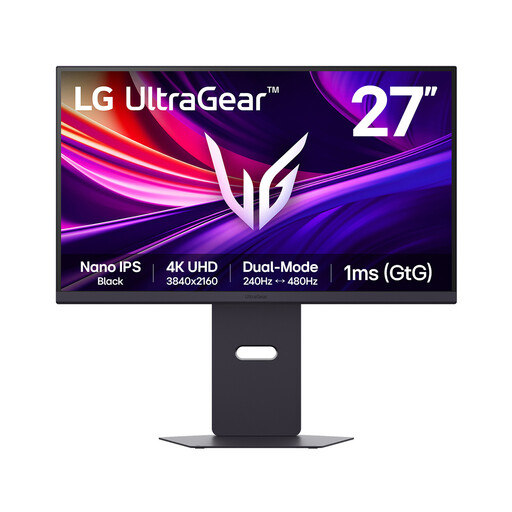 No image available
Its 4K resolution makes this model relevant to viewing detailed item images and records, even if gaming features are not a cataloguing priority.
The product name specifies a 27-inch Nano IPS display and dual-mode 240 Hz/480 Hz operation. Those refresh-rate figures do not establish better readability beside a window.
Check the screen finish for your desk position, and confirm connection options against your computer.
 No image available
Consider this 4K model if your catalogue involves detailed photographs and records at a fixed desk.
The product name specifies a 27-inch 4K UHD monitor. “Matte Black” identifies the listed colour; check the screen’s surface treatment separately before deciding how it fits a bright room.
Confirm USB-C video and charging capabilities if you intend to use one cable with a laptop.
 No image available
This model is relevant when detailed item photographs, labels and spreadsheet records are central to your catalogue.
The product name specifies a 27-inch 4K IPS display, 60 Hz refresh rate, HDMI and DisplayPort connections.
Check the exact screen finish for your window position. If you need a one-cable laptop setup, confirm the required video and charging connections before purchase.
Avoid a position that puts a bright window reflection on the screen. The Health and Safety Executive advises arranging screens and lighting to reduce reflections and glare; changing the screen angle or using blinds or curtains can help with intrusive light.
Not on its own. A brightness specification does not show how the screen will handle a reflection at your desk, so check its surface finish and plan the screen position as well.
No: the laptop must support the required USB-C connection, and the monitor must deliver enough power for it. Dell lists up to 65 W for the S2725QC and LG up to 90 W for the 27UP85ZK-W; check your laptop’s video-output support and charging requirement against the particular model.
Yes, the Health and Safety Executive’s advice on arranging screens and lighting offers practical ways to address glare at a household desk. Its display-screen guidance concerns work settings, including home working; that scope should not be mistaken for a general legal requirement for a private project.
Check your local authority or retailer for an electrical-equipment collection or recycling route. GOV.UK identifies the Waste Electrical and Electronic Equipment Regulations 2013, as amended, as the UK framework for electrical-equipment waste; available collection services depend on your local arrangements.