What matters when choosing?
Start with visibility at the window and the output your test system can deliver. Then decide whether motion updates or fine visual detail will do more for the work you inspect most often.
| Concern |
What to check |
Who this matters to |
| Window reflections and daytime visibility |
Look for a stated matte or anti-glare treatment and typical brightness; assess where the window appears on the screen. |
If daylight falls across my test view, I need to see the collision without relying on an HDR peak figure. Around 36% of consumers would put glare control and normal-use visibility first. |
| Fast-motion inspection |
Match the refresh mode and VRR support to the application’s achievable frame rate, including any overclock requirement. |
When I replay a fast impact, I want display updates that my test PC can actually supply. For around 29% of consumers, motion inspection would be the primary concern. |
| Fine detail and workspace |
Compare QHD and 4K resolution against the size of the details you inspect and the system’s rendering load. |
Small edges and dense debug tools are hard to assess when I lack enough useful screen detail. Around 21% of consumers would prioritise detail and workspace. |
| Connection and mode fit |
Confirm the source port, cable and selected mode support the intended resolution, refresh rate and VRR; check a specific VESA certification if HDR matters. |
I need the advertised display mode to work with my existing test setup, rather than just on the monitor’s specification sheet. Compatibility would come first for around 14% of consumers. |
Relevant brands to consider
These model lines illustrate different ways to balance reflections, motion and detail; a brand name alone does not establish how a screen will perform beside your window.
BenQ MOBIUZ
The EX2710U is a 4K IPS option to examine when fine geometry and a stated matte surface matter.
- BenQ UK lists 3840 × 2160 resolution, a matte coating, 300 nits typical brightness, 144Hz and two HDMI 2.1 ports for the EX2710U.
- Its listed refresh ceiling is 144Hz, so choose based on whether that mode meets your motion-inspection needs rather than expecting a 240Hz mode.
ASUS TUF Gaming
The VG27AQML1A is a QHD IPS option for inspecting fast motion when the source can deliver high frame rates.
- ASUS UK lists native 240Hz operation, VRR support and ELMB Sync for this model.
- Its up-to-260Hz specification requires an overclocked mode; the cited model is QHD, not 4K.
LG UltraGear
The 27GS95QE-B is a QHD OLED option to assess when high refresh capability and a stated low-reflection treatment are both relevant.
- LG UK lists 240Hz, an anti-glare/low-reflection surface and 275 nits typical brightness for the 27GS95QE-B.
- LG’s higher peak-brightness figures have separate picture conditions and should not be read as its typical full-screen brightness.
Alienware
Dell’s AW2725DF and AW3225QF represent different choices: QHD at 360Hz or a larger, curved 4K display at 240Hz.
- Dell UK lists QHD and 360Hz for the AW2725DF, and 3840 × 2160 at 240Hz for the AW3225QF.
- Their size, resolution and source-device demands differ. Check the exact model and connection mode rather than applying one model’s specifications to the other.
Joybuy monitor choices
These monitors offer different starting points for window-adjacent collision review, from compact QHD motion-focused screens to wide test workspaces. Check each screen’s placement and the modes your test system can drive; the list is not a ranking of glare performance.
 No image available
Samsung Odyssey G6 S27DG612 27-inch QHD OLED monitor
Consider this for repeated inspection of fast impacts if your source can deliver the intended mode. Its title specifies 240Hz and 0.03ms; assess reflections and normal-use brightness in your window position before deciding.
View on Joybuy
 No image available
LG UltraGear 34GX900A-B 34-inch OLED WQHD monitor
Consider the wider view if you keep test tools alongside moving content and have room to position the curved screen away from reflections. Its title specifies 240Hz; check daytime visibility and the source’s achievable frame rate. For long sessions with static test interfaces, follow the product’s OLED screen-protection guidance.
View on Joybuy
 No image available
Acer X Predator X49X 49-inch QD-OLED monitor
Its 32:9 curved format is worth considering if a broad test workspace is the priority and the desk can accommodate it. The title specifies a 1800R curve and 240Hz; confirm that the source can drive the intended mode and assess how the wide surface catches window reflections.
View on Joybuy
 No image available
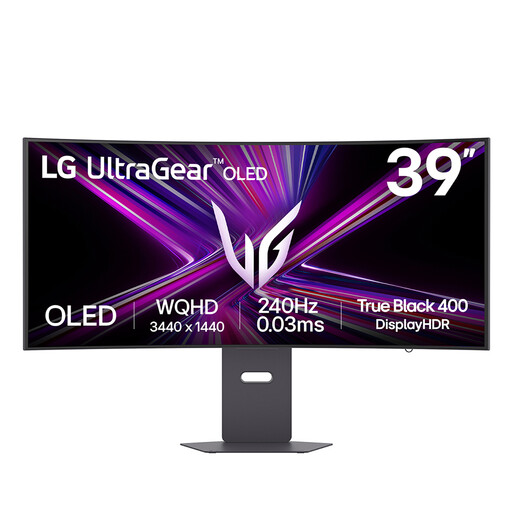
LG UltraGear 39GX900A-B 39-inch OLED QHD monitor
Consider this larger curved screen when you need space for the running test and adjacent tools. Its title specifies 240Hz; check desk fit, reflections and whether the source can maintain the mode you intend to use.
View on Joybuy
 No image available
AOC Q32V4 31.5-inch IPS monitor
Consider this for a window-adjacent workspace where visual detail matters more than the highest motion-update rate. Check its refresh mode against the speed of your collision tests, and assess brightness and reflections in the intended position.
View on Joybuy
Frequently asked questions
Should I focus on HDR peak brightness or the screen surface beside a bright window?
Start with the stated screen treatment and typical brightness, then assess reflections at your desk. LG UK, for example, lists 275 nits typical brightness for the 27GS95QE-B under conditions distinct from its higher peak figures. A VESA DisplayHDR certification describes HDR performance criteria, not how your window will appear on the screen.
Will a 240Hz or 360Hz monitor make collision testing more accurate?
No: a higher display refresh rate does not change the application’s collision calculation. It can provide more display updates for observing motion when the test system supplies enough frames; check the achieved frame rate, connection and selected monitor mode.
What should I check before choosing a 4K monitor at 240Hz?
Check the source device, cable, port and exact connection mode, as well as the frame rate your test can sustain at 4K. Dell UK lists the AW3225QF at 3840 × 2160 and 240Hz, with Display Stream Compression for its DisplayPort 1.4 mode; that monitor specification alone does not establish what every source device can output.
What should I check about returns and disposal in the UK?
Check the applicable cancellation terms for an online order separately from remedies if the monitor is faulty or misdescribed; GOV.UK distinguishes cancellation from problems with goods. For disposal, GOV.UK identifies electrical and electronic equipment as subject to the UK WEEE framework, so check the retailer’s take-back arrangements or your local authority’s accepted recycling route.


